
Tag: PowerShell

Using AL Table Proxy Generator Tool to create Integration Table(s) in Business Central for the Dataverse table
This is the Sixth post in the series. If you want to go to previous post click here.
From the series of steps this post is dedicated to Step-5:
As a fifth Step we will Create Integration Table(s) in Business Central for the Dataverse table created in Step-4
When table(s) are present in Microsoft Dataverse, but not in Business Central, this tool can be run to generate integration or proxy table(s) for the specified table(s).
The AL Table Proxy Generator tool you can find in AL Language extension by name altpgen.exe in the equivalent folder [C:\Users\ashwi\.vscode\extensions\ms-dynamics-smb.al-7.4.502459\bin\]
Run PowerShell ISE as Administrator
Change to folder containing altpgen.exe

Above command should be single line, I have break for clarity of parameters. Below is the sample command.
.\altpgen -project:"C:\Userdata\AL Project\DataVerseIntegration" -packagecachepath:"C:\Userdata\AL Project\DataVerseIntegration\packagecachepath" -serviceuri:"https://xxxxxxxxxxx.crm8.dynamics.com/" -entities:cr95d_prospects -baseid:50125 -tabletype:CDS
When you run the command, it will ask for authentication, provide and continue.

Once you Accept the Permissions request, you can see the output of the command.
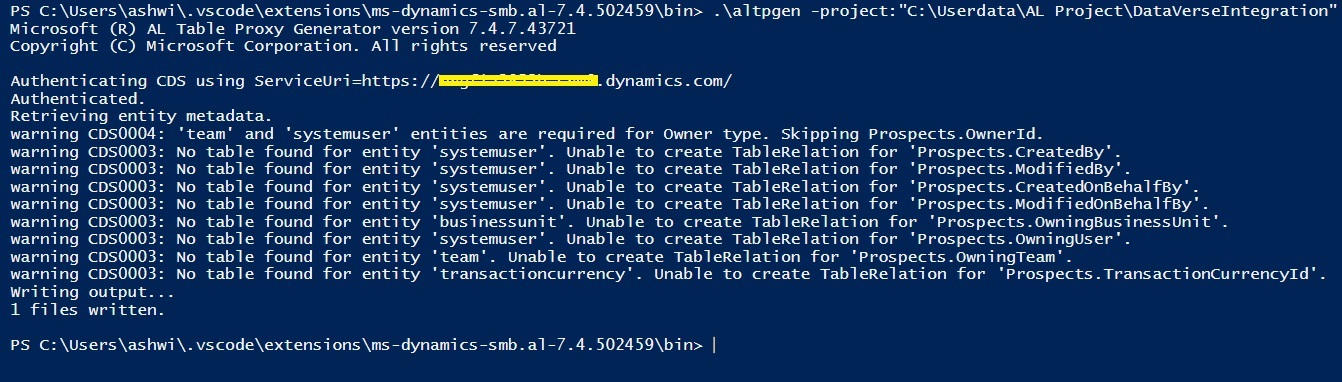
Don’t worry for warnings, Your AL file will be generated in specified folder.
Below is the sample of generated file, it is suggested to generate this file using the tool, don’t try to create manually.
table 50126 "CDS cr95d_Prospects"
{
  ExternalName = 'cr95d_prospects';
  TableType = CDS;
  Description = '';

  fields
  {
    field(1;cr95d_ProspectsId;GUID)
    {
      ExternalName = 'cr95d_prospectsid';
      ExternalType = 'Uniqueidentifier';
      ExternalAccess = Insert;
      Description = 'Unique identifier for entity instances';
      Caption = 'Prospects';
    }
    field(2;CreatedOn;Datetime)
    {
      ExternalName = 'createdon';
      ExternalType = 'DateTime';
      ExternalAccess = Read;
      Description = 'Date and time when the record was created.';
      Caption = 'Created On';
    }
    field(4;ModifiedOn;Datetime)
    {
      ExternalName = 'modifiedon';
      ExternalType = 'DateTime';
      ExternalAccess = Read;
      Description = 'Date and time when the record was modified.';
      Caption = 'Modified On';
    }
    field(24;statecode;Option)
    {
      ExternalName = 'statecode';
      ExternalType = 'State';
      ExternalAccess = Modify;
      Description = 'Status of the Prospects';
      Caption = 'Status';
      InitValue = " ";
      OptionMembers = " ", Active, Inactive;
      OptionOrdinalValues = -1, 0, 1;
    }
    field(26;statuscode;Option)
    {
      ExternalName = 'statuscode';
      ExternalType = 'Status';
      Description = 'Reason for the status of the Prospects';
      Caption = 'Status Reason';
      InitValue = " ";
      OptionMembers = " ", Active, Inactive;
      OptionOrdinalValues = -1, 1, 2;
    }
    field(28;VersionNumber;BigInteger)
    {
      ExternalName = 'versionnumber';
      ExternalType = 'BigInt';
      ExternalAccess = Read;
      Description = 'Version Number';
      Caption = 'Version Number';
    }
    field(29;ImportSequenceNumber;Integer)
    {
      ExternalName = 'importsequencenumber';
      ExternalType = 'Integer';
      ExternalAccess = Insert;
      Description = 'Sequence number of the import that created this record.';
      Caption = 'Import Sequence Number';
    }
    field(30;OverriddenCreatedOn;Date)
    {
      ExternalName = 'overriddencreatedon';
      ExternalType = 'DateTime';
      ExternalAccess = Insert;
      Description = 'Date and time that the record was migrated.';
      Caption = 'Record Created On';
    }
    field(31;TimeZoneRuleVersionNumber;Integer)
    {
      ExternalName = 'timezoneruleversionnumber';
      ExternalType = 'Integer';
      Description = 'For internal use only.';
      Caption = 'Time Zone Rule Version Number';
    }
    field(32;UTCConversionTimeZoneCode;Integer)
    {
      ExternalName = 'utcconversiontimezonecode';
      ExternalType = 'Integer';
      Description = 'Time zone code that was in use when the record was created.';
      Caption = 'UTC Conversion Time Zone Code';
    }
    field(33;cr95d_ProspectName;Text[100])
    {
      ExternalName = 'cr95d_prospectname';
      ExternalType = 'String';
      Description = 'Required name field';
      Caption = 'Prospect Name';
    }
    field(34;cr95d_ContractAmount;Decimal)
    {
      ExternalName = 'cr95d_contractamount';
      ExternalType = 'Money';
      Description = '';
      Caption = 'Contract Amount';
    }
    field(37;ExchangeRate;Decimal)
    {
      ExternalName = 'exchangerate';
      ExternalType = 'Decimal';
      ExternalAccess = Read;
      Description = 'Exchange rate for the currency associated with the entity with respect to the base currency.';
      Caption = 'Exchange Rate';
    }
    field(38;cr95d_contractamount_Base;Decimal)
    {
      ExternalName = 'cr95d_contractamount_base';
      ExternalType = 'Money';
      ExternalAccess = Read;
      Description = 'Value of the Contract Amount in base currency.';
      Caption = 'Contract Amount (Base)';
    }
    field(39;cr95d_Probability;Integer)
    {
      ExternalName = 'cr95d_probability';
      ExternalType = 'Integer';
      Description = '';
      Caption = 'Probability';
    }
    field(40;cr95d_Stage;Option)
    {
      ExternalName = 'cr95d_stage';
      ExternalType = 'Picklist';
      Description = '';
      Caption = 'Stage';
      InitValue = Lead;
      OptionMembers = Lead, Opportunity, Won, Lost;
      OptionOrdinalValues = 256080000, 256080001, 256080002, 256080003;
    }
    field(42;cr95d_ForcastedRevenue;Decimal)
    {
      ExternalName = 'cr95d_forcastedrevenue';
      ExternalType = 'Money';
      Description = '';
      Caption = 'Forcasted Revenue';
    }
    field(43;cr95d_forcastedrevenue_Base;Decimal)
    {
      ExternalName = 'cr95d_forcastedrevenue_base';
      ExternalType = 'Money';
      ExternalAccess = Read;
      Description = 'Value of the Forcasted Revenue in base currency.';
      Caption = 'Forcasted Revenue (Base)';
    }
  }
  keys
  {
    key(PK;cr95d_ProspectsId)
    {
      Clustered = true;
    }
    key(Name;cr95d_ProspectName)
    {
    }
  }
  fieldgroups
  {
    fieldgroup(DropDown;cr95d_ProspectName)
    {
    }
  }
}
Create a Page for above table
page 50122 "CDS Prospect List"
{
    Caption = 'CDS Prospect List';
    PageType = List;
    SourceTable = "CDS cr95d_Prospects";
    Editable = false;
    ApplicationArea = All;
    UsageCategory = Lists;
    RefreshOnActivate = true;

    layout
    {
        area(Content)
        {
            repeater(Group)
            {
                field("No."; Rec.cr95d_ProspectsId)
                {
                    Caption = 'No.';
                    ApplicationArea = All;
                }
                field(Name; Rec.cr95d_ProspectName)
                {
                    Caption = 'Name';
                    ApplicationArea = All;
                }
                field(Stage; Rec.cr95d_Stage)
                {
                    Caption = 'Stage';
                    ApplicationArea = All;
                }
                field("Probability"; Rec.cr95d_Probability)
                {
                    Caption = 'Probability';
                    ApplicationArea = All;
                }
                field("Contract Amount"; Rec.cr95d_ContractAmount)
                {
                    Caption = 'Contract Amount';
                    ApplicationArea = All;
                }
                field("Contract Amount (Base)"; Rec.cr95d_contractamount_Base)
                {
                    Caption = 'Contract Amount (Base)';
                    ApplicationArea = All;
                }
                field("Forecast Revenue"; Rec.cr95d_ForcastedRevenue)
                {
                    Caption = 'Forecast Revenue';
                    ApplicationArea = All;
                }
                field("Forecast Revenue (Base)"; Rec.cr95d_forcastedrevenue_Base)
                {
                    Caption = 'Forecast Revenue (Base)';
                    ApplicationArea = All;
                }
                field("Exchange Rate"; Rec.ExchangeRate)
                {
                    Caption = 'Exchange Rate';
                    ApplicationArea = All;
                }
            }
        }
    }
}
You can read more about AL Table Proxy Generator Tool from Microsoft docs
Now you are good to proceed with Next Step.
You can jump to Next Step from here.
Comparison of NAV 2018 W1 Objects with NAV 2017 W1 Objects – What’s Difference
With the release of NAV 2018, first thing that comes to mind is how much objects are changed from previous version. To check this I have performed small comparison straight forward on NAV 2017 W1 and NAV 2018 W1 database objects.
I have used power shell commands for quick comparison.
Here we go->
- To compare two sets of application objects
- Open the Microsoft Dynamics NAV Development Shell in administrator mode.
- Navigate to the location of your folders by typing a command such as the following:
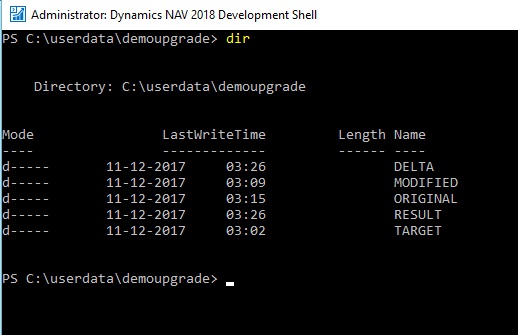
In this example, the DEMOUPGRADE folder contains five folders: ORIGINAL, MODIFIED, TARGET, DELTA, and RESULT. The DELTA and RESULT folders are empty. The ORIGINAL, MODIFIED, and TARGET folders contains one or more text files that contain application objects. You can now run the cmdlet. In my case Original = NAV 2017 W1 and Modified = NAV 2018 W1objects.
- To run the cmdlet to compare all application objects in the ORIGINAL folder to the application objects in the MODIFIED folder, type the following command:
Compare-NAVApplicationObject -OriginalPath .\ORIGINAL -ModifiedPath .\MODIFIED -DeltaPath .\DELTA
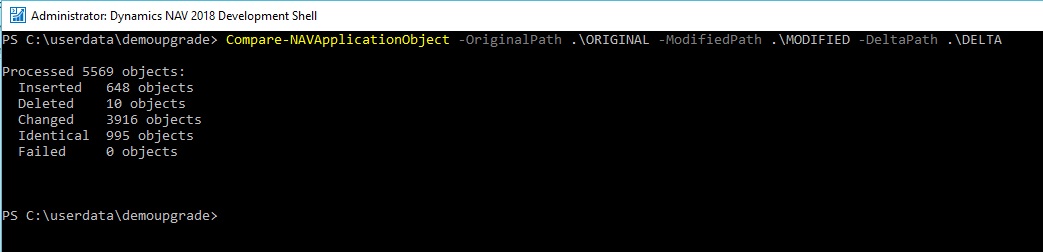
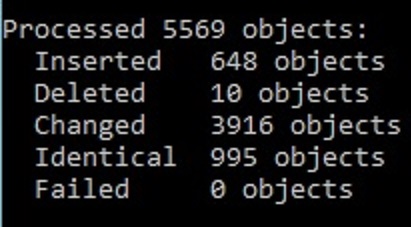
This generates a number of DELTA files that describe the difference between ORIGINAL and MODIFIED. You can open the DELTA files in text editors such as Notepad.
The following example illustrates how a DELTA file identifies the difference between ORIGINAL and MODIFIED.

You can identify those differences in DELTA folder.
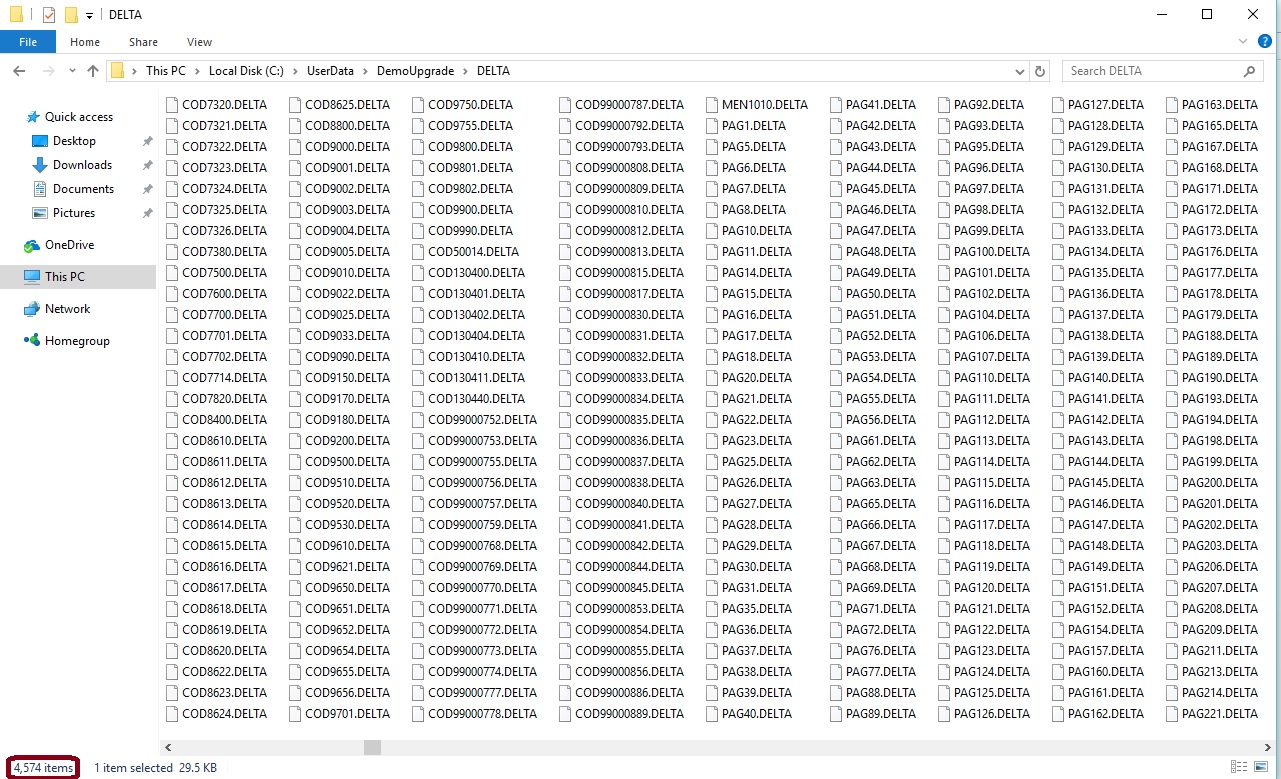
However on top level review I found there is major change in properties, changes in field size and new codes additions.
Out of which 1014 objects have minor changes like insert, modify or deletion of simple properties or one line code etc.
-
Virtual Table Changes after 2017:
| Table | 2000000142 | Query Metadata |
| Table | 2000000174 | New Page Pattern |
| Table | 2000000178 | All Profile |
| Table | 2000000192 | Page Control Field |
| Table | 2000000193 | Api Web Service |
New Additions in 2018
Deletion from 2017 in 2018
-
List of Virtual Tables in NAV 2018, are new additions and rest is common from 2017
| Table | 2000000001 | Object |
| Table | 2000000007 | Date |
| Table | 2000000009 | Session |
| Table | 2000000020 | Drive |
| Table | 2000000022 | File |
| Table | 2000000026 | Integer |
| Table | 2000000028 | Table Information |
| Table | 2000000029 | System Object |
| Table | 2000000038 | AllObj |
| Table | 2000000039 | Printer |
| Table | 2000000040 | License Information |
| Table | 2000000041 | Field |
| Table | 2000000043 | License Permission |
| Table | 2000000044 | Permission Range |
| Table | 2000000045 | Windows Language |
| Table | 2000000048 | Database |
| Table | 2000000049 | Code Coverage |
| Table | 2000000055 | SID – Account ID |
| Table | 2000000058 | AllObjWithCaption |
| Table | 2000000063 | Key |
| Table | 2000000101 | Debugger Call Stack |
| Table | 2000000102 | Debugger Variable |
| Table | 2000000103 | Debugger Watch Value |
| Table | 2000000135 | Table Synch. Setup |
| Table | 2000000136 | Table Metadata |
| Table | 2000000137 | CodeUnit Metadata |
| Table | 2000000138 | Page Metadata |
| Table | 2000000139 | Report Metadata |
| Table | 2000000140 | Event Subscription |
| Table | 2000000141 | Table Relations Metadata |
| Table | 2000000142 | Query Metadata |
| Table | 2000000154 | Database Locks |
| Table | 2000000164 | Time Zone |
| Table | 2000000167 | Aggregate Permission Set |
| Table | 2000000171 | Page Table Field |
| Table | 2000000172 | Table Field Types |
| Table | 2000000173 | Finish Design Save Mode |
| Table | 2000000178 | All Profile |
| Table | 2000000192 | Page Control Field |
| Table | 2000000193 | Api Web Service |
-
List of New Objects in NAV 2018
| Type | No. | Name |
| Table | 11 | Country/Region Translation |
| Table | 52 | Batch Processing Parameter |
| Table | 53 | Batch Processing Parameter Map |
| Table | 63 | Account Use Buffer |
| Table | 138 | Unlinked Attachment |
| Table | 143 | ECSL VAT Report Line Relation |
| Table | 247 | Intrastat Setup |
| Table | 248 | VAT Reg. No. Srv Config |
| Table | 316 | Tax Area Translation |
| Table | 327 | Tax Jurisdiction Translation |
| Table | 355 | Dimension Set ID Filter Line |
| Table | 362 | ECSL VAT Report Line |
| Table | 466 | Payment Method Translation |
| Table | 467 | Workflow Webhook Entry |
| Table | 468 | Workflow Webhook Notification |
| Table | 469 | Workflow Webhook Subscription |
| Table | 483 | Change Global Dim. Log Entry |
| Table | 730 | Standard Address |
| Table | 742 | VAT Statement Report Line |
| Table | 746 | VAT Reports Configuration |
| Table | 747 | VAT Report Archive |
| Table | 749 | Date Lookup Buffer |
| Table | 832 | Workflows Entries Buffer |
| Table | 880 | Excel Template Storage |
| Table | 1170 | User Task |
| Table | 1236 | JSON Buffer |
| Table | 1314 | User Tours |
| Table | 1315 | Purch. Price Line Disc. Buff. |
| Table | 1432 | Net Promoter Score Setup |
| Table | 1433 | Net Promoter Score |
| Table | 1470 | Product Video Buffer |
| Table | 1471 | Product Video Category |
| Table | 1519 | Notification Context |
| Table | 1531 | Workflow Step Argument Archive |
| Table | 1542 | Workflow Webhook Sub Buffer |
| Table | 1543 | Flow Service Configuration |
| Table | 1544 | Flow User Environment Buffer |
| Table | 1545 | Flow User Environment Config |
| Table | 1637 | Office Suggested Line Item |
| Table | 1670 | Option Lookup Buffer |
| Table | 1797 | Data Migration Error |
| Table | 1798 | Data Migration Parameters |
| Table | 1799 | Data Migration Status |
| Table | 1808 | Aggregated Assisted Setup |
| Table | 1827 | Business Unit Setup |
| Table | 1828 | Business Unit Information |
| Table | 1829 | Consolidation Account |
| Table | 1875 | Business Setup |
| Table | 1876 | Business Setup Icon |
| Table | 1877 | VAT Setup Posting Groups |
| Table | 1878 | VAT Assisted Setup Templates |
| Table | 1879 | VAT Assisted Setup Bus. Grp. |
| Table | 2020 | Image Analysis Setup |
| Table | 2101 | O365 Item Basket Entry |
| Table | 2107 | O365 Customer |
| Table | 2112 | O365 Field Excel Mapping |
| Table | 2113 | O365 Cust. Invoice Discount |
| Table | 2114 | O365 HTML Template |
| Table | 2115 | O365 Coupon Claim |
| Table | 2116 | O365 Coupon Claim Doc. Link |
| Table | 2117 | O365 Posted Coupon Claim |
| Table | 2119 | O365 Payment Service Logo |
| Table | 2121 | O365 Brand Color |
| Table | 2122 | O365 Social Network |
| Table | 2132 | O365 Settings Menu |
| Table | 2152 | O365 Country/Region |
| Table | 2153 | O365 Payment Terms |
| Table | 2154 | O365 Payment Method |
| Table | 2158 | O365 Document Sent History |
| Table | 2160 | Calendar Event |
| Table | 2161 | Calendar Event User Config. |
| Table | 2162 | O365 C2Graph Event Settings |
| Table | 2163 | O365 Sales Event |
| Table | 2190 | O365 Sales Graph |
| Table | 2200 | O365 Sales Invoice Document |
| Table | 2822 | Native – Export Invoices |
| Table | 2831 | Native – Payment |
| Table | 2840 | Native – Gen. Settings Buffer |
| Table | 2850 | Native – API Tax Setup |
| Table | 5113 | Contact Dupl. Details Buffer |
| Table | 5152 | Integration Record Archive |
| Table | 5221 | Employee Posting Group |
| Table | 5222 | Employee Ledger Entry |
| Table | 5223 | Detailed Employee Ledger Entry |
| Table | 5224 | Payable Employee Ledger Entry |
| Table | 5225 | Employee Payment Buffer |
| Table | 5373 | CRM Full Synch. Review Line |
| Table | 5377 | Ext Txt ID Integration Record |
| Table | 5450 | Graph Contact |
| Table | 5451 | Graph Integration Record |
| Table | 5452 | Graph Integration Rec. Archive |
| Table | 5455 | Graph Subscription |
| Table | 5456 | Graph Business Profile |
| Table | 5466 | API Entities Setup |
| Table | 5475 | Sales Invoice Entity Aggregate |
| Table | 5476 | Sales Invoice Line Aggregate |
| Table | 5477 | Purch. Inv. Entity Aggregate |
| Table | 5478 | Purch. Inv. Line Aggregate |
| Table | 5479 | Journal Lines Entity Setup |
| Table | 5480 | Tax Group Buffer |
| Table | 5481 | Account Entity Setup |
| Table | 5487 | Balance Sheet Buffer |
| Table | 5488 | Trial Balance Entity Buffer |
| Table | 5489 | Dimension Set Entry Buffer |
| Table | 5495 | Sales Order Entity Buffer |
| Table | 5499 | Aged Report Entity |
| Table | 5502 | Tax Rate Buffer |
| Table | 5503 | Acc. Schedule Line Entity |
| Table | 5504 | Tax Area Buffer |
| Table | 5505 | Sales Quote Entity Buffer |
| Table | 5507 | Sales Cr. Memo Entity Buffer |
| Table | 5509 | Attachment Entity Buffer |
| Table | 6304 | Power BI User Configuration |
| Table | 6305 | Power BI Chart Buffer |
| Table | 7800 | MS-Event Emitter Event Codes |
| Table | 7820 | MS-QBO Customer |
| Table | 7821 | MS-QBO Item |
| Table | 7822 | MS-QBO Invoice |
| Table | 7823 | MS-QBO Modified Field List |
| Table | 7824 | MS-QBO Setup |
| Table | 7825 | MS-QBO Synchronization Error |
| Table | 7826 | MS-QBO Start Sync. Service |
| Table | 7827 | MS-QBO Failed Syncs |
| Table | 7828 | MS-QBO Sync Buffer |
| Table | 7860 | MS- PayPal Standard Account |
| Table | 7861 | MS- PayPal Standard Template |
| Table | 7862 | MS- PayPal Transaction |
| Table | 7880 | MS-QBD Setup |
| Table | 8450 | Field Buffer |
| Table | 8620 | Config. Tmpl. Selection Rules |
| Table | 9090 | Autocomplete Address |
| Table | 9091 | Postcode Service Config |
| Table | 9160 | TempStack |
| Table | 9510 | Email Parameter |
| Table | 130415 | Semi-Manual Test Wizard |
| Table | 130416 | Semi-Manual Execution Log |
| Table | 2000000081 | Upgrade Blob Storage |
| Table | 2000000082 | Report Layout |
| Table | 2000000176 | NAV App Resource |
| Table | 2000000177 | Tenant Profile |
| Table | 2000000179 | OData Edm Type |
| Table | 2000000182 | Media Resources |
| Table | 2000000186 | Profile Page Metadata |
| Table | 2000000187 | Tenant Profile Page Metadata |
| Table | 2000000188 | User Page Metadata |
| Report | 323 | ECSL Report Request Page |
| Report | 394 | Suggest Employee Payments |
| Report | 399 | Remittance Advice – Journal |
| Report | 400 | Remittance Advice – Entries |
| Report | 742 | VAT Report Request Page |
| Report | 1170 | User Task Utility |
| Report | 1302 | Standard Sales – Pro Forma Inv |
| Report | 1826 | Consolidation – Test |
| Report | 2500 | Day Book VAT Entry |
| Report | 2501 | Day Book Cust. Ledger Entry |
| Report | 2502 | Day Book Vendor Ledger Entry |
| Report | 5085 | Contact Cover Sheet |
| Report | 9200 | Void/Transmit Elec. Pmnts |
| Codeunit | 48 | PostingSetupManagement |
| Codeunit | 52 | BOM-BOM Component |
| Codeunit | 112 | Empl. Entry-SetAppl.ID |
| Codeunit | 114 | Empl. Entry-Edit |
| Codeunit | 140 | EC Sales List Suggest Lines |
| Codeunit | 143 | ECSL Report Validate |
| Codeunit | 224 | EmplEntry-Apply Posted Entries |
| Codeunit | 325 | Update Currency Factor |
| Codeunit | 351 | Intrastat Document Completion |
| Codeunit | 456 | Job Queue Management |
| Codeunit | 483 | Change Global Dimensions |
| Codeunit | 484 | Block Table Ops Subscriber |
| Codeunit | 576 | Run Template Balance Sheet |
| Codeunit | 577 | Run Template Income Stmt. |
| Codeunit | 578 | Run Template CashFlow Stmt. |
| Codeunit | 579 | Run Template Retained Earn. |
| Codeunit | 580 | Run Template Trial Balance |
| Codeunit | 581 | Run Template Aged Acc. Pay. |
| Codeunit | 582 | Run Template Aged Acc. Rec. |
| Codeunit | 703 | Find Record Management |
| Codeunit | 704 | MemoryStream Wrapper |
| Codeunit | 745 | VAT Report Suggest Lines |
| Codeunit | 790 | IC Inbox Outbox Subscribers |
| Codeunit | 882 | OCR – Sync Master Data |
| Codeunit | 883 | OCR Master Data Mgt. |
| Codeunit | 884 | ReadSoft OCR Master Data Sync |
| Codeunit | 1060 | Paypal Account Proxy |
| Codeunit | 1061 | QBO Sync Proxy |
| Codeunit | 1062 | QBD Sync Proxy |
| Codeunit | 1344 | Acct. WebServices Mgt. |
| Codeunit | 1345 | Product Videos Activities Mgt. |
| Codeunit | 1347 | User Task Activities Mgt. |
| Codeunit | 1350 | Telemetry Management |
| Codeunit | 1351 | Telemetry Subscribers |
| Codeunit | 1352 | Create Telemetry Cal. Events |
| Codeunit | 1353 | Generate Master Data Telemetry |
| Codeunit | 1354 | Generate Activity Telemetry |
| Codeunit | 1355 | G/L Post. Inconsistent Telem. |
| Codeunit | 1370 | Batch Post Parameter Types |
| Codeunit | 1371 | Sales Batch Post Mgt. |
| Codeunit | 1372 | Purchase Batch Post Mgt. |
| Codeunit | 1373 | Batch Posting Print Mgt. |
| Codeunit | 1380 | Batch Processing Mgt. |
| Codeunit | 1390 | Document Notifications |
| Codeunit | 1432 | Net Promoter Score Mgt. |
| Codeunit | 1508 | Notification Lifecycle Handler |
| Codeunit | 1511 | Notification Lifecycle Mgt. |
| Codeunit | 1540 | Workflow Webhook Setup |
| Codeunit | 1541 | Workflow Webhook Events |
| Codeunit | 1542 | Workflow Webhook Responses |
| Codeunit | 1543 | Workflow Webhook Management |
| Codeunit | 1544 | Workflow Webhook Subscription |
| Codeunit | 1545 | Workflow Webhook Notification |
| Codeunit | 1546 | Workflow Webhook Notify Task |
| Codeunit | 1547 | Workflow Webhook Sub Delete |
| Codeunit | 1639 | Office Line Generation |
| Codeunit | 1797 | Data Migration Facade Helper |
| Codeunit | 1798 | Data Migration Mgt. |
| Codeunit | 1799 | Import Config. Package File |
| Codeunit | 1813 | Assisted Setup Management |
| Codeunit | 1815 | Progress Dialog |
| Codeunit | 1875 | Business Setup Management |
| Codeunit | 2002 | Cortana Tracing |
| Codeunit | 2020 | Image Analysis Management |
| Codeunit | 2021 | Image Analysis Result |
| Codeunit | 2103 | O365 Sales Cancel Invoice |
| Codeunit | 2104 | O365 Send + Resend Invoice |
| Codeunit | 2107 | O365 Sales Management |
| Codeunit | 2112 | O365 Sales Attachment Mgt |
| Codeunit | 2114 | O365 HTML Templ. Mgt. |
| Codeunit | 2115 | Display Coupons |
| Codeunit | 2116 | Coupons Management |
| Codeunit | 2117 | Coupons Sync |
| Codeunit | 2130 | O365 Excel Import Management |
| Codeunit | 2135 | O365 Setup Email |
| Codeunit | 2142 | O365 Template Management |
| Codeunit | 2151 | O365 Sales Email Management |
| Codeunit | 2155 | O365 Discounts |
| Codeunit | 2158 | O365 Document Send Mgt |
| Codeunit | 2160 | Calendar Event Mangement |
| Codeunit | 2161 | Calendar Event Execution |
| Codeunit | 2162 | O365 Sales Invoice Events |
| Codeunit | 2163 | O365 Sales Quote Events |
| Codeunit | 2190 | O365 Sales Web Service |
| Codeunit | 2201 | Webhooks Adapter Mgt. |
| Codeunit | 2310 | O365 Sales Invoice Mgmt |
| Codeunit | 2502 | Extension License Mgmt |
| Codeunit | 2800 | Native – Setup APIs |
| Codeunit | 2801 | Native – EDM Types |
| Codeunit | 2815 | Native – Coupons |
| Codeunit | 2820 | Native – Attachments |
| Codeunit | 2822 | Native – Reports |
| Codeunit | 2831 | Native – Payments |
| Codeunit | 2850 | Native API – Language Handler |
| Codeunit | 5066 | Rlshp. Msgt. Comm. Line Subs |
| Codeunit | 5067 | Interaction Mgt. |
| Codeunit | 5344 | CRM Product Name |
| Codeunit | 5347 | Integration Rec. Delete Invoke |
| Codeunit | 5349 | Auto Create Sales Orders |
| Codeunit | 5351 | CRM Customer-Contact Link |
| Codeunit | 5377 | Webhook Management |
| Codeunit | 5440 | Business Profile Sync. Runner |
| Codeunit | 5441 | Graph Sync. – Business Profile |
| Codeunit | 5442 | Graph Int – Business Profile |
| Codeunit | 5445 | Graph Delta Sync |
| Codeunit | 5446 | Graph Webhook Sync To NAV |
| Codeunit | 5450 | Graph Subscription Management |
| Codeunit | 5451 | Graph Integration Table Sync |
| Codeunit | 5452 | Graph Sync. Runner |
| Codeunit | 5453 | Graph Sync. Runner – OnModify |
| Codeunit | 5454 | Graph Sync. Runner – OnDelete |
| Codeunit | 5455 | Graph Data Setup |
| Codeunit | 5456 | Graph Connection Setup |
| Codeunit | 5457 | Graph Sync. – Contact |
| Codeunit | 5458 | Graph Collection Mgt – Contact |
| Codeunit | 5459 | JSON Management |
| Codeunit | 5460 | Graph Int. – Contact Addresses |
| Codeunit | 5461 | Graph Int. – Contact |
| Codeunit | 5462 | Graph Int. – Questionnaire |
| Codeunit | 5465 | Graph Mgt – General Tools |
| Codeunit | 5466 | Graph Mgt – In. Services Setup |
| Codeunit | 5468 | Graph Mgt – Complex Types |
| Codeunit | 5469 | Library API – General Journal |
| Codeunit | 5470 | Graph Collection Mgt – Item |
| Codeunit | 5471 | Graph Mgt – Customer |
| Codeunit | 5472 | Graph Mgt – Vendor |
| Codeunit | 5473 | Graph Mgt – Company Info. |
| Codeunit | 5474 | Graph Mgt – Sales Header |
| Codeunit | 5475 | Graph Mgt – Sales Invoice |
| Codeunit | 5476 | Graph Mgt – Sales Inv. Lines |
| Codeunit | 5477 | Sales Invoice Aggregator |
| Codeunit | 5478 | Graph Mgt – Journal Lines |
| Codeunit | 5479 | Graph Mgt – Customer Payments |
| Codeunit | 5480 | Graph Mgt – Account |
| Codeunit | 5481 | Graph Mgt – Tax Group |
| Codeunit | 5482 | Graph Mgt – Journal |
| Codeunit | 5483 | Graph Mgt – Employee |
| Codeunit | 5485 | Graph Mgt – Currency |
| Codeunit | 5486 | Graph Mgt – Payment Method |
| Codeunit | 5487 | Graph Mgt – Dimension |
| Codeunit | 5488 | Graph Mgt – Reports |
| Codeunit | 5490 | Graph Mgt – Payment Terms |
| Codeunit | 5491 | Graph Mgt – Shipment Method |
| Codeunit | 5492 | Graph Mgt – Item Category |
| Codeunit | 5494 | Graph Mgt – Country/Region |
| Codeunit | 5495 | Graph Mgt – Sales Order |
| Codeunit | 5496 | Graph Mgt – Sales Order Buffer |
| Codeunit | 5497 | Graph Mgt – Doc. Sent History |
| Codeunit | 5498 | Graph Mgt – Unit Of Measure |
| Codeunit | 5499 | Graph Mgt – Purchase Header |
| Codeunit | 5502 | Graph Mgt – Unlinked Att. |
| Codeunit | 5503 | Graph Mgt – Attachment Buffer |
| Codeunit | 5504 | Graph Mgt – Tax Area |
| Codeunit | 5505 | Graph Mgt – Sales Quote |
| Codeunit | 5506 | Graph Mgt – Sales Quote Buffer |
| Codeunit | 5507 | Graph Mgt – Sales Credit Memo |
| Codeunit | 5508 | Graph Mgt – Sal. Cr. Memo Buf. |
| Codeunit | 5509 | Graph Mgt – Inc Doc Attachment |
| Codeunit | 5527 | Graph Mgt – Purchase Invoice |
| Codeunit | 5528 | Graph Mgt – Purch. Inv. Lines |
| Codeunit | 5529 | Purch. Inv. Aggregator |
| Codeunit | 6100 | Data Migration Facade |
| Codeunit | 6101 | Data Migration Status Facade |
| Codeunit | 6110 | GL Acc. Data Migration Facade |
| Codeunit | 6111 | Vendor Data Migration Facade |
| Codeunit | 6112 | Customer Data Migration Facade |
| Codeunit | 6113 | Item Data Migration Facade |
| Codeunit | 6114 | Ex. Rate Data Migration Facade |
| Codeunit | 6305 | Set Power BI User Config |
| Codeunit | 6306 | PBI Aged Acc. Calc |
| Codeunit | 6307 | PBI Aged Inventory Calc. |
| Codeunit | 6308 | PBI Job Chart Calc. |
| Codeunit | 6309 | PBI Sales Pipeline Chart Calc. |
| Codeunit | 6310 | PBI Top Opportunities Calc. |
| Codeunit | 6400 | Flow Service Management |
| Codeunit | 6711 | OData Action Management |
| Codeunit | 6723 | Server Config. Setting Handler |
| Codeunit | 6724 | Booking Appointment – Modify |
| Codeunit | 7326 | Whse. Item Tracking FEFO |
| Codeunit | 7820 | MS-QBO Table Mgt. |
| Codeunit | 8622 | Config. Insert With Validation |
| Codeunit | 8623 | Create D365 RapidStart Package |
| Codeunit | 8624 | Setup Company Name |
| Codeunit | 8625 | Setup Item Costing Method |
| Codeunit | 9003 | Team Member Action Manager |
| Codeunit | 9004 | User Grp. Perm. Subscribers |
| Codeunit | 9005 | Environment Mgt. |
| Codeunit | 9033 | Invite External Accountant |
| Codeunit | 9090 | Postcode Service Manager |
| Codeunit | 9755 | Media Resources Mgt. |
| Codeunit | 9802 | Logon Management |
| XMLport | 5801 | Export Item Data |
| Page | 63 | Applied Employee Entries |
| Page | 148 | Customer Posting Group Card |
| Page | 149 | Vendor Posting Group Card |
| Page | 199 | Unlinked Attachments |
| Page | 234 | Apply Employee Entries |
| Page | 248 | VAT Registration Config |
| Page | 321 | ECSL Report |
| Page | 322 | ECSL Report Subform |
| Page | 323 | EC Sales List Reports |
| Page | 328 | Intrastat Setup |
| Page | 481 | Dimension Set ID Filter |
| Page | 577 | Change Global Dimensions |
| Page | 578 | Change Global Dim. Log Entries |
| Page | 621 | IC Setup |
| Page | 625 | Unapply Employee Entries |
| Page | 670 | Concurrent Session List |
| Page | 739 | VAT Report Log |
| Page | 742 | VAT Report Statement Subform |
| Page | 746 | VAT Reports Configuration |
| Page | 749 | Date Lookup |
| Page | 830 | Workflow Webhook Entries |
| Page | 831 | Workflow Webhook Subscriptions |
| Page | 832 | Approvals |
| Page | 1156 | Company Detail |
| Page | 1157 | Client Detail Cash Flow Chart |
| Page | 1158 | Cash Account Balances |
| Page | 1159 | Purchase Documents |
| Page | 1160 | Sales Documents |
| Page | 1161 | Purchase Documents Due Today |
| Page | 1162 | Purchase Invoice Due Next Week |
| Page | 1163 | Sales Invoices Due Next Week |
| Page | 1164 | User Task List Part |
| Page | 1170 | User Task List |
| Page | 1171 | User Task Card |
| Page | 1172 | User Task Recurrence |
| Page | 1313 | Dynamics CRM Admin Credentials |
| Page | 1314 | AccountantPortal Activity Cues |
| Page | 1315 | Accountant Portal Finance Cues |
| Page | 1316 | Accountant Portal User Tasks |
| Page | 1320 | ExcelTemplateCompanyInfo |
| Page | 1328 | Purch. Order From Sales Order |
| Page | 1330 | Update Address |
| Page | 1339 | EU VAT Registration No Check |
| Page | 1346 | Purchases Price and Line Disc. |
| Page | 1394 | Trial Balance Setup |
| Page | 1432 | Net Promoter Score Setup |
| Page | 1433 | Net Promoter Score |
| Page | 1470 | Product Videos |
| Page | 1561 | Pick Report |
| Page | 1637 | Office Suggested Line Items |
| Page | 1670 | Option Lookup List |
| Page | 1797 | Data Migration Error |
| Page | 1798 | Data Migration About |
| Page | 1799 | Data Migration Overview |
| Page | 1826 | Company Consolidation Wizard |
| Page | 1827 | Business Units Setup Subform |
| Page | 1875 | Business Setup |
| Page | 1876 | Integration Services Setup |
| Page | 1877 | VAT Setup Wizard |
| Page | 1878 | VAT Bus. Post. Grp Part |
| Page | 1879 | VAT Product Posting Grp Part |
| Page | 1880 | VAT Assisted Setup Template |
| Page | 1881 | Sandbox Environment |
| Page | 2020 | Image Analysis Setup |
| Page | 2120 | O365 Sales Doc. Attachments |
| Page | 2121 | O365 Posted Sales Inv. Att. |
| Page | 2122 | O365 Incoming Doc. Attch. List |
| Page | 2123 | O365 Incoming Doc. Att. Pict. |
| Page | 2124 | O365 Item Basket Part |
| Page | 2125 | O365 Payment History Card |
| Page | 2130 | O365 Business Info Settings |
| Page | 2131 | O365 Learn Settings |
| Page | 2132 | O365 Invoice Send Settings |
| Page | 2133 | O365 Tax Payments Settings |
| Page | 2134 | O365 Import Export Settings |
| Page | 2135 | O365 Email Account Settings |
| Page | 2136 | O365 Help Feedback Settings |
| Page | 2137 | O365 Bank Information Settings |
| Page | 2138 | O365 Payments Settings |
| Page | 2139 | O365 Language Settings |
| Page | 2140 | O365 Sync with Microsoft Apps |
| Page | 2141 | O365 Sales Quote |
| Page | 2142 | O365 First Invoice Wizard |
| Page | 2143 | O365 VAT Product Posting Gr. |
| Page | 2145 | O365 VAT Posting Setup Card |
| Page | 2146 | O365 VAT Posting Setup List |
| Page | 2147 | O365 Service Configuration |
| Page | 2148 | O365 Address |
| Page | 2149 | O365 Email CC/BCC Card |
| Page | 2150 | O365 Sales Email Dialog |
| Page | 2151 | O365 Tax Area List |
| Page | 2152 | O365 Country/Region List |
| Page | 2153 | O365 Payment Terms List |
| Page | 2154 | O365 Payment Method List |
| Page | 2155 | O365 Sales Invoice Discount |
| Page | 2156 | O365 Cust. Invoice Discount |
| Page | 2157 | O365 Sales Invoice Line Card |
| Page | 2158 | O365 Brand Colors |
| Page | 2159 | O365 Email Preview |
| Page | 2160 | O365 Sales Graph |
| Page | 2162 | O365 Social Networks |
| Page | 2165 | O365 Coupon |
| Page | 2166 | O365 Coupon List |
| Page | 2179 | O365 Contact Lookup |
| Page | 2180 | O365 Import from Excel Wizard |
| Page | 2181 | O365 Excel Sheet Data SubPage |
| Page | 2182 | O365 Excel Columns |
| Page | 2183 | O365 Sales Invoice Line Dummy |
| Page | 2190 | O365 Invoicing Sales Doc. List |
| Page | 2191 | O365 Invoicing Settings |
| Page | 2193 | O365 Sales Hist.Sell-toFactBox |
| Page | 2194 | O365 Units of Measure |
| Page | 2195 | O365 Country/Region Card |
| Page | 2196 | O365 Link to Financials |
| Page | 2197 | O365 Email Setup Wizard |
| Page | 2200 | Sales Invoice Document API |
| Page | 2201 | Sales Invoice Reminder API |
| Page | 2304 | BC O365 Posted Sale Inv. Lines |
| Page | 2310 | BC O365 Sales Invoice |
| Page | 2311 | BC O365 Sales Inv. Line Subp. |
| Page | 2313 | BCO365 Posted Sales Invoice |
| Page | 2314 | BC O365 Item List |
| Page | 2315 | BC O365 Settings |
| Page | 2316 | BC O365 Customer List |
| Page | 2317 | BC O365 Item Card |
| Page | 2318 | BC O365 Sales Customer Card |
| Page | 2322 | BC O365 Inc. Doc. Attch. List |
| Page | 2328 | BC O365 Email Settings Part |
| Page | 2329 | BC O365 Email Settings |
| Page | 2330 | BC O365 Business Info Settings |
| Page | 2335 | BC O365 Email Account Settings |
| Page | 2338 | BC O365 Payments Settings |
| Page | 2341 | BC O365 Sales Quote |
| Page | 2345 | BC O365 PayPal Std. Settings |
| Page | 2346 | BC O365 VAT Posting Setup List |
| Page | 2347 | BC O365 Service Settings |
| Page | 2352 | BC O365 Country/Region List |
| Page | 2365 | BC O365 Coupon |
| Page | 2366 | BC O365 Coupon List |
| Page | 2375 | BC O365 Quickbooks Settings |
| Page | 2376 | BC O365 Sync with MS Apps |
| Page | 2379 | BC O365 Contact Lookup |
| Page | 2397 | BC O365 Email Setup Wizard |
| Page | 2800 | Native – KPIs Entity |
| Page | 2801 | Native – Customer Entity |
| Page | 2802 | Native – Item Entity |
| Page | 2803 | Native – Contact |
| Page | 2810 | Native – Sales Inv. Entity |
| Page | 2812 | Native – Sales Quotes |
| Page | 2815 | Native – Coupons |
| Page | 2820 | Native – Attachments |
| Page | 2821 | Native – PDFs |
| Page | 2822 | Native – Export Invoices |
| Page | 2823 | Native – Email Preview |
| Page | 2824 | Native – Test Mail |
| Page | 2831 | Native – Payments |
| Page | 2840 | Native – General Setting |
| Page | 2841 | Native – SMTP Mail Setup |
| Page | 2842 | Native – Email Setting |
| Page | 2843 | Native – Sync Services Setting |
| Page | 2844 | Native – QBO Sync Auth |
| Page | 2850 | Native – Tax Area |
| Page | 2852 | Native – Tax Group Entity |
| Page | 2860 | Native – Units of Measure |
| Page | 2861 | Native – Payment Terms |
| Page | 2862 | Native – Payment Methods |
| Page | 2863 | Native Country/Regions Entity |
| Page | 2865 | Native – Sales Tax Setup |
| Page | 2866 | Native – VAT Setup |
| Page | 2870 | Native – Languages |
| Page | 2876 | Native – Tax Rates |
| Page | 5192 | Contact Duplicate Details |
| Page | 5224 | Employee Posting Groups |
| Page | 5237 | Employee Ledger Entries |
| Page | 5238 | Detailed Empl. Ledger Entries |
| Page | 5239 | Empl. Ledger Entries Preview |
| Page | 5240 | Detailed Empl. Entries Preview |
| Page | 5331 | CRM Full Synch. Review |
| Page | 5333 | CRM Skipped Records |
| Page | 5469 | API Setup |
| Page | 5470 | Item Entity |
| Page | 5471 | Customer Entity |
| Page | 5472 | Vendor Entity |
| Page | 5473 | Company Information Entity |
| Page | 5475 | Sales Invoice Entity |
| Page | 5476 | Sales Invoice Line Entity |
| Page | 5477 | Customer Paym. Journal Entity |
| Page | 5478 | Journal Lines Entity |
| Page | 5479 | Customer Payments Entity |
| Page | 5480 | Account Entity |
| Page | 5481 | Tax Group Entity |
| Page | 5482 | Journal Entity |
| Page | 5483 | Employee Entity |
| Page | 5484 | G/L Entry Entity |
| Page | 5485 | Currencies Entity |
| Page | 5486 | Payment Methods Entity |
| Page | 5487 | Dimensions Entity |
| Page | 5488 | Dimension Values Entity |
| Page | 5489 | Dimension Lines Entity |
| Page | 5490 | Payment Terms Entity |
| Page | 5491 | Shipment Method Entity |
| Page | 5492 | Item Categories Entity |
| Page | 5493 | Cash Flow Statement Entity |
| Page | 5494 | Country/Regions Entity |
| Page | 5495 | Sales Order Entity |
| Page | 5496 | Sales Order Line Entity |
| Page | 5497 | Retained Earnings Entity |
| Page | 5498 | Units of Measure Entity |
| Page | 5499 | Aged AR Entity |
| Page | 5500 | Aged AP Entity |
| Page | 5501 | Balance Sheet Entity |
| Page | 5502 | Trial Balance Entity |
| Page | 5503 | Income Statement Entity |
| Page | 5504 | Tax Area Entity |
| Page | 5505 | Sales Quote Entity |
| Page | 5506 | Sales Quote Line Entity |
| Page | 5507 | Sales Credit Memo Entity |
| Page | 5508 | Sales Credit Memo Line Entity |
| Page | 5527 | Purchase Invoice Entity |
| Page | 5528 | Purchase Invoice Line Entity |
| Page | 5831 | Inventory Posting Setup Card |
| Page | 6306 | Power BI Report FactBox |
| Page | 6307 | PBI Aged Acc. Payable |
| Page | 6308 | PBI Aged Acc. Receivable |
| Page | 6309 | PBI Aged Inventory Chart |
| Page | 6310 | PBI Job Act. v. Budg. Price |
| Page | 6311 | PBI Job Profitability |
| Page | 6312 | PBI Job Act. v. Budg. Cost |
| Page | 6313 | PBI WorkDate Calc. |
| Page | 6314 | PBI Sales Pipeline |
| Page | 6315 | PBI Top 5 Opportunities |
| Page | 6316 | Content Pack Setup Wizard |
| Page | 6317 | Content Pack Setup Part |
| Page | 6400 | Flow Template Selector |
| Page | 6401 | Flow Selector |
| Page | 6402 | Sales Document Entity |
| Page | 6403 | Sales Document Line Entity |
| Page | 6404 | Purchase Document Entity |
| Page | 6405 | Purchase Document Line Entity |
| Page | 6406 | Gen. Journal Batch Entity |
| Page | 6407 | Gen. Journal Line Entity |
| Page | 6408 | Workflow – Customer Entity |
| Page | 6409 | Workflow – Item Entity |
| Page | 6410 | Workflow – Vendor Entity |
| Page | 6415 | Flow Service Configuration |
| Page | 6416 | Flow User Env. Selection |
| Page | 6713 | OData Fields Export |
| Page | 6725 | OData EDM Definitions |
| Page | 6726 | OData EDM Definition Card |
| Page | 8637 | Config. Package Subform Saas |
| Page | 9031 | O365 Invoicing RC |
| Page | 9033 | Invite External Accountant |
| Page | 9043 | Team Member Activities No Msgs |
| Page | 9077 | O365 Invoicing Activities |
| Page | 9078 | User Tasks Activities |
| Page | 9140 | Postcode Select Address |
| Page | 9628 | Available Table Selection List |
| Page | 9629 | Available Field Selection Page |
| Page | 9630 | Page Fields Selection List |
| Page | 130415 | Semi-Manual Test Wizard |
| Page | 130416 | Get Semi-Manual Test Codeunits |
| Query | 50 | Power BI Customer List |
| Query | 51 | Power BI Vendor List |
| Query | 52 | Power BI Item Purchase List |
| Query | 53 | Power BI GL Amount List |
| Query | 54 | Power BI Jobs List |
| Query | 55 | Power BI Sales List |
| Query | 56 | Power BI Purchase List |
| Query | 57 | Power BI Item Sales List |
| Query | 58 | Power BI GL Budgeted Amount |
| Query | 59 | Power BI Top Cust. Overview |
| Query | 60 | Power BI Sales Hdr. Cust. |
| Query | 61 | Power BI Cust. Item Ledg. Ent. |
| Query | 62 | Power BI Cust. Ledger Entries |
| Query | 63 | Power BI Vendor Ledger Entries |
| Query | 64 | Power BI Purchase Hdr. Vendor |
| Query | 65 | Power BI Vend. Item Ledg. Ent. |
| Query | 106 | Segment Lines |
| Query | 134 | OCR Vendors |
| Query | 135 | OCR Vendor Bank Accounts |
| Query | 141 | EU VAT Entries |
| Query | 260 | Dimension Set Entries |
| Query | 261 | G/L Entries |
| Query | 262 | Cust. Ledger Entries |
| Query | 263 | Vendor Ledger Entries |
| Query | 264 | Bank Account Ledger Entries |
| Query | 265 | Item Ledger Entries |
| Query | 266 | Value Entries |
| Query | 267 | FA Ledger Entries |
| Query | 268 | Job Ledger Entries |
| Query | 269 | Res. Ledger Entries |
| Query | 270 | G/L Budget Entries |
| Query | 472 | Failed Job Queue Entry |
| Query | 1470 | Product Videos with Category |
| Query | 5480 | Customer Sales Entity |
| Query | 5481 | Vendor Purchases Entity |
| Query | 5502 | Tax Groups For Tax Areas |
| Query | 7301 | Whse. Employees at Locations |
I will come with more details as I proceed on same.
SQL Server Database Backup using PowerShell
In this post we will see how we can take backup of databases from SQL Server using PowerShell and schedule it as a daily run Plan.
Step-1 : We will create Powershell Script to take backup of Databases in SQL Server.

Here is the full Script for your ready refrence.
param( $serverName, $backupDirectory )
[System.Reflection.Assembly]::LoadWithPartialName(“Microsoft.SqlServer.SMO”) | Out-Null
[System.Reflection.Assembly]::LoadWithPartialName(“Microsoft.SqlServer.SmoExtended”) | Out-Null
[System.Reflection.Assembly]::LoadWithPartialName(“Microsoft.SqlServer.ConnectionInfo”) | Out-Null
[System.Reflection.Assembly]::LoadWithPartialName(“Microsoft.SqlServer.SmoEnum”) | Out-Null
$server = New-Object (“Microsoft.SqlServer.Management.Smo.Server”) $serverName
$dbs = $server.Databases
foreach ($database in $dbs | where { $_.IsSystemObject -eq $False })
{
$dbName = $database.Name
$timestamp = Get-Date -format yyyy-MM-dd-HHmmss
$targetPath = $backupDirectory + “\” + $dbName + “_” + $timestamp + “.bak”
$smoBackup = New-Object (“Microsoft.SqlServer.Management.Smo.Backup”)
$smoBackup.Action = “Database”
$smoBackup.BackupSetDescription = “Full Backup of “ + $dbName
$smoBackup.BackupSetName = $dbName + ” Backup”
$smoBackup.Database = $dbName
$smoBackup.MediaDescription = “Disk”
$smoBackup.Devices.AddDevice($targetPath, “File”)
$smoBackup.SqlBackup($server)
“backed up $dbName ($serverName) to $targetPath“
}
Save this Script file as ps1 extension.
You can create the script using even notepad.
Step 2: We will Create Batch file to call PowerShell scrip and to be used in Windows scheduler.

Save as .BAT file. Here is the batch script for ready refrence:
powershell -ExecutionPolicy RemoteSigned
-File “C:\User Data\SQL Backup\Tools\SQLServerBackupAllDatabase.ps1”
-serverName “INDEL-AXT5283NB”
-backupDirectory “C:\User Data\SQL Backup”
>> “C:\User Data\SQL Backup\LOG\\%date%.log”
Step 3 : Create a Windows Scheduler
Open Windows Task Scheduler.
Create New Task as shown below :

Enter Name & Description on General Tab as shown below:

On Trigger Tab create New Trigger and enter details as shown below :

On Action Tab Create Action and enter information as shown below : Here Select the batch file created in Step 2.
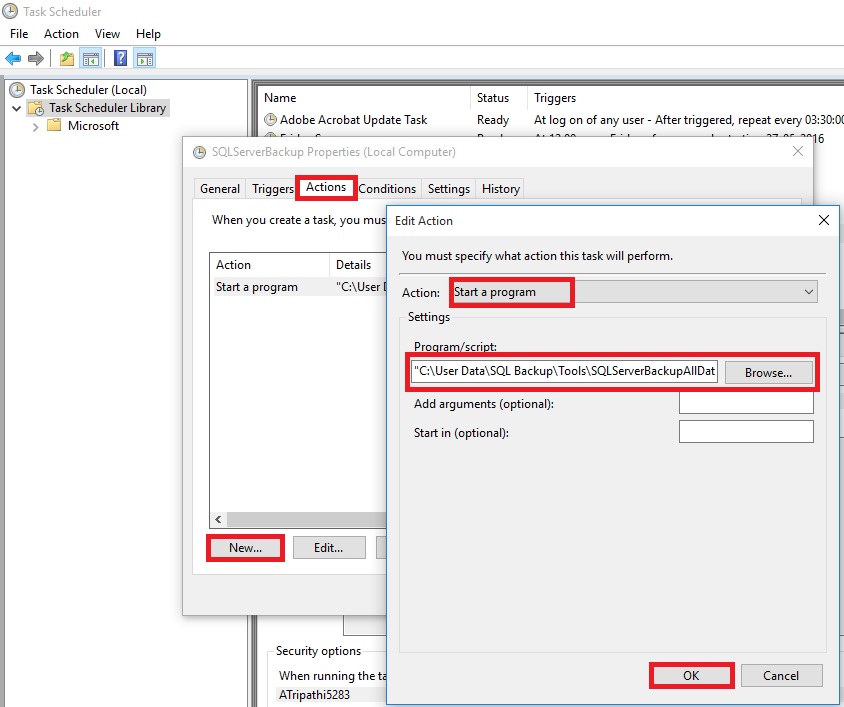
In Settings Tab do the setting as shown Below :

Click on OK to Save the Task and return to Task Scheduler Window.
Here you can see the newly created Task.

When Task is executed you will find the backup of databases at defined path in the script.

You can also find Log file at the path defined in batch.

Thats all for this post, will come up will more information in my up comming posts.
More about Loops in PowerShell
Do Until
The logic of this loop is to execute the Do {block} until (the condition is true).
As usual in PowerShell, pay close attention to the style of brackets, the curly brackets or parentheses guides you to write the correct code.

Note: Don’t try: Until ($strQuit = “N”). You need here to use -eq, this is PowerShell’s way of comparing two values.
Do While
The logic of ‘Do … While’ is the opposite of the Do Until. {Execute the block statement} while the (condition is true)
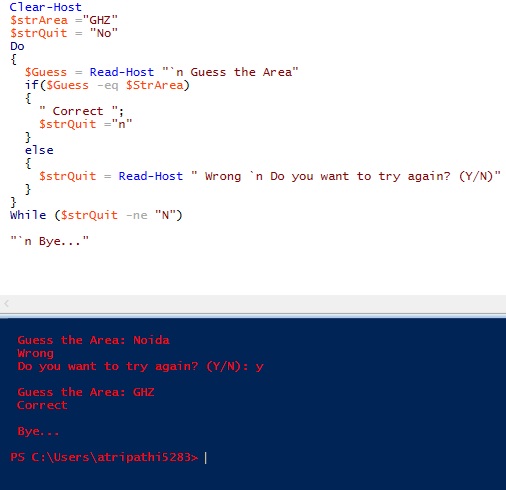
Note: There are difference between until & while in above two examples: Until ($strQuit -eq “N”) While ($strQuit -ne “N”)
‘While’ on Its Own – No Explicit ‘Do’
This method is the more traditional way with the (condition) followed by the {Block command}. Clearly, PowerShell’s While loop is simpler and more basic than the ‘Do … While’ construction in above two examples.
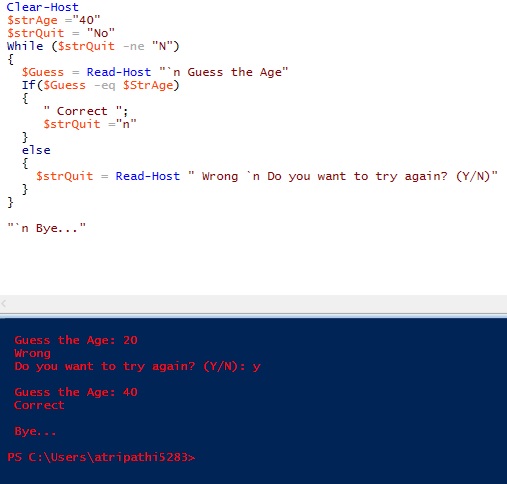
Note: In this example the ‘While’ clause is at the beginning instead of the end.
‘For’ Loop
Below example is a simple method using the keyword ‘For’. As usual there is a (condition) and {Block Statement}.
The speciality of this loop is the <init> and <repeat> sections.
Here is the syntax:
For (<init>; <condition>; <repeat>) {<command_block>}
Example: Times Table for 25

One side-effect of the For loop is that it always returns the <init> before it tests for the condition.
The <repeat> modifies the $i variable, which is then tested inside the <condition> of the next cycle.
‘Foreach’ loop
The PowerShell ‘Foreach’ loop is more complex, and has more arguments than the ‘for’ and ‘Do While’ loops. The key feature is that the loop interrogates an array, known as a collection. It then applies a {Statement Block} to each iteration. In addition to the position and the type of bracket, observe the tiny, but crucial keyword – ‘In’.
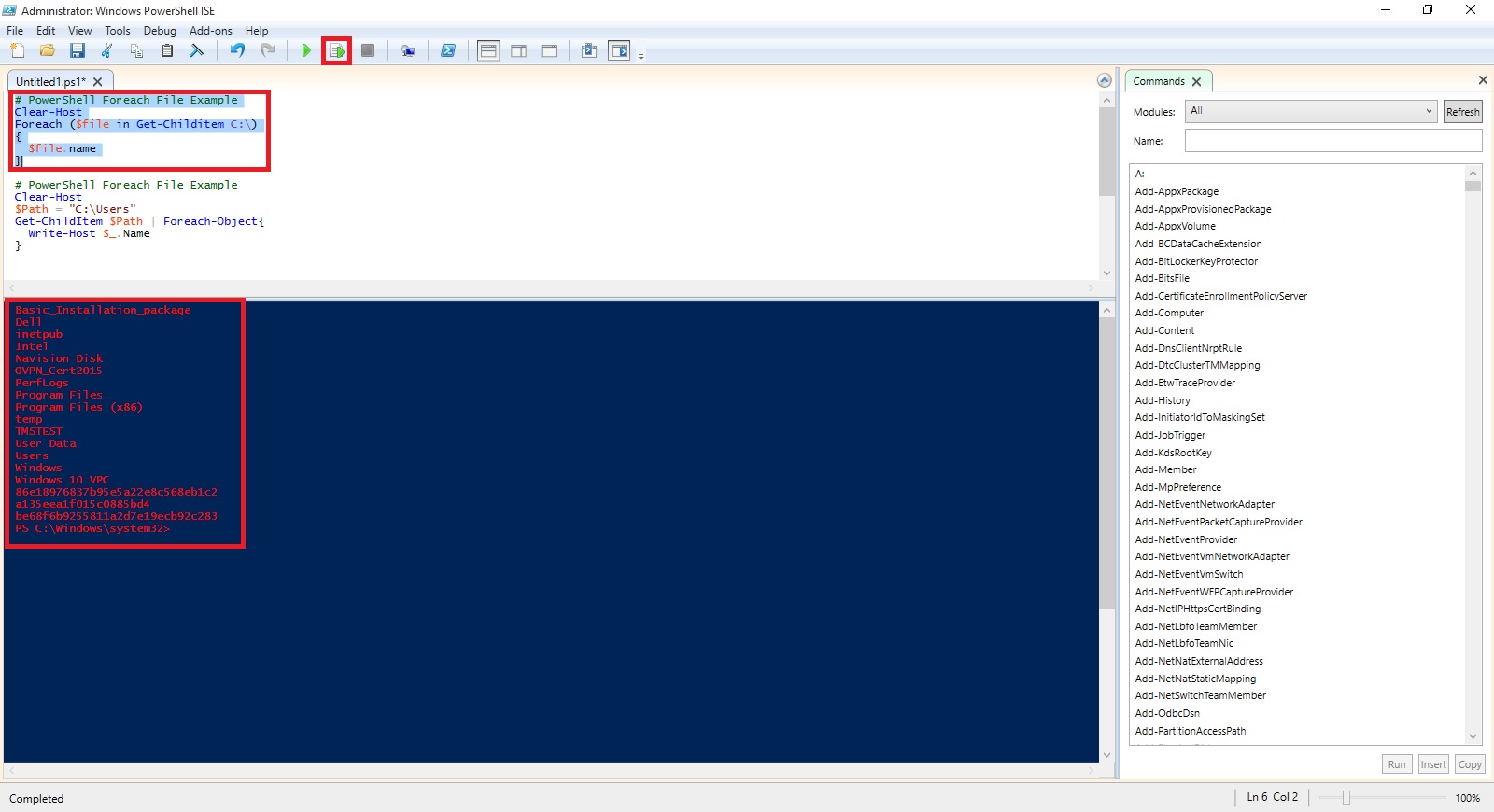
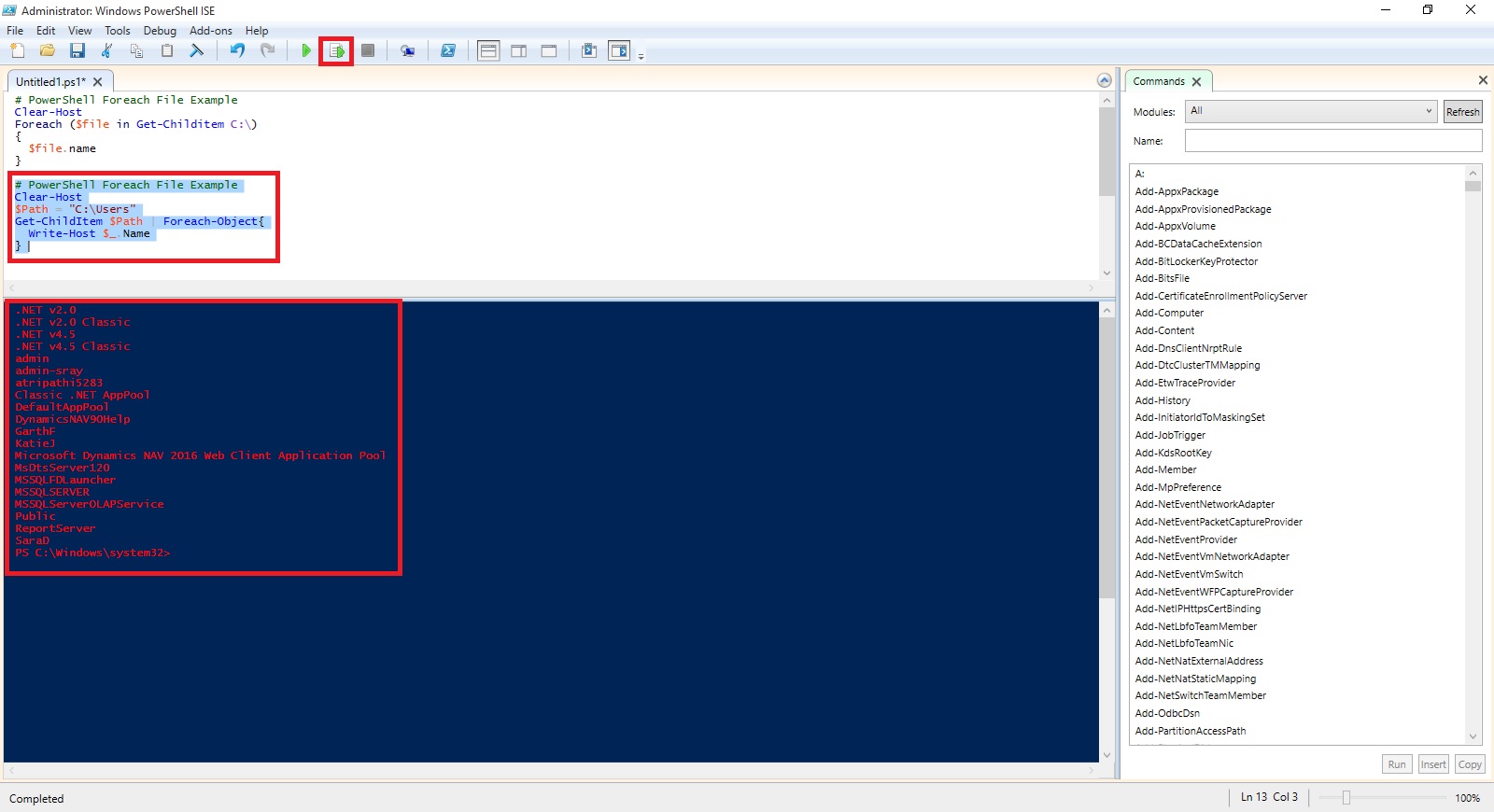
# PowerShell ForEach loop to display files in C:\Program files
$Path = “C:\Program Files\” “{0,10} {1,-24} {2,-2}” -f ` ” Size”, “Last Accessed”, “File Name ” Foreach ($file in Get-Childitem $Path -recurse -force) {If ($file.extension -eq “.txt”) { “{0,10} {1,-24} {2,-2}” -f ` $file.length, $file.LastAccessTime, $file.fullname } }
# PowerShell ForEach-Objcet piping into block statement
Clear-Host $Path = “C:\Program Files\” Get-Childitem $Path -recurse -force | Foreach-Object {If ($_.extension -eq “.txt”) {Write-Host $_.fullname } }
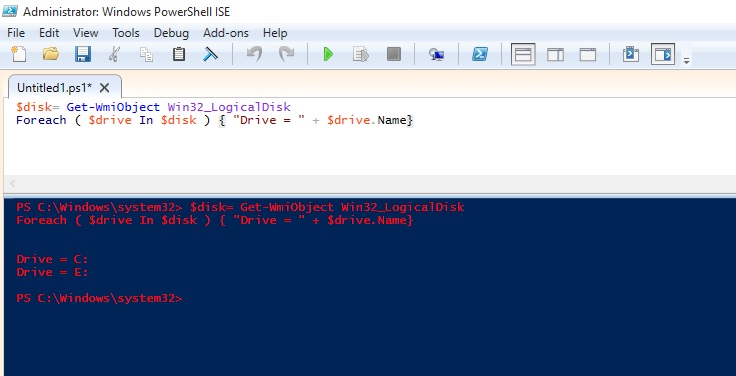
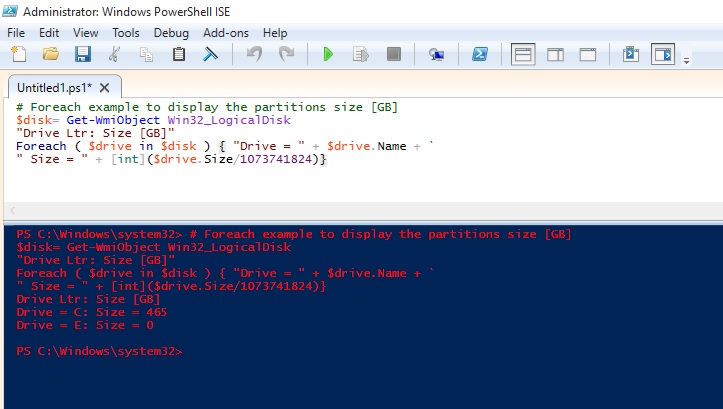
I will come up with more stuffs in my upcoming posts.
Till then keep practicing and stay tuned for more details.
An Introduction to PowerShell – Profile
PowerShell is a great way to automate almost anything in Windows.
However, it’s not just a scripting language.
If you find yourself using it as a command line shell it may be useful to store your functions and customizations in a profile that gets loaded every time you load the Console.
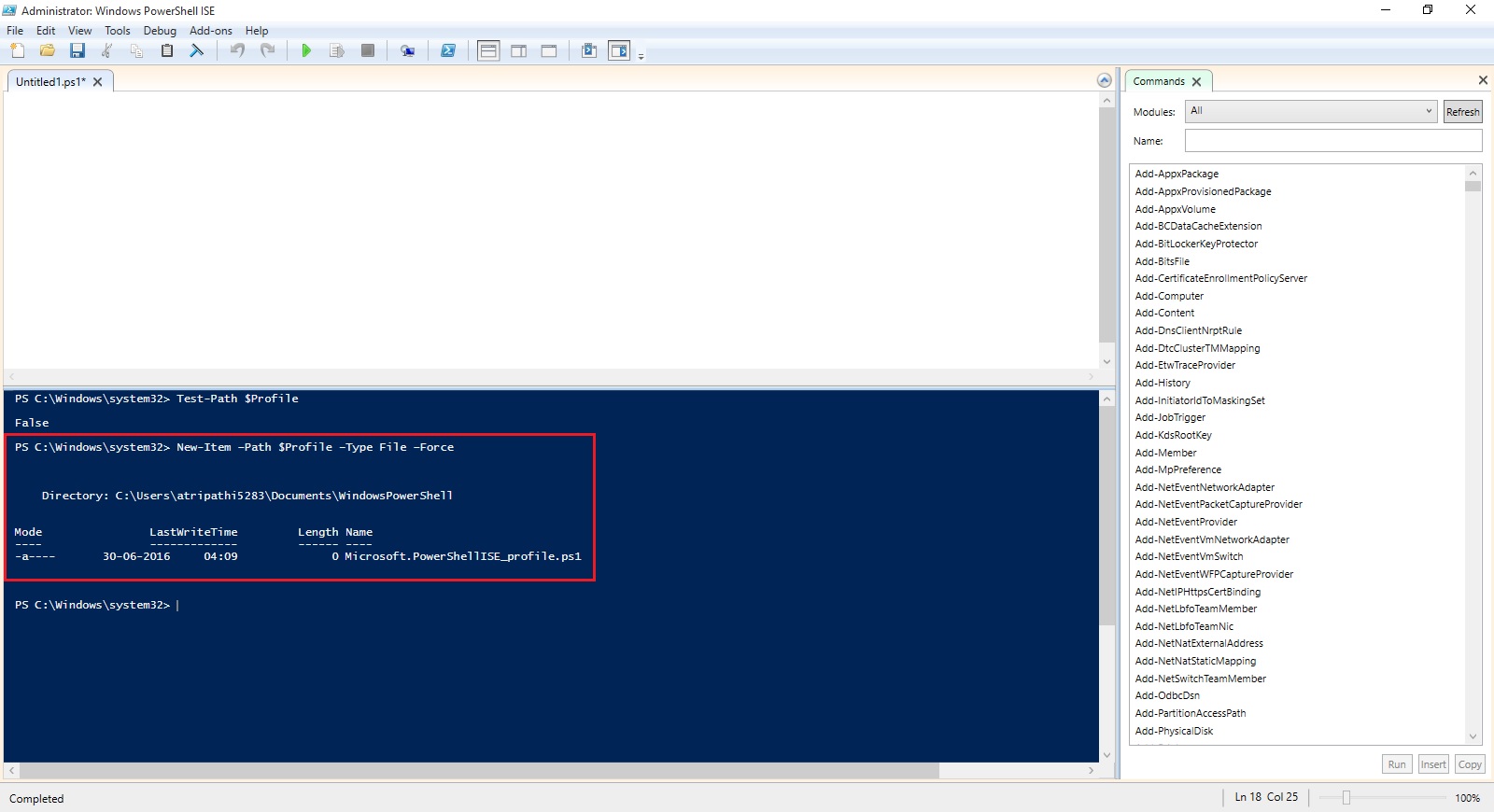
The first thing we do here is check if we already have a profile. There is an automatic variable, $Profile, that stores the fully qualified location of the PowerShell profile. An easy way to check if any profile exists is to use the Test-Path cmdlet on the $Profile variable.
Test-Path $Profile

As you can see no profile file yet created for me, so we will create one, we can easily do that with the New-Item cmdlet.
New-Item –Path $Profile –Type File –Force
Using the force parameter will cause a profile to be created even if already we have one. This means our old profile will be overwritten and new will be created.
Profile can be edit using notepad, which can be easily started using PowerShell.
notepad $Profile

You can put any commands, functions, alias’s and even module imports into your PowerShell profile.
I normally work on PowerShell for Navision so I would prefer loading module whenever I launch the PowerShell command, so I include my cmdlets for loading the same in my profile.

Save the Profile and close the PowerShell. Next time I launch PowerShell this Module get loaded for me by default.
Finally, I would like to also have some customizations to the console. One is it basically determines if you have opened an elevated PowerShell console and changes the font colour, this way I will always remember that I am running with elevated privileges.
Let us Save the Profile and check the effect of this Profile.
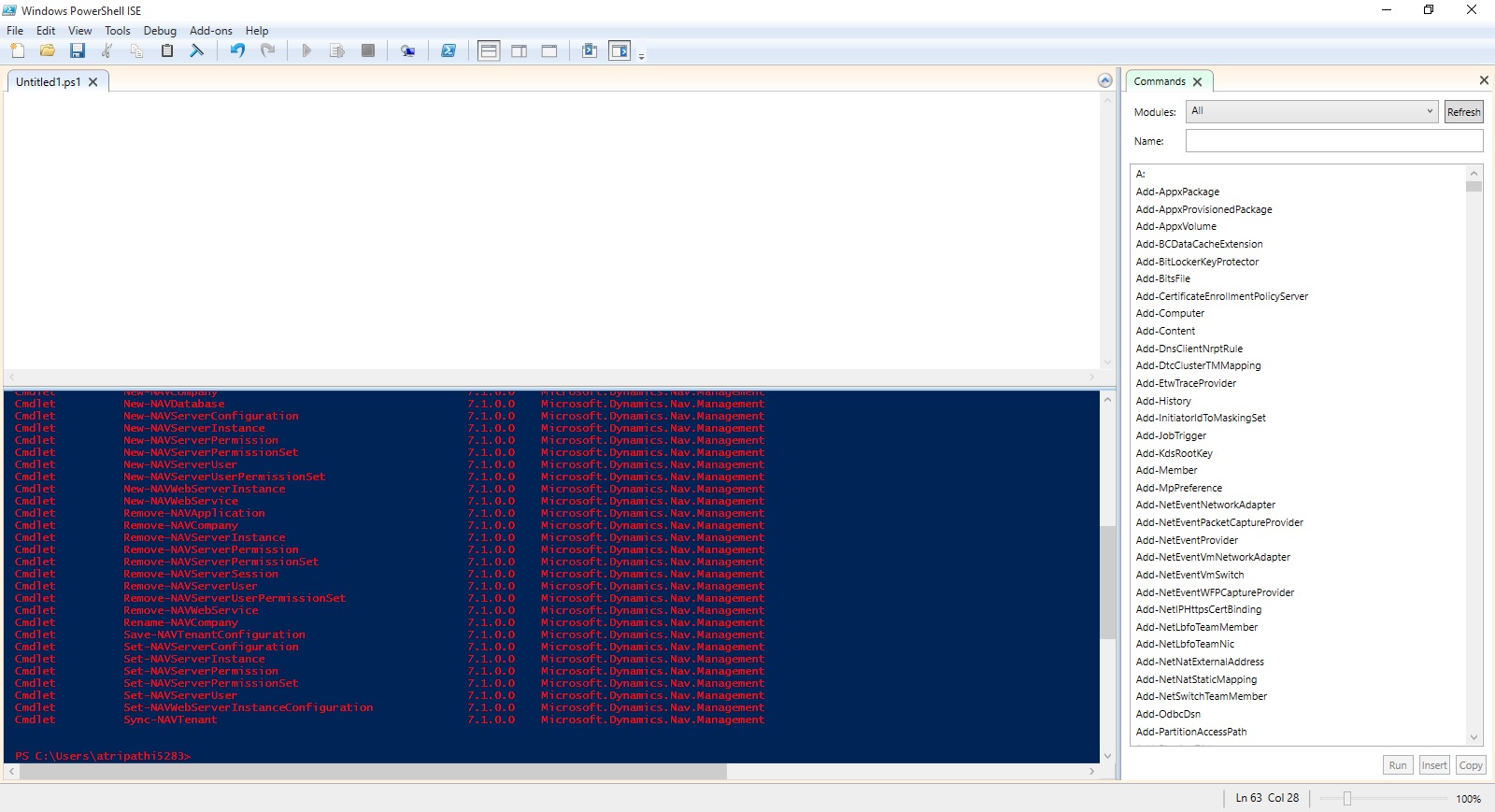
That’s all for today.
I will come up with more stuffs in my upcoming posts.
Till then keep practicing and stay tuned for more details.
An Introduction to PowerShell – Execution Policies
PowerShell has something called Execution Policies, which stop you from just running any old script. In fact, by default, you can’t run any scripts and need to change your execution policy if you want to be allowed to run them. There are 4 notable Execution Policies:
- Restricted: This is the default configuration in PowerShell. This setting means that no script can run, regardless of its signature. The only thing that can be run in PowerShell with this setting is an individual command.
- AllSigned: This setting does allow scripts to run in PowerShell. The script must have an associated digital signature from a trusted publisher. There will be a prompt before you run the scripts from trusted publishers.
- RemoteSigned: This setting allows scripts to be run, but requires that the script and configuration files that are downloaded from the Internet have an associated digital signature from a trusted publisher. Scripts run from the local computer don’t need to be signed. There are no prompts before running the script.
- Unrestricted: This allows unsigned scripts to run, including all scripts and configuration files downloaded from the Internet. This will include files from Outlook and Messenger. The risk here is running scripts without any signature or security. It is recommenced that you never us this setting.
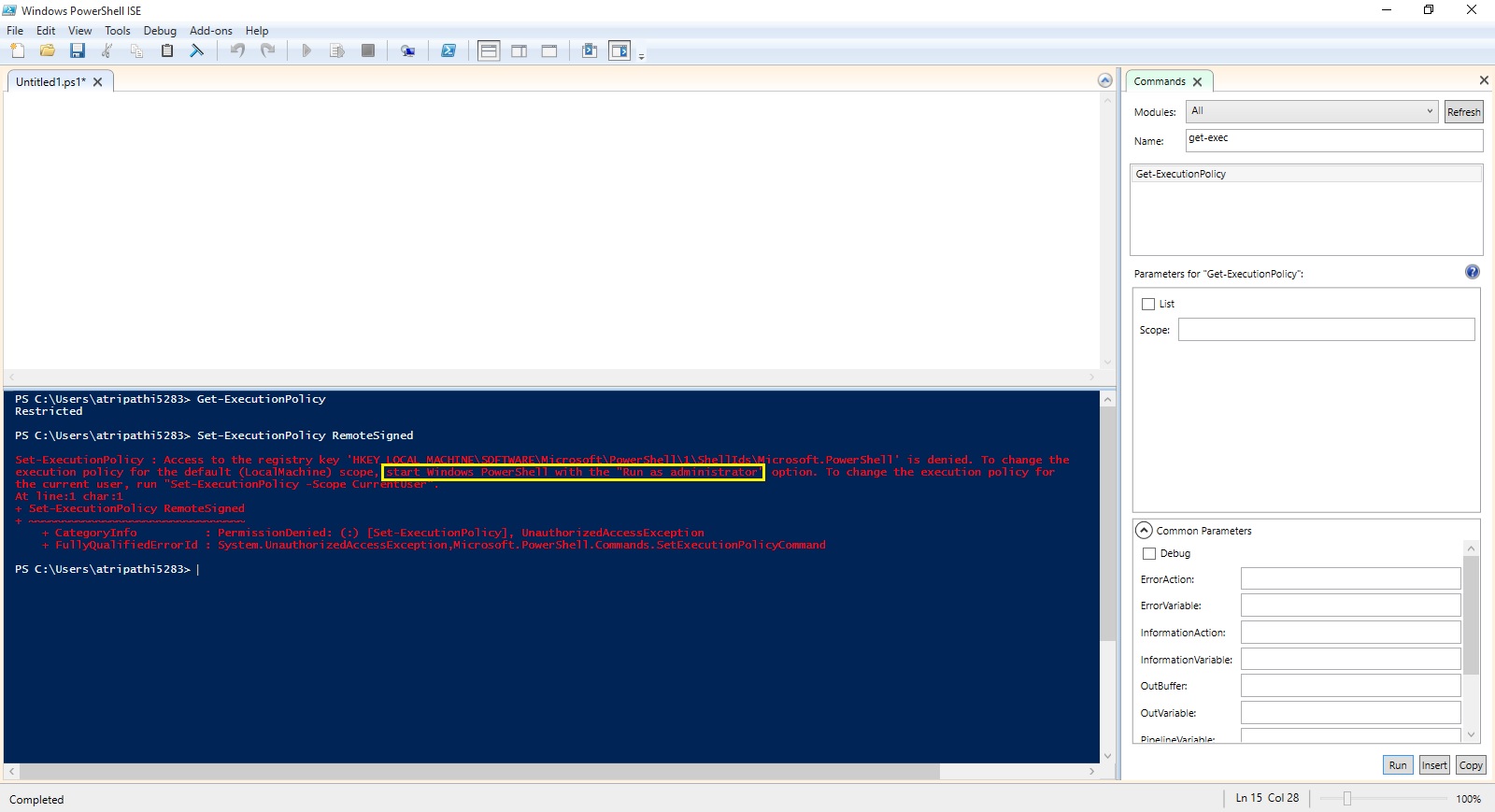
To see what your current Execution Policy is set to, open a PowerShell Console and type:
Get-ExecutionPolicy

Set-ExecutionPolicy RemoteSigned

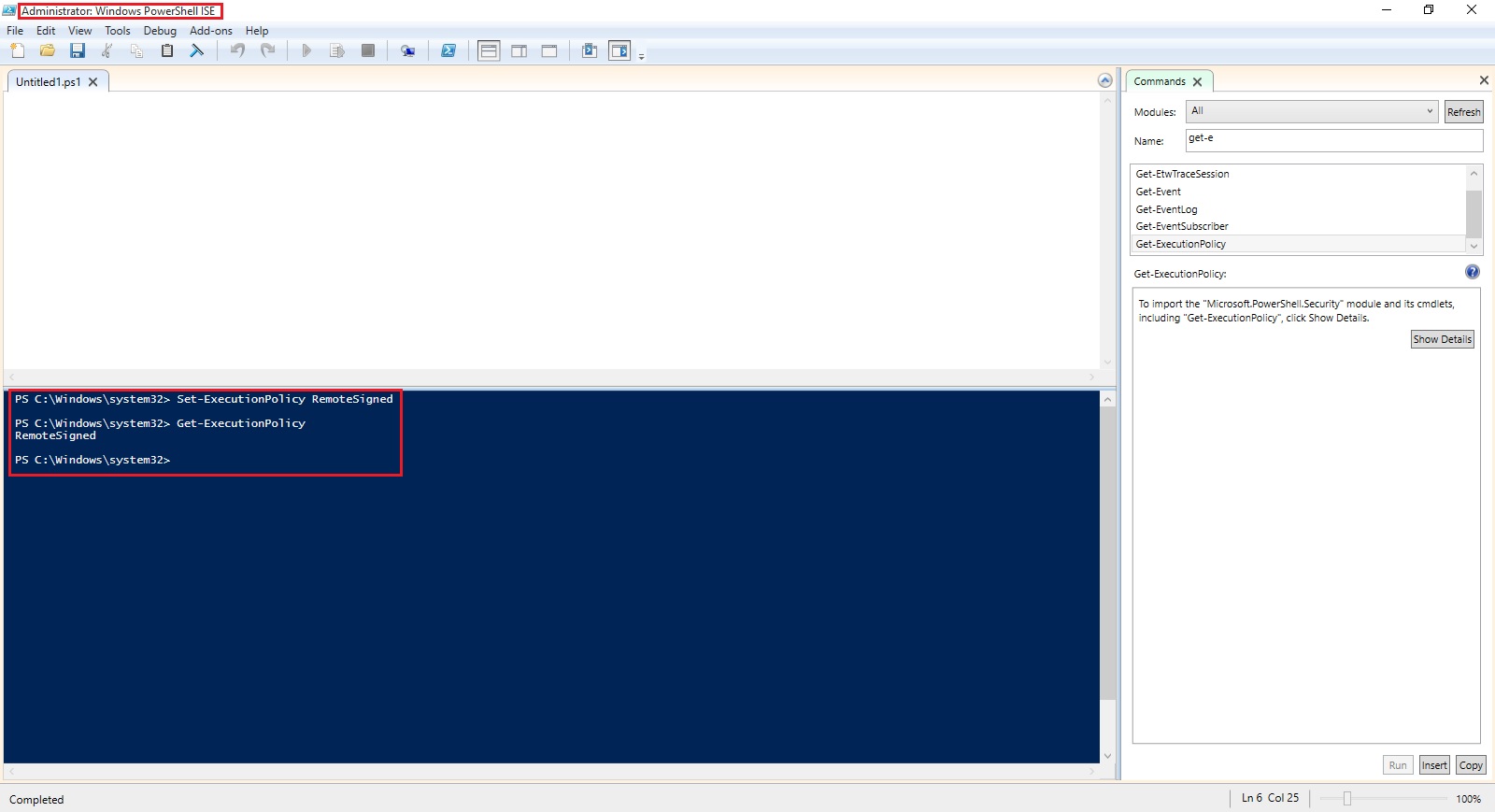
To run this command you need to run the PowerShell with Administrative rights. Right click on icon and select Run as Administrator and try the command again.
When i run PowerShell as Administrator, now i am able to execute the command successfully as in below screen.
The proper term for a PowerShell command is a cmdlet, and from now on we will use this correct terminology. It just felt more appropriate to call them commands for this introduction.
I will come up with more stuffs in my upcoming posts.
Till then keep practicing and stay tuned for more details.
An Introduction to PowerShell – ForEach
ForEach simply looks at a set of list and pulls out one at a time to look at them and then, perform some type of action or set of commands on it.
One different part of a ForEach loop is the keyword in that lives within that parenthetical statement. That tells PowerShell to create a single variable to hold the values that come out, one at a time, for your list.
Let’s define a variable with list of Fruits
$names = “Apple”,”Banana”,”Grape”,”Orange”,”Chiku”
When we make a list within a variable, we have created an array, which is simply a sort of matrix thing that PowerShell holds in memory that lets it store a lots of things at one time.
Let’s also initialize a count variable so we get a feel of how the loop is going.
$count = 0
Let’s use a ForEach loop to count how many names we have. Remember our keyword in we have to create a new variable that we can call FruitName. This holds each single name that comes out of that list of names we have stored in the variable $names.
ForEach ($FruitName in $names)
{
$count += 1
Write-Host “$FruitName”
}
Finally, I’ll add a simple Write-Host line after the end (after the right curly brace, that is) to display the count, so we can actually give us the count of names in the list of Fruits.
Write-Host “The total number of names is $count.”
Here is the output of above script.

I will come up with more stuffs in my upcoming posts.
Till then keep practicing and stay tuned for more details.
An Introduction to PowerShell – Do While
Do While is the simplest of the looping constructs in PowerShell.
A looping construct is basically a piece of code that repeats the same action over and over again to a set of iteration, it loops through a set of statements, doing some action in each of its iteration, until some condition is met or that set of statement is exhausted.
Do While is simply a construct that says to PowerShell, “repeat set of things until some condition becomes true”.
For example, let’s set up a control variable called count and give it an initial value of one.
$count = 1
Then, let’s set up a simple Do While construct that adds 1 to whatever value of count is already in that variable, until the variable has the number 10 in it.
Do
{
$count = $count + 1
Write-Host “The current value of the variable is $count”
} While ($count –lt 10)

Another way of doing same is:
You can also set up a Do While construct so that your set of commands only executes when the condition is true. You just need to eliminate the do statement, and only use while.
While ($count –lt 10)
{
$count = $count + 1
Write-Host “The current value of the variable is $count”
}
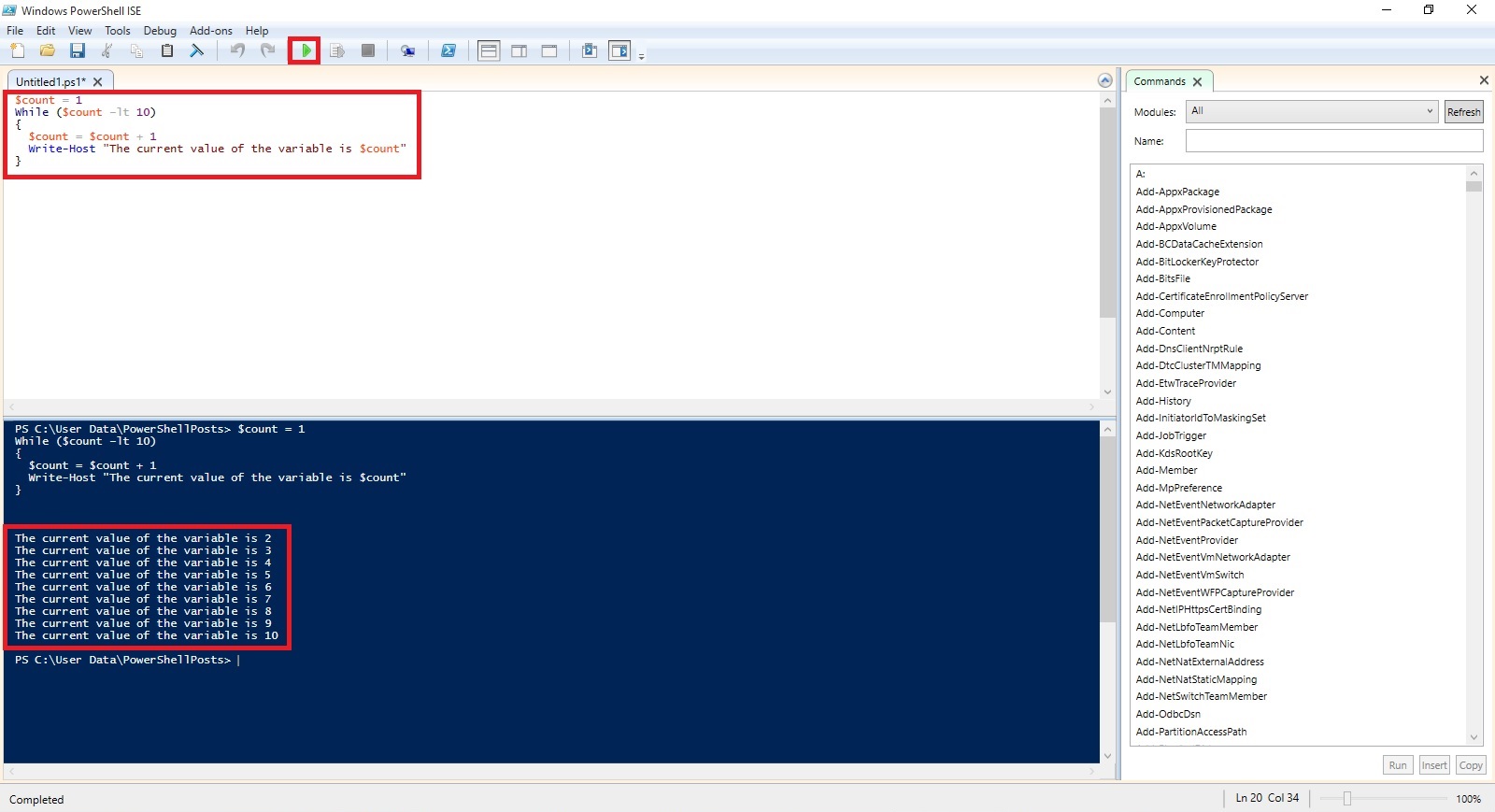
Only difference in above both way of using Do While construct is in first way if we initialize Count with 11 then also the loop with execute once as the condition is tested after loop is executed at least once if condition is satisfied the loop will continue else will exit. Where as in second way the condition is tested before it enters the loop and will exit before first iteration of the loop.
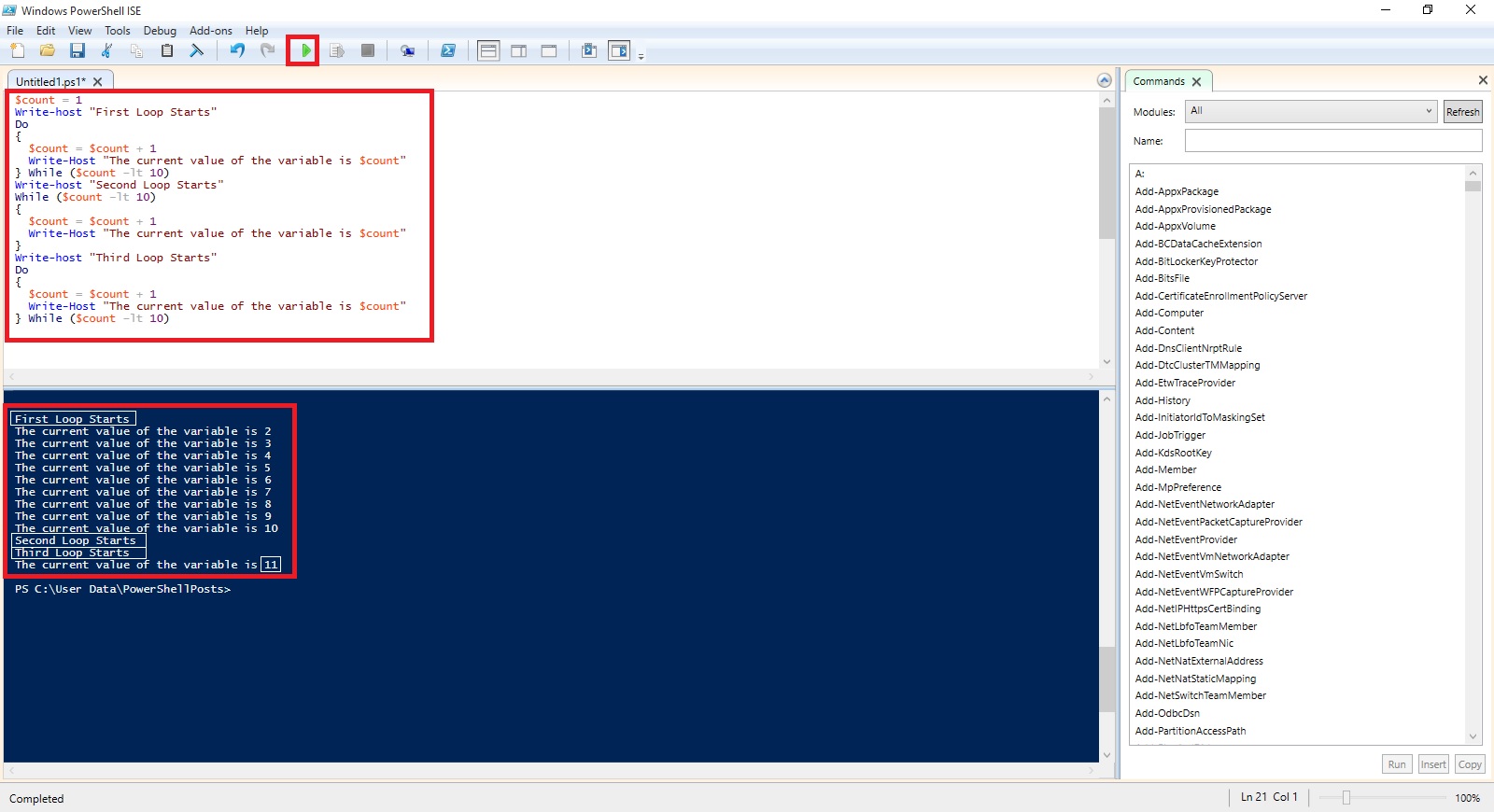
I will come up with more stuffs in my upcoming posts.
Till then keep practicing and stay tuned for more details.
An Introduction to PowerShell – If/Then
The simplest form of decision making in PowerShell is the if/then mechanism.
The code that runs if your comparison clause is YES/TRUE or NO/FALSE must be surrounded within curly braces, it is best practice to put these curly braces on lines by themselves so that you can match them up when you are writing more complicated scripts.
If condition is met then
{
Do This
}
Else
{
Do This
}
Example:
If (20 –gt 15)
{
Write-Host “20 is Greater than 15”
}

Here the –gt is the PowerShell switch for “greater than”.
Another Example using Nesting
If (20 –gt 25)
{
Write-Host “20 is Greater than 25”
}
elseif (25 –gt 20)
{
Write-Host “25 is Greater than 20”
}
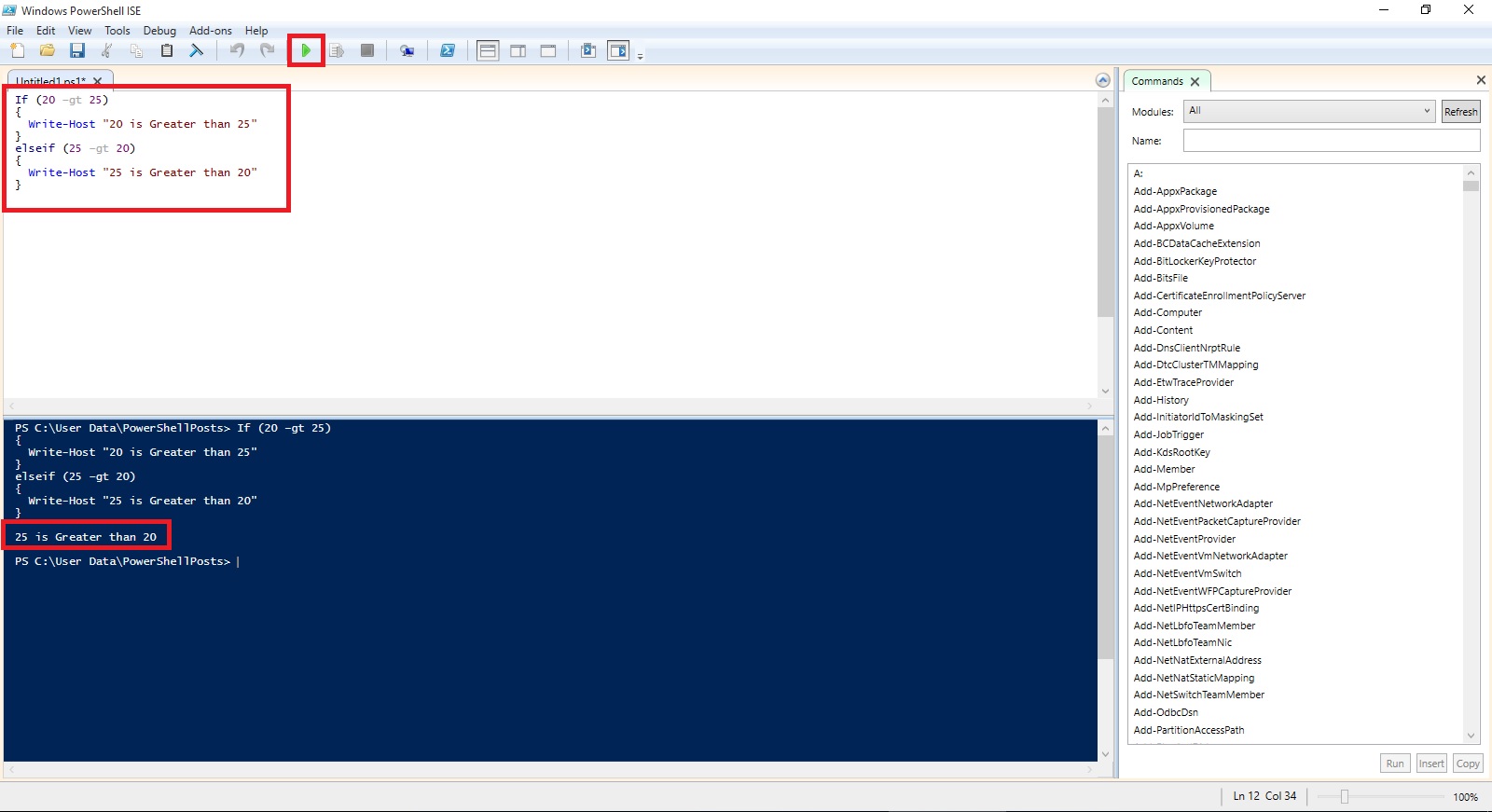
You can include n number of these elseif blocks in your script, there is no maximum limit for how many times it occurs in script.
If (10 –gt 11)
{
Write-Host “10 is Greater than 11”
}
elseif (11 –lt 10)
{
Write-Host “11 is Less than 10”
}
elseif (20 –gt 40)
{
Write-Host “20 is Greater than 40”
}
else
{
Write-Host “None of above conditions are true”
}

I will come up with more stuffs in my upcoming posts.
Till then keep practicing and stay tuned for more details.
 ARKSD Consultancy Private Limited
You must be logged in to post a comment.