Development Tips, Email, How To, Information, Office 365, Office Integration, Smtp, Tip & Tricks

Multiple Line Mail Body Formatting without using Mail Templates

I came across one requirement from one of my customer, so I decided to share the solution with you all.

In today’s post we will see how we can create multi line mail body for SMTP mail.

Lets start with the solution rather than talking of logic.

Step-1: Create a codeunit for the function or decide where you wish to add this function

Step-2: Define Variables

1

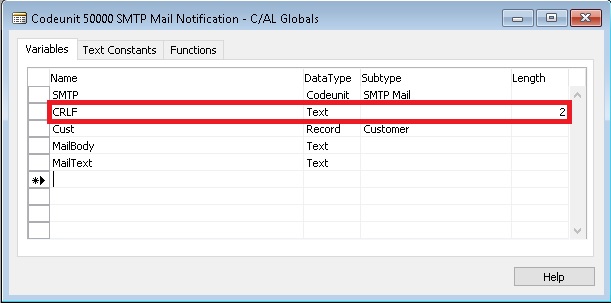
you may notice that Variable CRLF is defined as Text with Size 2.

Define all other variables that you may require as per your logic.

Step-3: Write the function. Define your parameters and additional codes you may require as per your logic.

2

In above code notice that I have set last parameter of CreateMessage as FALSE for(HTMLFormatted), this is required else CRLF logic will not work.

Where ever I require New Line I just add CRLF.

3

Step-4: SMTP Mail Setup I am using as below for live.com, you check with yours SMTP details accordingly.

4

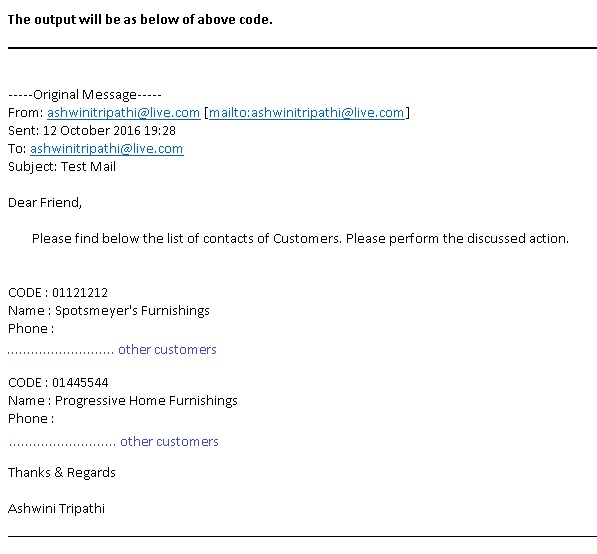
Yes we are done now you can execute the above function to generate your mails.

I will come up with more details in my upcoming posts, till then keep exploring and learning.


Dynamics 365, Information

The first look at the next generation of intelligent business applications in the cloud. Dynamics – 365


Today I had a chance to attend Dynamics 365 – first look presentation from Microsoft.

Below are the few takeaways from this session, sharing with you, will come up with more details later in my upcoming posts.

Microsoft Dynamics 365

Enable your organization to grow, adapt, and evolve to meet the needs of your customers with Dynamics 365 – the next generation of intelligent business applications.


1


14


15

Use digital intelligence to reimagine what’s possible for your business.

Dynamics 365 unifies CRM and ERP capabilities into applications that work seamlessly together across sales, customer service, field service, operations, financials, marketing, and project service automation.

Start with what you need, add applications as your business grows.

Rethink what’s possible for your business when you:

  • Better engage customers
  • Empower employees
  • Optimize operations
  • Reinvent products and business models

23456789101112

Product demo was also given, will share those details also in my upcoming posts. Till then keep exploring and learning.

All screenshots are taken from Microsoft presentation.

You can find more details and explore on below link: https://www.microsoft.com/en-us/dynamics/default.aspx

13


Cumulative Updates

Cumulative Update 12 for Microsoft Dynamics NAV 2016 Released Oct 2016

This cumulative update includes all hotfixes and regulatory features that have been released for Microsoft Dynamics NAV 2016, including hotfixes and regulatory features that were released in previous cumulative updates.

For a list of cumulative updates released for Microsoft Dynamics NAV 2016, see released cumulative updates for Microsoft Dynamics NAV 2016  (https://support.microsoft.com/kb/3108728/ ) . Cumulative updates are intended for new and existing customers who are running Microsoft Dynamics NAV 2016.

Which hotfix package to download

This cumulative update has multiple hotfix packages. Select and download one of the following packages depending on the country version of your Microsoft Dynamics NAV 2016 database:

Country Hotfix package
AT – Austria Download the ATKB3193868 package
AU – Australia Download the AUKB3193868 package
BE – Belgium Download the BEKB3193868 package
CH – Switzerland Download the CHKB3193868 package
CZ- Czech Download the CZKB3193868 package
DE – Germany Download the DEKB3193868 package
DK – Denmark Download the DKKB3193868 package
ES – Spain Download the ESKB3193868 package
FI – Finland Download the FIKB3193868 package
FR – France Download the FRKB3193868 package
IS – Iceland Download the ISKB3193868 package
IT – Italy Download the ITKB3193868 package
IN – India Download the INKB3193868 package
NA – North America Download the NAKB3193868 package
NL – Netherlands Download the NLKB3193868 package
NO – Norway Download the NOKB3193868 package
NZ – New Zealand Download the NZKB3193868 package
RU – Russia Download the RUKB3193868 package
SE – Sweden Download the SEKB3193868 package
UK – United Kingdom Download the GBKB3193868 package
All other countries Download the W1KB3193868 package

How to install a Microsoft Dynamics NAV 2016 cumulative update

See How to install a Microsoft Dynamics NAV 2016 cumulative update  (https://support.microsoft.com/kb/3109325/ ) .

Prerequisites

You must have Microsoft Dynamics NAV 2016 installed to apply this hotfix.

Hotfix Download Available View and download the hotfix

How to obtain the Microsoft Dynamics NAV update files

Click the link in the “Hotfix Download Available” section above to download the cumulative update files. After you request the Microsoft Dynamics NAV update, a hyperlink will be sent to you in an e-mail.

The e-mail will contain a hyperlink and a password. You can use the hyperlink to download the Microsoft Dynamics NAV hotfix or the update files. When you click the hyperlink, the File Download – Security Warning dialog box opens. Then, you are prompted to run, to save, or to cancel the download.

For more details see : Link

You will require PartnerSource or CustomerSource access.

Released Cumulative Updates for Microsoft Dynamics NAV 2016

Cumulative Updates for Microsoft Dynamics NAV 2016


You should always install the latest cumulative update.


Knowledge
Base ID
Title Release date Build no. Local versions included
3193868    Cumulative update 12 for Microsoft Dynamics NAV 2016 October, 2016 47042 AT, AU, BE, CH, CZ, DE, DK, ES, FI, FR, IS, IT, IN, NA, NL, NO, NZ, RU, SE, UK
3188240    Cumulative update 11 for Microsoft Dynamics NAV 2016 September, 2016 46773 AT, AU, BE, CH, CZ, DE, DK, ES, FI, FR, IS, IT, IN, NA, NL, NO, NZ, RU, SE, UK
3182131    Cumulative update 10 for Microsoft Dynamics NAV 2016 August, 2016 46621 AT, AU, BE, CH, CZ, DE, DK, ES, FI, FR, IS, IT, IN, NA, NL, NO, NZ, RU, SE, UK
3172549    Cumulative update 9 for Microsoft Dynamics NAV 2016 July, 2016 46290 AT, AU, BE, CH, CZ, DE, DK, ES, FI, FR, IS, IT, NA, NL, NO, NZ, RU, SE, UK
3166287    Cumulative update 8 for Microsoft Dynamics NAV 2016 June, 2016 46045 AT, AU, BE, CH, CZ, DE, DK, ES, FI, FR, IS, IT, NA, NL, NO, NZ, RU, SE, UK
3157492    Cumulative update 7 for Microsoft Dynamics NAV 2016 May, 2016 45834 AT, AU, BE, CH, CZ, DE, DK, ES, FI, FR, IS, IT, NA, NL, NO, NZ, RU, SE, UK
3151017    Cumulative update 6 for Microsoft Dynamics NAV 2016 April, 2016 45480 AT, AU, BE, CH, CZ, DE, DK, ES, FI, FR, IS, IT, NA, NL, NO, NZ, RU, SE, UK
3145855    Cumulative update 5 for Microsoft Dynamics NAV 2016 March, 2016 45243 AT, AU, BE, CH, CZ, DE, DK, ES, FI, FR, IS, IT, NA, NL, NO, NZ, RU, SE, UK
3139364    Cumulative update 4 for Microsoft Dynamics NAV 2016 February, 2016 44974 AT, AU, BE, CH, CZ, DE, DK, ES, FI, FR, IS, IT, NA, NL, NO, NZ, RU, SE, UK
3130298    Cumulative update 3 for Microsoft Dynamics NAV 2016 January, 2016 44365 AT, AU, BE, CH, CZ, DE, DK, ES, FI, FR, IS, IT, NA, NL, NO, NZ, RU, SE, UK
3121038    Cumulative update 2 for Microsoft Dynamics NAV 2016 December, 2015 43897 AT, AU, BE, CH, CZ, DE, DK, ES, FI, FR, IS, IT, NA, NL, NO, NZ, RU, SE, UK
3106089    Cumulative Update 1 for Microsoft Dynamics NAV 2016 November, 2015 43402 AT, AU, BE, CH, CZ, DE, DK, ES, FI,


Cumulative Updates

Cumulative Update 24 for Microsoft Dynamics NAV 2015 released Oct 2016

Cumulative Update 24 includes all application and platform hotfixes and regulatory features that have been released for Microsoft Dynamics NAV 2015.

The cumulative update includes hotfixes that apply to all countries and hotfixes specific to the following local versions:

  •   AU – Australia
  •   AT – Austria
  •   BE – Belgium
  •   CH – Switzerland
  •   CZ – Czech Republic
  •   DE – Germany
  •   DK – Denmark
  •   ES – Spain
  •   FI  – Finland
  •   FR – France
  •   IS – Iceland
  •   IT – Italy
  •   NA – North America
  •   NL – Netherlands
  •   NO – Norway
  •   NZ – New Zealand
  •   RU – Russia
  •   SE – Sweden
  •   UK – United Kingdom

Note: You must convert the database if you are upgrading to this cumulative update from a cumulative update earlier than Cumulative Update 9 (build 41779). For more information, see Converting a Database in Help for Microsoft Dynamics NAV.

Where to find Cumulative Update 24

You can download the cumulative update from KB 3193867  – Cumulative Update 24 for Microsoft Dynamics NAV 2015 (Build 47039).

Warning

Before you install a cumulative update in a production environment, take the following precautions:

  1. Test the cumulative update in a non-production environment.
  2. Make a backup of the system or computer where the cumulative update is to be installed.

Additional Information

For information about how to install the cumulative update, see How to Install a Microsoft Dynamics NAV 2015 Cumulative Update.

For information about how to work around a recent process change, see How to Get Back the ‘Hotfix Directories’ from NAV 2015 Cumulative Update 1.

For a list of all cumulative updates for this version, see Released Cumulative Updates for Microsoft Dynamics NAV 2015.

For more details see : https://blogs.msdn.microsoft.com/nav/2016/10/07/cumulative-update-24-for-microsoft-dynamics-nav-2015-has-been-released/

Cumulative Updates

Cumulative Update 43 for Microsoft Dynamics NAV 2013 released Oct 2016

Cumulative Update 43 includes all application and platform hotfixes and regulatory features that have been released for Microsoft Dynamics NAV 2013.

The cumulative update includes hotfixes that apply to all countries and hotfixes specific to the following local versions:

  • AU – Australia
  • AT – Austria
  • BE – Belgium
  • CH – Switzerland
  • DE – Germany
  • DK – Denmark
  • ES – Spain
  • FI – Finland
  • FR – France
  • IS – Iceland
  • IT – Italy
  • NA – North America
  • NL – Netherlands
  • NO – Norway
  • NZ – New Zealand
  • SE – Sweden
  • UK – United Kingdom

Where to find Cumulative Update 43

You can download the cumulative update from KB 3193864  – Cumulative Update 43 for Microsoft Dynamics NAV 2013 (Build 47058).

Warning

Before you install a cumulative update in a production environment, take the following precautions:

  1. Test the cumulative update in a non-production environment.
  2. Make a backup of the system or computer where the cumulative update is to be installed.

Additional Information

For a list of all cumulative updates for this version, see Released Cumulative Updates for Microsoft Dynamics NAV 2013.

For a list of all hotfixes included in cumulative updates for this version, see the following CustomerSource and PartnerSource pages:

CustomerSource:

PartnerSource:

For more details see : https://blogs.msdn.microsoft.com/nav/2016/10/07/cumulative-update-43-for-microsoft-dynamics-nav-2013-has-been-released/

Cumulative Updates

Cumulative Update 36 for Microsoft Dynamics NAV 2013 R2 released in Oct 2016

Cumulative Update 36 includes all application and platform hotfixes and regulatory features that have been released for Microsoft Dynamics NAV 2013 R2.

Where to find Cumulative Update 36

You can download the cumulative update from KB 3193866  – Cumulative Update 36 for Microsoft Dynamics NAV 2013 R2 (Build 47043).

Warning

Before you install a cumulative update in a production environment, take the following precautions:

  1. Test the cumulative update in a non-production environment.
  2. Make a backup of the system or computer where the cumulative update is to be installed.

Additional Information

For more information about cumulative updates for this version, see Announcement of update rollups for Microsoft Dynamics NAV 2013 R2.

For a list of all cumulative updates for this version, see Released Cumulative Updates for Microsoft Dynamics NAV 2013 R2.

For a list of all hotfixes included in cumulative updates for this version, see the following CustomerSource and PartnerSource pages:

CustomerSource:

PartnerSource

For more details see : https://blogs.msdn.microsoft.com/nav/2016/10/07/cumulative-update-36-for-microsoft-dynamics-nav-2013-r2-has-been-released/

The cumulative update includes hotfixes that apply to all countries and hotfixes specific to the following local versions:

  •   AU – Australia
  •   AT – Austria
  •   BE – Belgium
  •   CH – Switzerland
  •   CZ – Czech Republic
  •   DE – Germany
  •   DK – Denmark
  •   ES – Spain
  •   FI  – Finland
  •   FR – France
  •   IS – Iceland
  •   IT – Italy
  •   NA – North America
  •   NL – Netherlands
  •   NO – Norway
  •   NZ – New Zealand
  •   RU – Russia
  •   SE – Sweden
  •   UK – United Kingdom

Note: Implementing this cumulative update will require a database upgrade.

Development Tips, How To, Information, Tip & Tricks

How can I Drill Down to any Page dynamically using Table ID

There is a requirement from my one of my reader.

Today I will discuss on how we can dynamically open page by using table ID only.

As you are aware to open Page we require PageID and Table record.

PAGE.RUN(Number [, Record] [, Field])

For this we will use RecordRef and minimum requirement is table have Page ID for Lookup and Drilldown defined else we will get error when try to open the page.


Create a Function name it say ShowRecords.

Define 2 Variables as:

Name rRef

DataType RecordRef

Name varRecRef

DataType Variant


We require VARIANT because PAGE don’t accept RecordRef datatype.

PAGE.RUN(Number [, Record] [, Field])

Also define Parameter to the function to receive Table ID.


In function you write below code:


rRef.CLOSE;

CLEAR(rRef);

//rRef.OPEN(No [, Temp] [, CompanyName])

rRef.OPEN(TableID,FALSE,COMPANYNAME);

//You can apply filters also if required before accessing the Page

varRecRef := rRef;

//PAGE.RUN(Number [, Record] [, Field])

PAGE.RUN(0,varRecRef);


Now where you require you can call your function as ShowRecords(18)

This will Open Customer List Page to show the records from table.

I will show good use of same in my upcoming post. One use can be to design Navigate Page but few limitations will apply, wait for my next post.


That’s all for this post, I will come up with more details in my upcoming posts, till then keep exploring and learning.


Application, Area, Development Tips, Extension Package, How To, Information, Library, Machine, Multitenancy, NAV 2017, Notification, Permission, PowerShell, Readiness Library, Series, Tagging, Time, Tip & Tricks, Web Services, What's New

New Changes or features for Developer and IT Pro Changes in Microsoft Dynamics NAV 2017

Although it is too early to discuss on features and capabilities which we are going to get in our new release, we should wait for exact information post release of same.

Here are few extracts from available documents pre-release of the product.

You will find most of the features similar to which we have discussed in our earlier posts for Madeira Preview Project.

New thing is capability of extensions and Web Services are enhanced and programmatically handling Notifications.


Extensions

Dynamics NAV 2017 includes many new capabilities for Extensions:

  1. You can now include reports, XMLports, and queries in your extension along with new custom report templates.
  2. Default or initial data for new tables as part of your extension. These data will be included in the package file (.navx) and inserted into the table at the time of installation of the extension.
  3. You can include translated captions and constants for one or more languages by including object language files in the extension package.
  4. A translation only extension could be built that translates strings for base objects or objects for another extension.
  5. You can include and deploy .NET interop types executed on the server, client-side JavaScript or WinForms extensibility control add-ins.
  6. Extension can include a web service and configure it for the tenant the extension is being installed for in a multitenant deployment.
  7. Two new C/AL functions NAVAPP.RESTOREARCHIVEDATA and NAVAPP.DELETEARCHIVEDATA, you can easily restore or delete archived table data during a reinstall or upgrade of the extension.
  8. Use the NAVAPP.RESTOREARCHIVEDATA function to simply copy the data back from the archive table when special upgrade logic is not required.
  9. Use the NAVAPP.DELETEARCHIVEDATA function in situations where you do not want to restore the archived data for the table.
  10. You can publish an extension to a Dynamics NAV Server instance that is configured with an Azure SQL Database using new parameters added to the Publish-NAVApp cmdlet. The new parameters are used to provide the location and credentials for connecting to an existing Azure SQL database you created.
  11. Users with the appropriate permissions in the application can install and uninstall extensions from the Extensions Management page. The page will display all of the extensions that are currently published.


Web Services in multitenant deployments

You can publish per-tenant web services in situations where a web service has not been published for all tenants of the service.

You can also package and deploy published web services for base objects or extension objects in an extension.

The packaged web services will be published to the tenant for which the extension is being installed.


Notifications in the UI

Dynamics NAV 2017 introduces a programmatic way to send non-intrusive notifications to the UI in the Dynamics NAV Web client.

Notifications provide users with information about a current situation, but do not require any immediate action or block users from continuing with their current task.

In the UI, notifications appear in the Notification bar (similar to validation errors) at the top of the page on which a user is currently working.

Notifications that are defined on sub-pages, for example in parts and FactBoxes, appear in the same Notification bar.

Validation errors on the page will be shown first.

In the development environment, you create notifications in C/AL by using the newNotification and NotificationScope data types and the following functions.

  1. MESSAGE specifies the content of the notification that appears in the UI
  2. SCOPE specifies the scope in which the notification appears, which can be LocalScope or GlobalScope.
  3. A LocalScope notification appears in context of what the user is currently doing, while GlobalScope notifications are not directly related to the current task. Note: GlobalScope is currently not supported.
  4. SEND sends the notification to be displayed by the client.
  5. ADDACTION adds an action on the notification. Actions enable you to create interactive notifications that provide users with different actions that they can take to address the notification, like opening an associated page for modifying data. A notification action calls a function in a codeunit that you define, passing the notification object in the call. You then add business logic to the function for handling the action.
  6. SETDATA and GETDATA set and retrieve a data property value for the notification, which is typically needed when actions are invoked.

The following example illustrates the simplified code for local scope notification that has an action:

VAR

CreditBalanceNotification@1170000000 :Notification;

PROCEDURECreditBalanceCheck@1170000023(Customer@1170000000 : Record 18);

BEGIN

//Create the notification

CreditBalanceNotification.MESSAGE(‘Thecustomer”s current balance exceeds

their credit limit’);

CreditBalanceNotification.SCOPE :=NOTIFICATIONSCOPE::LocalScope;

//Add a data property for the customernumber

CreditBalanceNotification.SETDATA(‘CustNumber’,Customer.”No.”);

//Add an action that calls the ActionHandler codeunit, which you define  in the next step.

CreditBalanceNotification.ADDACTION(‘Gohandle this’,

CODEUNIT::NavExtensionInstallationMgmt, ‘OpenCustomer’);

//Send the notification to the client.

CreditBalanceNotification.SEND;

END;

In the “Action Handler” codeunit, you would add code to handle the action in a global function, called OpenCustomer, which has a Notification data type parameter. You could use the GETDATA function to get the value of the data sent with the notification:

PROCEDUREOpenCustomer@1170000024(theNotification@1170000000 :

Notification);

VAR

CustNo@1170000001 : Code[20];

BEGIN

// Do the code to handle the action.Optionally retrieve data carried by

the notification.

CustNo :=theNotification.GETDATA(‘CustNumber’);

// …

END;


Setup data in the US version

The US version of Dynamics NAV 2017 includes two RapidStart packages that will enable a fast implementation for a new company.

These data packages come with a new Windows PowerShell script to upload to server – and can be enabled for new companies.

Create a new company in the Companies page, and choose the Enable assisted setup field.

Then, use the Import-NAVConfigurationPackageFile cmdlet to import the RapidStart packages.

Then open the new company, the packages are applied, and you will be taken through an assisted setup experience.


Application area tagging

The Application Areas system offers developers, administrators, and users the ability to define differentiated user experiences according to application scope.

By selecting a set of application areas, users only see UI elements that are specific to the application features that they need to perform their tasks.

When companies want to create differentiated user experiences, the Application Areas system should be considered as an option not compulsory to adopt.


Time series library

One of the most popular topics for machine learning is forecasting based on historical data.

Many algorithms are there that can do this, but you do not have to know them, because MS have wrapped them for us.

Five of these algorithms, are wrapped in one Azure ML experiment, added logic that compares different results and returns the best one accompanied by an indicator of the prediction’s quality.

There is also a generic API on top of this that allows Dynamics NAV developers create their own functionality that helps customers find the business-critical information that may be hidden in their database.

You can perform time-series analysis in the familiar development environment.

The time series library is used by the Sales and Inventory Forecast extension.


Source:- https://mbs.microsoft.com/Files/partner/NAV/Readiness_Training/ReadinessTrainingNews/WhatsNewDynamicsNAV2017LimitedBeta.pdf

I will come up with more details in my upcoming posts.


Cues, Data, Development Tips, Dynamics 365, Email, Extension Package, Functional Tips, How To, Information, Inventory, Job, Machine, Maderia, Multitenancy, NAV 2017, Office 365, Office Integration, Readiness Library, Server, Tip & Tricks

New Changes or features for Application Users in Microsoft Dynamics NAV 2017

Although it is too early to discuss on features and capabilities which we are going to get in our new release, we should wait for exact information post release of same.

Here are few extracts from available documents pre-release of the product.

You will find most of the features similar to which we have discussed in our earlier posts for Madeira Preview Project.


Incoming documents

New modification to the list of incoming documents. Now it will have filtered view, a new field Processed is added, and now by default filter is applied to show only unprocessed incoming documents in the list.

However you can choose to still view all incoming documents in the list using the show Show All action.

When documents are posted, the processed flag is set to Yes, such that incoming documents that have been processed into posted documents are filtered out.

Capability is added to manually switch the Processed flag.

Now OCR supports for document extracting line details, when we send PDF or image files on incoming documents to Lexmark ICS, the 3rd-party provider of OCR services.

You can now create purchase invoices with multi-line details.

Now you can easily correct OCR errors before receiving the document and at the same time configure the service to avoid the known errors in future.

You can use the new Lexmark ICS online experience to visually train and validate the OCR processing of PDF and image files for incoming documents, such as vendor invoices.

From each incoming document record, you can now link directly to the online extracted document to validate the OCR result and train the service with your corrections.

A new Role Center Cue will give users capability to monitor incoming documents that await your OCR validation.


Inventory Items

Item attributes similar to one we saw in Madeira.

Capability to add attributes to your inventory items will make it easy for you to find the right product that your customer wants by filtering on attributes.

You can define your own attribute types, such as Base Material, Colour, Size, or other product dimensions, and attach to your items as a supplement to the built-in item attribute types and values.

When you access your items on documents or list, you can view and filter on the attribute values to limit the list of items.

By using Categorize items you can create a hierarchy of item categories and assign item attributes to each item category.

When you add items to a category, they will inherit the default attributes on the category.

This will ensures to have a common set of attributes on related items, will speed up the assignment of attributes to similar items, and allow filtering and navigating related items easily based on the category.


Smarter sales and purchase documents

Now you can cancel posted sales and purchase credit memos in the same way like you can do for posted sales and purchase invoices.

After performing this action you will find the credit memo is unapplied from the invoice and creates a new invoice that is applied to the credit memo.

This action will bring you to the earlier position where you created the credit memo. (Like Undo)

Package Tracking No. and Shipping Agent Code on sales invoices Posted sales invoices now show the package tracking number and the shipping agent code by default.


Account Categories in the Chart of Accounts

A new capability is added as account categories and sub categories.

Now you can group G/L Accounts to adjust your need for financial reporting.

For each G/L account, now you can specify the account category so that when ledger entries are posted to these accounts they are categorized as per your category.

For each account category, you can now choose from different sub-categories, even you can also create new sub-categories as per your need.

For example, for the G/L account category Expense, you can define as many sub-categories as you need so that you can differentiate between Expenses on different sources.


Payment reconciliation

The Payment Reconciliation journal now will show you total outstanding transactions and outstanding payments.

From there itself you can now look up the list of documents that have not been applied or used in the reconciliation process.

You can now also choose to include outstanding payments and outstanding transactions information in the Payment Reconciliation report.


Jobs

Project Manager Role Center

A new project manager field is added to the Job Card in order to give users clear sense of job ownership.

A new list My Jobs list is added on the Project Manager Role Center which will display jobs with the status of Order by default based on the new project manager field as discussed above.

If a person is assigned as the project manager to 5 jobs and those jobs have the On Order status, those 5 jobs will default on the My Jobs list on the Project Manager Role Center.

A new cue is added to the Project Manager Role Center to Create Job Sales Invoice, so now users will have quick access to this functionality.

On the Project Manager Role Center a new drop down list for Job Reports has been added to the Actions ribbon.

Job cost

A new fact box will be available to the right side of the Job Card to display the job’s cost information.

Now the term Contract is renamed as Billable throughout the Jobs module.

On the Job Card the Allow Schedule/Billable lines and Apply Usage Link options are marked by default for new jobs.

A new report called Job Quote is available so user can send a quote to a customer. This report is available as Word Template so it can be modified using Word and emailed to the contact on the job.


Fixed Assets

Now setting up fixed assets is simpler. A standard setup is provided, but allows you to modify it at anytime you want.

You can register fixed asset as cards with complete information, accounting details, and reporting classification.

You can also register purchases of fixed assets through special fixed asset G/L journals where you can also dispose of fixed assets. The right accounting entries are created automatically.


Simplified Setup for using Dynamics CRM from inside Dynamics NAV

As you are familiar Dynamics NAV includes opportunity management and basic customer relationship management.

You can easily set up a connection with Dynamics CRM to have more benefit from the strong capabilities that Dynamics CRM offers, such as marketing and customer service capabilities.

A new assisted setup guide to the Business Manager home page will be available that will guide you through the setup process. Once you are through with this setup, you’ll have a seamless coupling of Dynamics CRM records with Dynamics NAV records.


Simplified opportunity management and CRM functionality

You will find Dynamics NAV CRM module has been simplified and improved in a number of ways:

  1. At place of CRM wizard pages now you will have card pages, so that they can now also run in the Web client with improved user experience.
  2. Worksheet pages also been replaced by list pages so now you can also use the pages in browsers.
  3. The Contact card has been simplified by marking a number of controls as Additional, so that the page default looks simpler.
  4. Mail merge have been replaced with Word reporting. Also, new Word reporting capabilities added to generate email body content based on the related report and the selected report layout.
  5. A new Sales & Relationship Manager Role Center has been added

New wizard has been created that helps users set up email logging (default public folders, rules, and job queue setup).


Smart notifications give you advice and recommendations

Similar to one which we discussed in our earlier post for Madeira.


Extensions

Microsoft provides the following extensions:

  1. Envestnet Yodlee Bank Feeds
  2. PayPal Payments Standard
  3. QuickBooks Data Migration
  4. Sales and Inventory Forecast

Similar to Madeira few of them we have discussed in our earlier posts, rest will discuss in our upcoming posts.


Office 365

If your organization uses Office 365, Dynamics NAV 2017 includes an add-in so you can invoice your customers based on entries in your Outlook calendar.

From the Contacts List in Dynamics NAV, you can manually synchronize your Dynamics NAV contacts to Office 365 People.

The contacts from Office 365 will sync back to Dynamics NAV as well.

There is a filter that can be applied to the synchronization process so users will only need to sync the contacts they use most often. This same filter is used during the automatic background sync as well. This synchronization process also works with Microsoft Outlook on the desktop.

We will discuss in more details in our upcoming posts. This feature is too available in Madeira.


US financial reports

In the US version of Dynamics 2017, added new four financial reports to the Business Manager and Accountant Role Centers:

  1. Balance Sheet
  2. Income Statement
  3. Cash Flow Statement, and
  4. Retained Earnings Statement

These reports use G/L account categories and sub-categories discussed above to group financial data.


Source:- https://mbs.microsoft.com/Files/partner/NAV/Readiness_Training/ReadinessTrainingNews/WhatsNewDynamicsNAV2017LimitedBeta.pdf

I will come up with more details in my upcoming posts.


Tip & Tricks

Cumulative Update 42 for Microsoft Dynamics NAV 2013 (Build 46772) – Released in Sep 2016

This cumulative update includes all hotfixes and regulatory features that have been released for Microsoft Dynamics NAV 2013, including hotfixes and regulatory features that were released in previous cumulative updates.

This cumulative update replaces previously released cumulative updates. You should always install the latest cumulative update.

It may be necessary to update your license after implementing this hotfix to gain access to new objects included in this or a previous cumulative update (this only applies to customer licenses).

For a list of cumulative updates released for Microsoft Dynamics NAV 2013, see released cumulative updates for Microsoft Dynamics NAV 2013  (https://support.microsoft.com/kb/2842257/ ) . For a complete list of all hotfixes released in cumulative updates for Microsoft Dynamics NAV 2013, view the following CustomerSource and PartnerSource pages:

CustomerSource
PartnerSource

Cumulative updates are intended for new and existing customers who are running Microsoft Dynamics NAV 2013.

46772 :- https://mbs2.microsoft.com/Knowledgebase/kbdisplay.aspx?scid=kb,en-us,3188237

Local versions included :- AT, AU, BE, CH, DE, DK, ES, FI, FR, IS, IT, NA, NL, NO, NZ, SE, UK

Download link :- https://mbs2.microsoft.com/Knowledgebase/kbdisplay.aspx?scid=kb,en-us,2842257

You will be required customer source/ partner source access to avail these resource.