Corfu Navision 2016, Data, Development Tips, How To, Tip & Tricks

How to Detect Duplicates

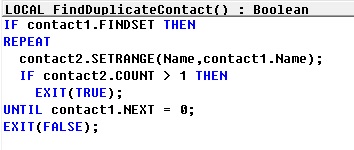
Until Dynamics NAV 2013, the only possibility was to iterate through the table in a loop and then create a sub-loop where another instance of the same table is filtered to check for duplicates.

For example, to check for duplicate names in the Contact table, the code would look like this:

Duplicate.-1

Dynamics NAV 2013 onwards, we can use queries to create a more efficient implementation of the same logic.

 The solution involves that you create a query to return duplicates, and then invoke it from a method that would test the value of the query to identify if duplicates were found.

Step 1 – Creating the Query

  • The query must be created with the table we want to search in as the dataitem.
  • The field we want to search for must be created as a grouped field.
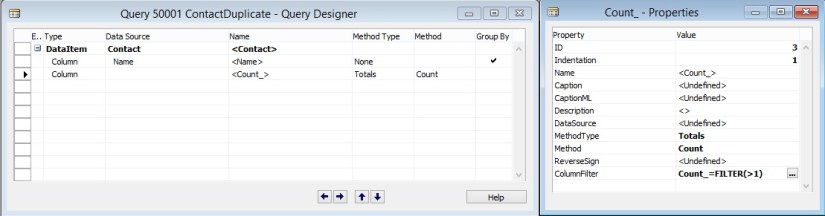
  • Create a totaling field on the count, and add a filter for Count > 1. This ensures that only records with more than one instance of the field that we selected in the previous step are included in the query result.
  • Continuing with our Contact Name example, here is how the query would look:

Duplicate.-2

Step 2 – Invoking the Query to Check for Duplicates

Now that the query is created, all we need to do is to invoke the query and check if any records are returned, which would mean that there are duplicates.

Here is an alternate implementation of the FindDuplicateContact method using the query that we created:

Duplicate.-3


Corfu Navision 2016, Development Tips, How To, Information

Using Argument Tables in Navision

When creating functions we sometimes need a lot of parameters to give the information we require. Number of arguments/parameters to function have limits.

Sometimes these parameters are optional, only required in some scenarios.

This makes calling them quite hard. The code becomes hard to read & understand, and sometimes spread across multiple lines.

When changing the signature of any std. function or already implemented functionality which is highly used over the system in several objects you might end up changing an endless chain of objects.

Imaging adding a field to such function, or change a datatype. The amount of code affected is pretty big and if you need to parameter only for one specific case you end up changing a lot of code for no purpose. Does this make sense?

These challenges can be solved by grouping commonly used arguments in a single table and use that table as the parameter of a function.

So the solution is to create a single table that holds the contract for the function.

When we add new fields to the table, we effectively do not change the signature of the function hence this acts as overloading allowing optional parameters to change the behavior of the code.

You can find usage of such Argument Tables in below objects:

Type      ID            Name

1              9500       Email Item

5              260         Document-Mailing

5              9520       Mail Management

Table is created to hold Parameter Values which will be passed to the function.

ArgumentTables-1

This Function in Table Pass the record as a parameter to the function, basically this is passing 10 Parameters using single record as a Parameter to the Function.

ArgumentTables-2

In Codeunit Document-Mailing below function, This is the extra work which you will be required to perform, if you miss this part you may not get errors at compile time but all the 10 Parameters will be passed as blank. This may be counted as side-effect of using such concept.

ArgumentTables-3

In Codeunit Mail Management below function, This Pass the record as a parameter to the function, basically this is passing 10 Parameters using single record as a Parameter to the Function.

ArgumentTables-4

In Codeunit Mail Management below function, This receives the record as a parameter to the function, basically this is receiving 10 Parameters using single record as a Parameter to the Function.

ArgumentTables-5

Best part is Argument tables can be outside of a customer’s license file since we never insert data in the SQL Server database.

For more details you can see this Link. https://community.dynamics.com/nav/w/designpatterns/245.argument-table


Corfu Navision 2016, Data, Functional Tips, How To, Information, Tip & Tricks

Cost Components

Cost components are different types of costs that make up the value of an inventory increase or decrease.

The below table shows the different cost components and any subordinate cost components that they consist of.

Cost component Subordinate cost component Description
Direct cost Unit cost (direct purchase price) Cost that can be traced to a cost object.
Freight cost (item charge)
Insurance cost (item charge)
Indirect cost Cost that cannot be traced to a cost object.
Variance Purchase variance The difference between actual and standard costs, which is only posted for items using the Standard costing method.
Material variance
Capacity variance
Subcontracted variance
Capacity overhead variance
Manufacturing overhead variance
Revaluation A depreciation or appreciation of the current inventory value.
Rounding Residuals caused by the way in which valuation of inventory decreases are calculated.

Freight and insurance costs are item charges that can be added to an item’s cost at any time. When you run the Adjust Cost – Item Entries batch job, the value of any related inventory decreases are updated accordingly.

Corfu Navision 2016, Functional Tips, How To, Tip & Tricks

Inventory Valuation

Inventory valuation is the determination of the cost that is assigned to an inventory item, as expressed by the following equation.

Ending inventory = beginning inventory + net purchasescost of goods sold

The calculation of inventory valuation uses the Cost Amount (Actual) field of the value entries for the item.

The entries are classified according to the entry type that corresponds to the cost components, direct cost, indirect cost, variance, revaluation, and rounding.

Entries are applied against each other, either by the fixed application, or according to the general cost-flow assumption defined by the costing method.

One entry of inventory decrease can be applied to more than one increase entry with different posting dates and possibly different acquisition costs.

Therefore, calculation of the inventory value for a given date is based on summing up positive and negative value entries.

Inventory Valuation report

To calculate the inventory value in the Inventory Valuation report, the report begins by calculating the value of the item’s inventory at a given starting date.

It then adds the value of inventory increases and subtracts the value of inventory decreases up to a given ending date.

The end result is the inventory value on the ending date.

The report calculates these values by summing the values in the Cost Amount (Actual) field in the value entries, using the posting dates as filters.

The printed report always shows actual amounts, that is, the cost of entries that have been posted as invoiced.

The report will also print the expected cost of entries that have posted as received or shipped, if you select the Include Expected Cost field on the Options FastTab.

Values in the Inventory Valuation report is reconciled with the Inventory account in the general ledger, meaning the value entries in question have been posted to the general ledger.

Amounts in the Value columns of the report are based on the posting date of transactions for an item.


Inventory Valuation – WIP report

A manufacturing company needs to determine the value of three types of inventory:

  • Raw Materials inventory
  • WIP inventory
  • Finished Goods inventory

The value of WIP inventory is determined by the following equation.

Ending WIP inventory = Beginning WIP inventory + manufacturing costscost of goods manufactured

As for purchased inventory, the value entries provide the basis of the inventory valuation. The calculation is made using the values in the Cost Amount (Actual) field of the item and capacity value entries associated with a production order.

The purpose of WIP inventory valuation is to determine the value of the items whose manufacturing has not yet been completed on a given date.

Therefore the WIP inventory value is based on the value entries related to the consumption and capacity ledger entries.

Consumption ledger entries must be completely invoiced at the date of the valuation.

Therefore, the Inventory Valuation – WIP report shows the costs representing the WIP inventory value in two categories: consumption and capacity.



Corfu Navision 2016, Data, Development Tips, Functional Tips, How To, Information, Tip & Tricks

Accounts in the General Ledger

To reconcile inventory and capacity ledger entries with the general ledger, the related value entries are posted to different accounts in the general ledger.

From the Inventory Ledger

The below table shows the relationship between different types of inventory value entries and the accounts and balancing accounts in the general ledger.

Value entry General ledger accounts
Item ledger entry type Value entry type Variance type Expected cost Account Balancing account
Purchase Direct Cost Yes Inventory (Interim) Invt. Accrual Acc. (Interim)
Direct Cost No Inventory Direct Cost Applied
Indirect Cost No Inventory Overhead Applied
Variance Purchase No Inventory Purchase Variance
Revaluation No Inventory Inventory Adjmt.
Rounding No Inventory Inventory Adjmt.
Sale Direct Cost Yes Inventory (Interim) COGS (Interim)
Direct Cost No Inventory COGS
Revaluation No Inventory Inventory Adjmt.
Rounding No Inventory Inventory Adjmt.
Positive Adjmt.,Negative Adjmt., Transfer Direct Cost No Inventory Inventory Adjmt.
Revaluation No Inventory Inventory Adjmt.
Rounding No Inventory Inventory Adjmt.
(Production) Consumption Direct Cost No Inventory WIP
Revaluation No Inventory Inventory Adjmt.
Rounding No Inventory Inventory Adjmt.
Assembly Consumption Direct Cost No Inventory Inventory Adjmt.
Direct Cost No Direct Cost Applied Inventory Adjmt.
Indirect Cost No Overhead Applied Inventory Adjmt.
(Production) Output Direct Cost Yes Inventory (Interim) WIP
Direct Cost No Inventory WIP
Indirect Cost No Inventory Overhead Applied
Variance Material No Inventory Material Variance
Variance Capacity No Inventory Capacity Variance
Variance Subcontracted No Inventory Subcontracted Variance
Variance Capacity Overhead No Inventory Cap. Overhead Variance
Variance Manufacturing Overhead No Inventory Mfg. Overhead Variance
Revaluation No Inventory Inventory Adjmt.
Rounding No Inventory Inventory Adjmt.
Assembly Output Direct Cost No Inventory Inventory Adjmt.
Revaluation No Inventory Inventory Adjmt.
Indirect Cost No Inventory Overhead Applied
Variance Material No Inventory Material Variance
Variance Capacity No Inventory Capacity Variance
Variance Capacity Overhead No Inventory Cap. Overhead Variance
Variance Manufacturing Overhead No Inventory Mfg. Overhead Variance
Rounding No Inventory Inventory Adjmt.

From the Capacity Ledger

The below table shows the relationship between different types of capacity value entries and the accounts and balancing accounts in the general ledger. Capacity ledger entries represent labor time consumed in assembly or production work.

Value entry General ledger accounts
Work type Capacity ledger entry type Value entry type Account Balancing account
Assembly Resource Direct Cost Direct Cost Applied Inventory Adjmt.
Assembly Resource Indirect Cost Overhead Applied Inventory Adjmt.
Production Machine Center/Work Center Direct Cost WIP Account Direct Cost Applied
Production Machine Center/Work Center Indirect Cost WIP Account Overhead Applied

Assembly Costs are Always Actual

As shown in the table above, assembly postings are not represented in interim accounts. This is because the concept of work in process (WIP) does not apply in assembly output posting, unlike in production output posting. Assembly costs are only posted as actual cost, never as expected cost.

Calculating the Amount to Post to the General Ledger

The following fields in the Value Entry table are used to calculate the expected cost amount that is posted to the general ledger:

  • Cost Amount (Actual)
  • Cost Posted to G/L
  • Cost Amount (Expected)
  • Expected Cost Posted to G/L

The following table shows how the amounts to post to the general ledger are calculated for the two different cost types.

Cost type Calculation
Actual Cost Cost Amount (Actual) Cost Posted to G/L
Expected Cost Cost Amount (Expected) Expected Cost Posted to G/L


Corfu Navision 2016, Development Tips, How To, Tip & Tricks

Zip/Un-Zip files using 7Zip

Dear friends today I am sharing functionality created in Navision which can be used to zip or Un-Zip files. Upon request of one of follower of my blog I decided to discuss on this point.

Here below I present below how we can do the same. The variables, functions and process is self-explanatory.

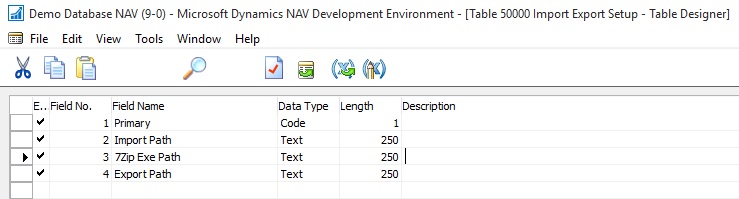
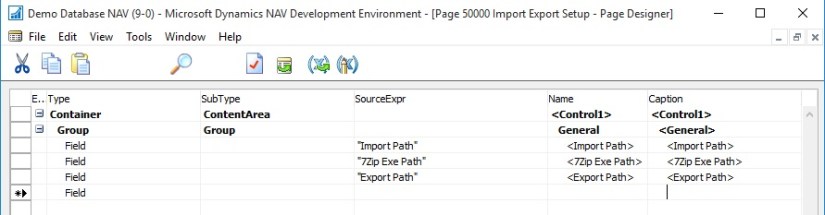
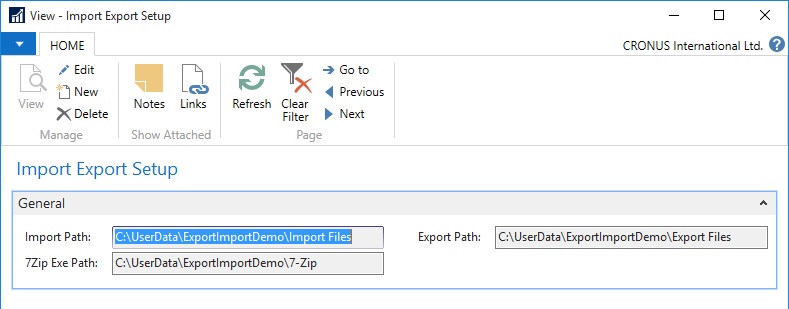
Step 1: Let us create a Setup Table and Page

Zip-UnZip-1

Zip-UnZip-2

Zip-UnZip-3

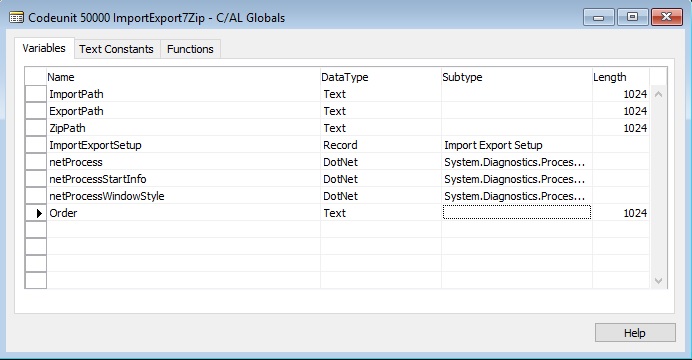
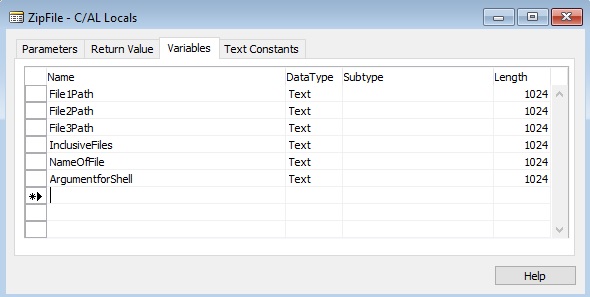
Step 2: Let us define variables

Zip-UnZip-4

Name                                                    DataType             Subtype                    Length

netProcess                                         DotNet                 System.Diagnostics.Process.’System, Version=4.0.0.0, Culture=neutral, PublicKeyToken=b77a5c561934e089′

netProcessStartInfo                       DotNet System.Diagnostics.ProcessStartInfo.’System, Version=4.0.0.0, Culture=neutral, PublicKeyToken=b77a5c561934e089′

netProcessWindowStyle              DotNet System.Diagnostics.ProcessWindowStyle.’System, Version=4.0.0.0, Culture=neutral, PublicKeyToken=b77a5c561934e089′

ImportPath                                         Text                                                        1024

ExportPath                                         Text                                                         1024

ZipPath                                                 Text                                                        1024

ImportExportSetup                         Record                  Import Export Setup

Order                                                    Text                                                          1024 

Step 3: Let us create a Function to Get Information of Path from Setup:

Zip-UnZip-5

This function is to initialize all the required variables which will be used in other functions.

It takes value from the Setup created above to store path of required folders. 

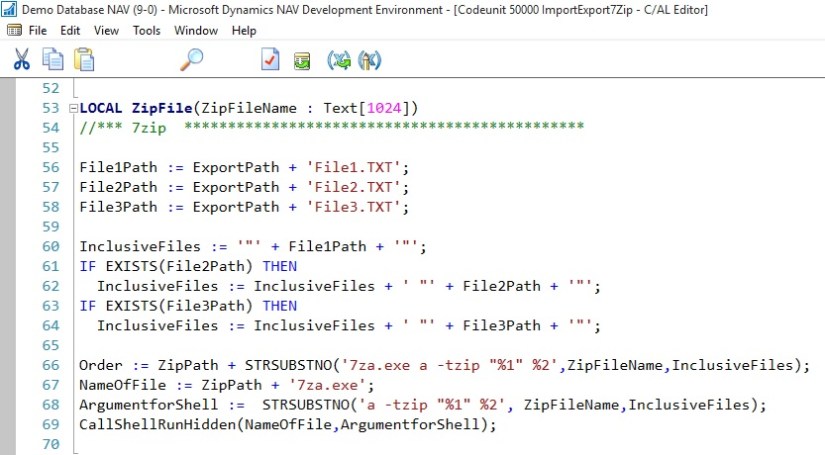
Step 4: Let us create a Function for running Shell Command for 7zip Files:

Zip-UnZip-6

This function runs the shell script in background to Zip or Un-Zip files in specified folder.

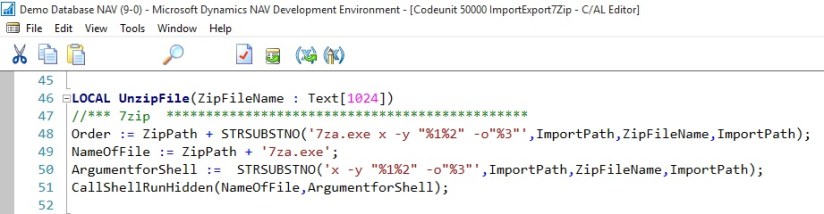
Step 5: Let us create a Function to call UnZip file after preparing the Parameters for Command

Zip-UnZip-7

This function prepares the path, Name of File and Argument for the Shell and finally calls the Shell function to run the command in background. At the end of function you will get UnZiped files from the Zip file.

Step 6: Let us create a Function to call Zip file after preparing the Parameters for Command

Zip-UnZip-8

Zip-UnZip-9

This function prepares the path, Name of File and Argument for the Shell and finally calls the Shell function to run the command in background. At the end of function you will get Ziped file which contains the file specified in InclusiveFiles.

This way you can use above functions to Zip / Un-Zip files using 7Zip.


Corfu Navision 2016, Functional Tips

Unit Cost Field, Item Table

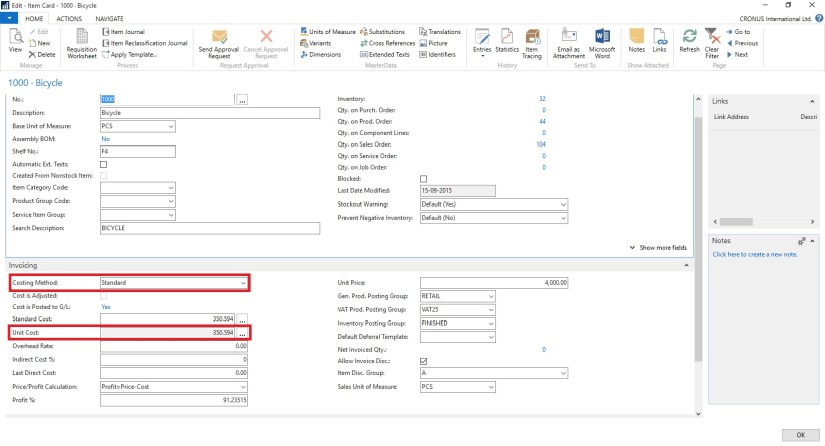
Contains the cost per unit of the item.

UnitCost-1

Depending on what you selected in the Costing Method field, the Unit Cost field is filled as follows:

  • If the costing method is Standard, then the field is grayed and non-editable.
  • If the costing method is FIFO, LIFO, Specific, or Average, then the unit cost is calculated as follows: Unit cost = inventory value of items on hand (expected cost + invoiced cost) / quantity on hand

If the costing method is FIFO, LIFO, Specific, or Average, then the Unit Cost field is updated in the following cases:

  • When the item is cost-adjusted, automatically or by the Adjust Cost – Item Entries batch job.
  • During the posting of purchase invoices, output, or positive adjustment if one of the following conditions is true:
    • The net invoiced quantity of the item changes from negative or zero to positive.
    • The current unit cost is zero.

If one of these conditions is true, then the Unit Cost field is updated with the value in the Last Direct Cost field on the item card.

Note The Unit Cost field is not updated if the current unit cost is higher than zero and the new unit cost is zero. A unit cost of zero is considered an exception from regular business. Therefore, the current unit cost is retained to provide the last known, relevant value. This exception applies even if the existing inventory has been revalued to zero.

If the item uses the costing method Average, then you can choose the field to open the Average Cost Calc. Overview window, which shows all the source value entries that are used to calculate the average cost, grouped and summarized by average cost period.


Error

Windows Error Reporting and Collecting Crash Dumps

For troubleshooting issues with Microsoft products in general, you can use Windows Error Reporting to report computer problems to Microsoft. Microsoft uses the problem reports to try to match descriptions of each problem to a solution. This feature is enabled by default, and generates detailed reports about the problem.

To troubleshoot application instability issues, we will often need crash dumps in addition. For Microsoft Dynamics NAV, a full crash dump might be required to provide sufficient details to isolate and fix the problem. Once crash dump is collected, contact support and provide the dump. There are number of ways and tools to collect a crash dump, but we’ll look at how to automate this action in a very simple way.

For more details see:- Here


Uncategorized

LS Retail Unveils Cloud-Based Management Solution for Fashion Retailers

LS Fashion Express is a more compact, cloud-based version of successful management software LS Nav, built on Microsoft Dynamics NAV. It includes everything fashion retailers need to run their business – from financials down to the Point of Sale.

See more at:
http://pointofsale.com/PointofSale.com-Blog/LS-Retail-Unveils-Cloud-Based-Management-Solution-for-Fashion-Retailers.html