Backup, Corfu Navision 2016, How To, Information, Job, Schedule, SQL, Tip & Tricks

Schedule SQL Job for SQL Database Backup


Today we will see how we can schedule to take daily backup of our database.

Before i start explaining the step i am confirming the version of SQL based on which i am writing this post.

Process will remain same may be screen bit different in different versions of SQL.
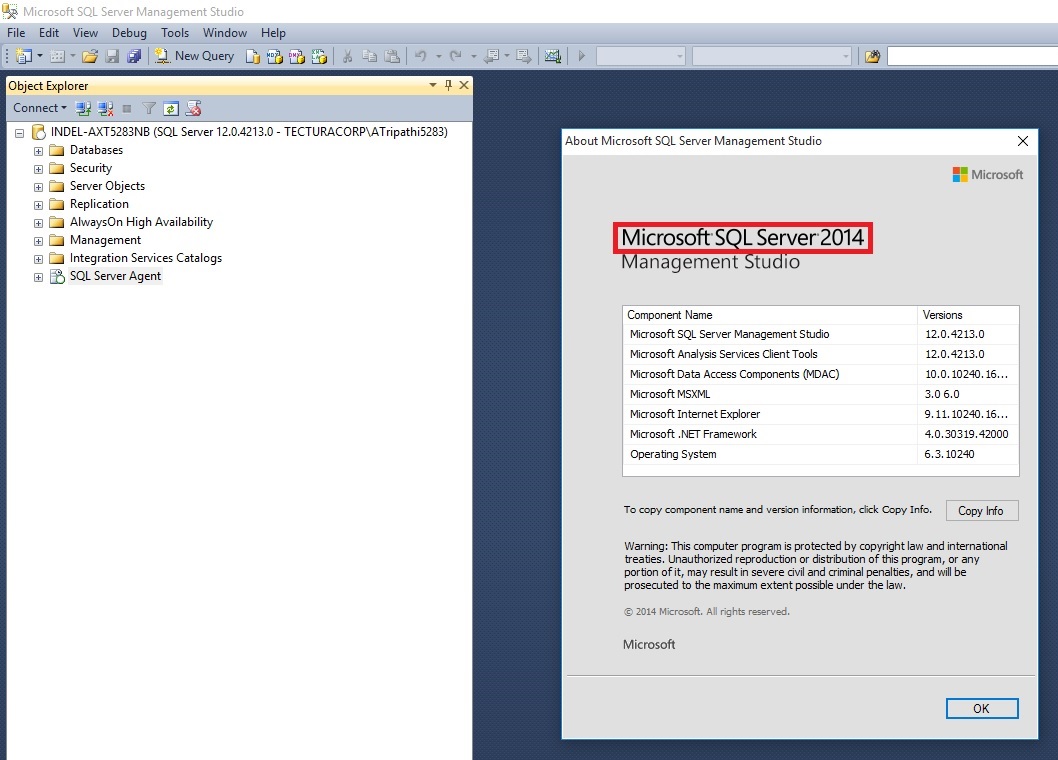
SCheduleJob-1

At first we will ensure that SQL Server Agent is running, in case it is not right click and Start it.
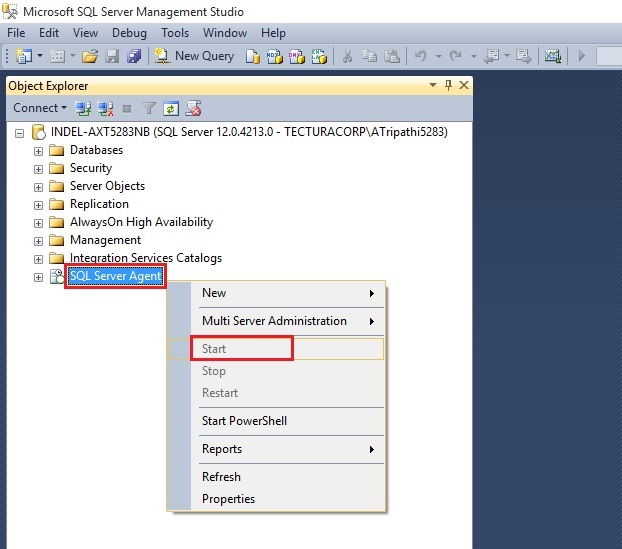
SCheduleJob-1

Expand the SQL Server Agent Folder, Select Jobs, Right click and select New Job.
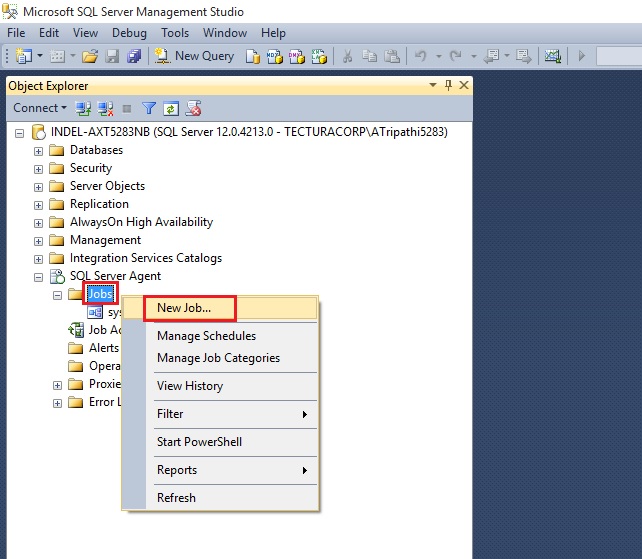
SCheduleJob-1

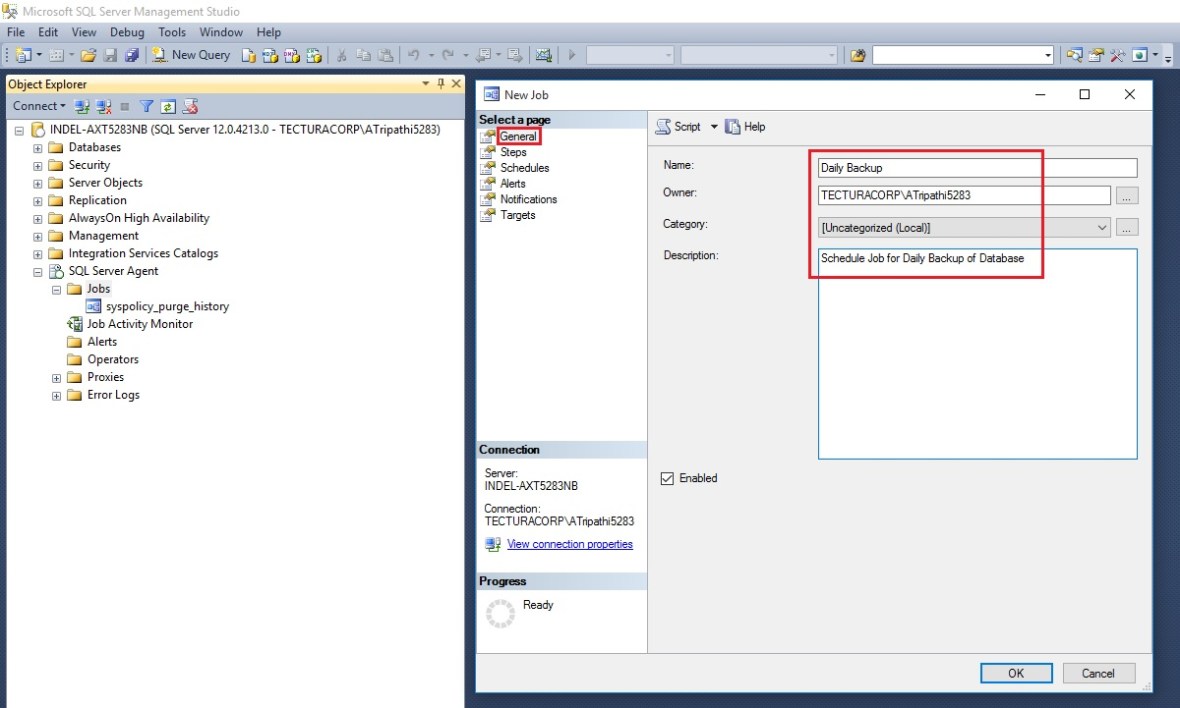
Provide Name & Description to your New Job.
SCheduleJob-1

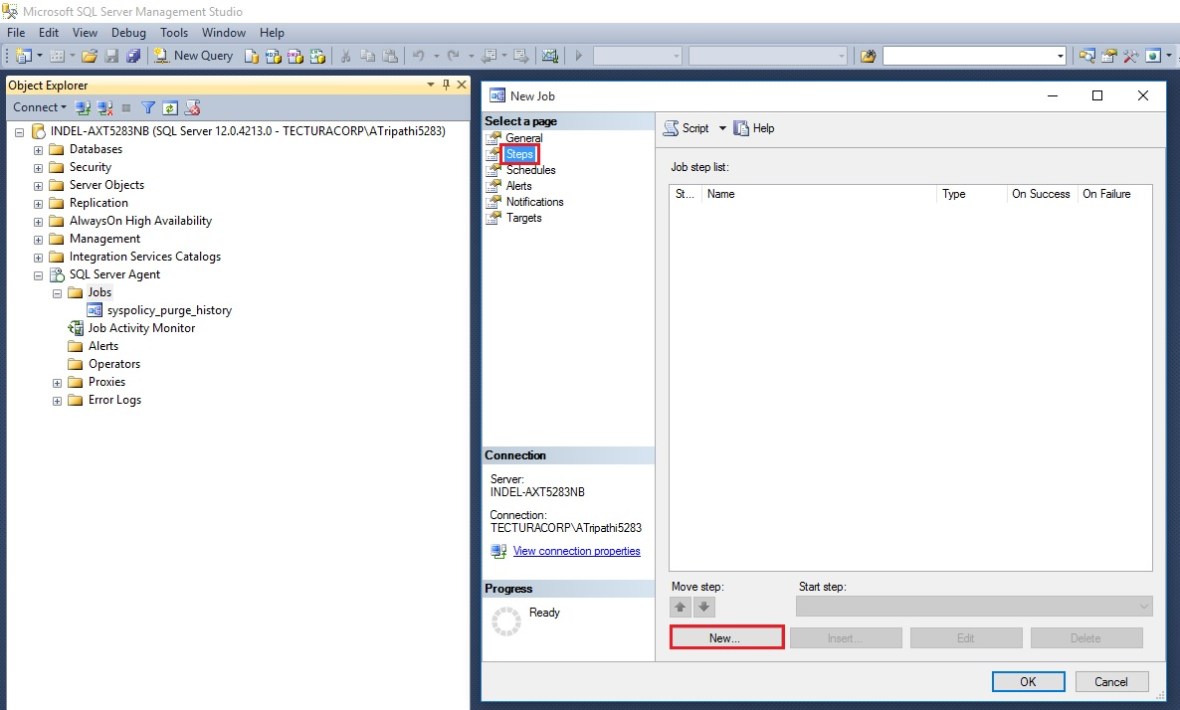
Select Page Steps & New from Bottom of the page to define Step for your Job.
SCheduleJob-1

Give name to the Step.

Select Type as Transact Script (T-SQL).

Select Database Name in my case i am selecting Demo Database NAV (9-0)

Write the Script as shown below:
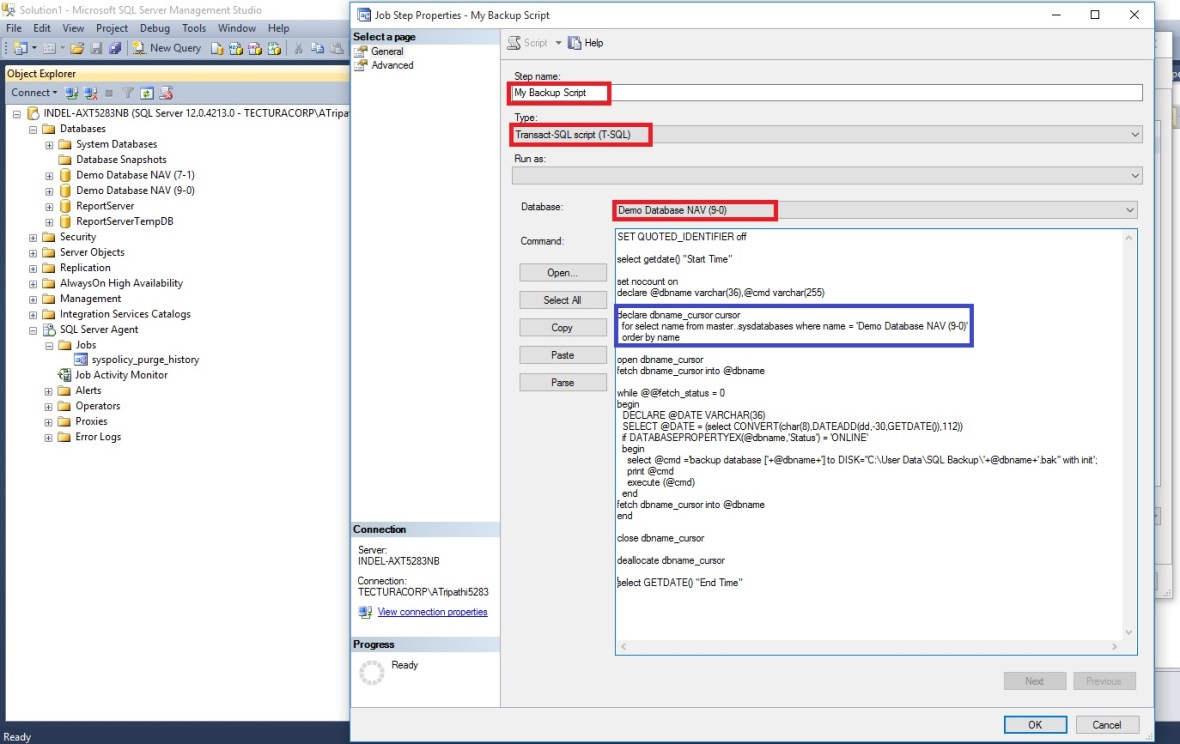
SCheduleJob-1

Here is the Script for your ready reference:

{– Script Start

SET QUOTED_IDENTIFIER off

select getdate() “Start Time”

set nocount on
declare @dbname varchar(36),@cmd varchar(255)

declare dbname_cursor cursor
for select name from master..sysdatabases where name = ‘Demo Database NAV (9-0)’
order by name

open dbname_cursor
fetch dbname_cursor into @dbname

while @@fetch_status = 0
begin
DECLARE @DATE VARCHAR(36)
SELECT @DATE = (select CONVERT(char(8),DATEADD(dd,-30,GETDATE()),112))
if DATABASEPROPERTYEX(@dbname,’Status’) = ‘ONLINE’
begin
select @cmd =’backup database [‘+@dbname+’] to DISK=”C:\User Data\SQL Backup\’+@dbname+’.bak” with init’;
print @cmd
execute (@cmd)
end
fetch dbname_cursor into @dbname
end

close dbname_cursor

deallocate dbname_cursor

select GETDATE() “End Time”

–Script End}

Although above script is for multipurpose like if you want to backup all database on your SQL Server, you can make small tweaking and you are done.

If you would like to backup all the databases on a particular SQL Server, then make the following changes to the code above.

Replace following line of code:

for select name from master..sysdatabases where name = ‘Demo Database NAV (9-0)’

with the following line of code:

for select name from master..sysdatabases where name != ‘tempdb’

This will create a backup file for each database on the server, except for the temp database.

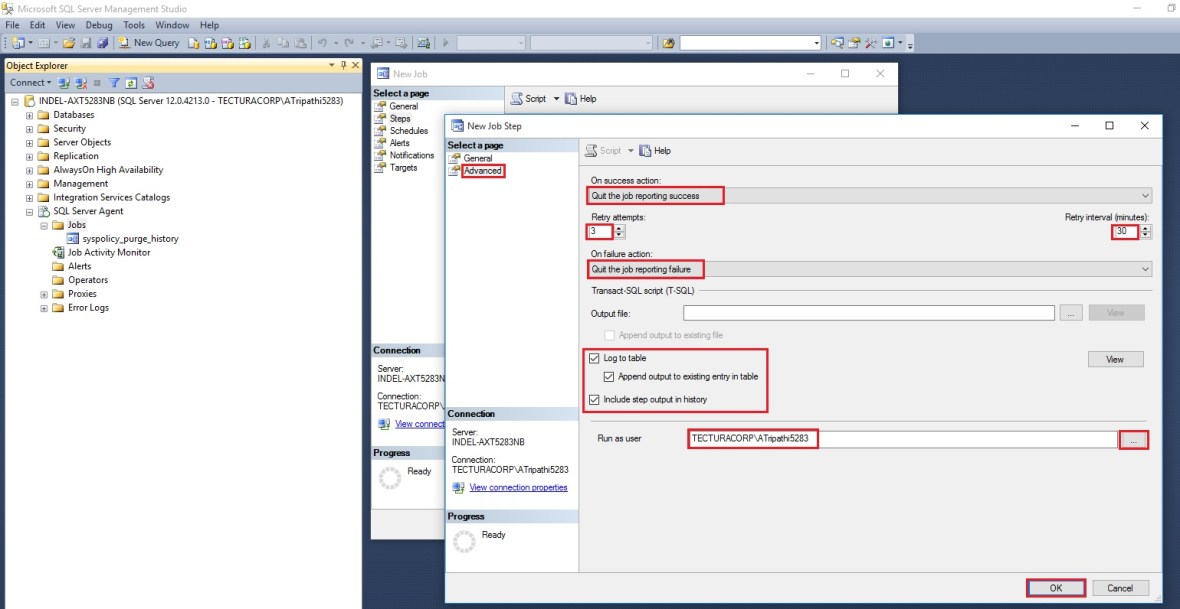
Next : Switch to Advanced Page.

Define other parameters as shown in below screen as per your requirement.
SCheduleJob-1

On Selecting OK, you will return to Job window.
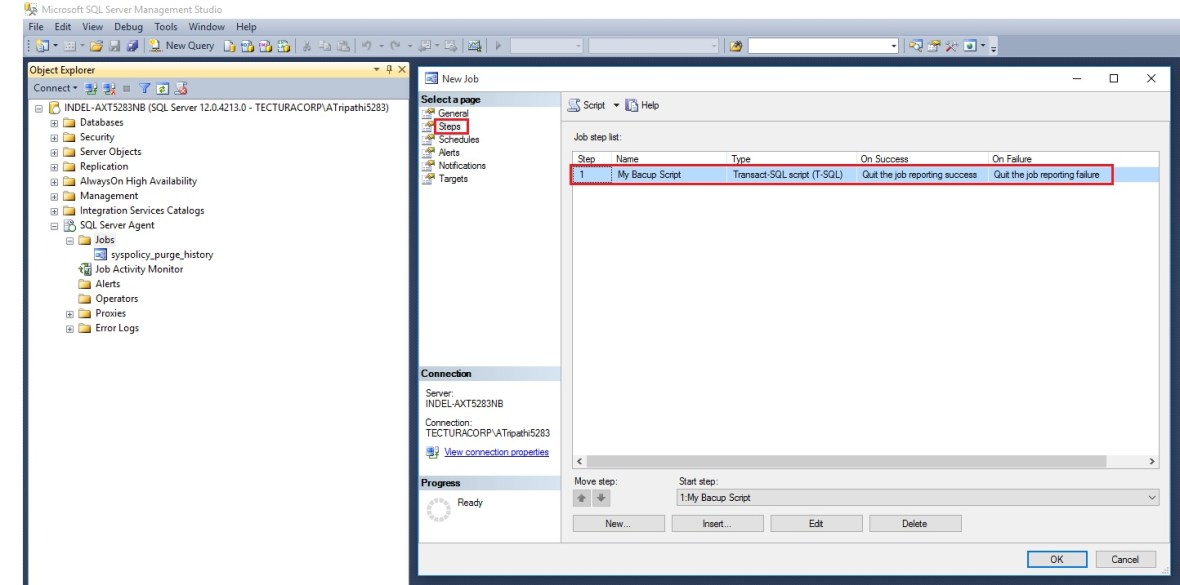
SCheduleJob-1

Select Schedule Page:

Define your Schedule as per your requirement.
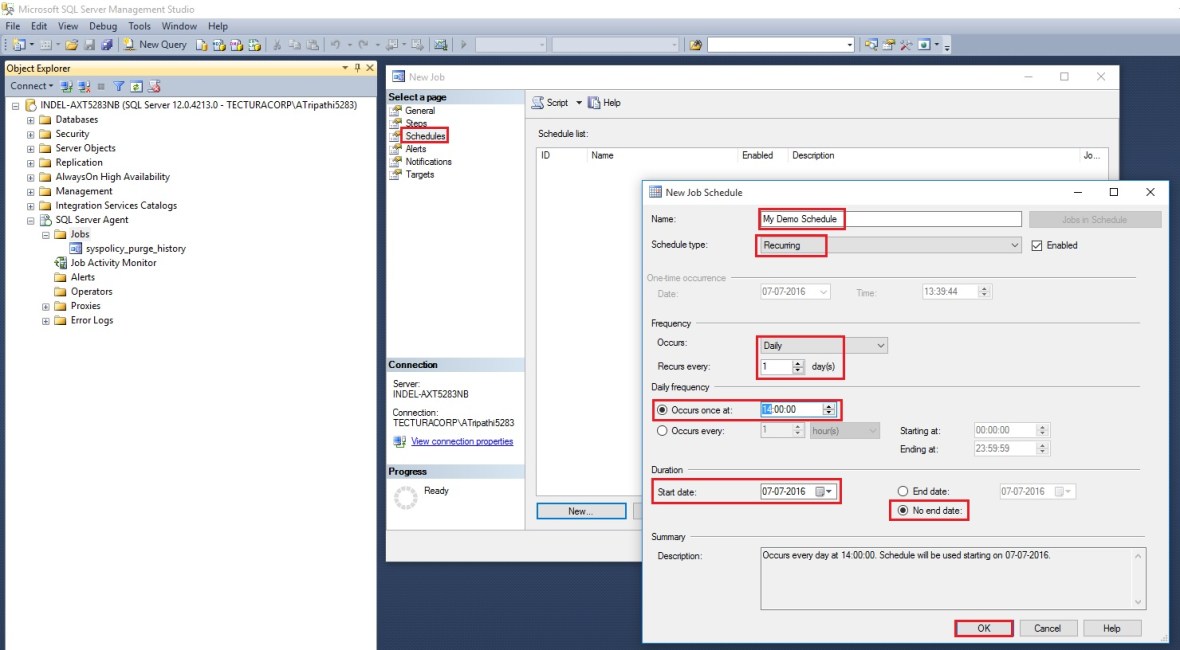
SCheduleJob-1

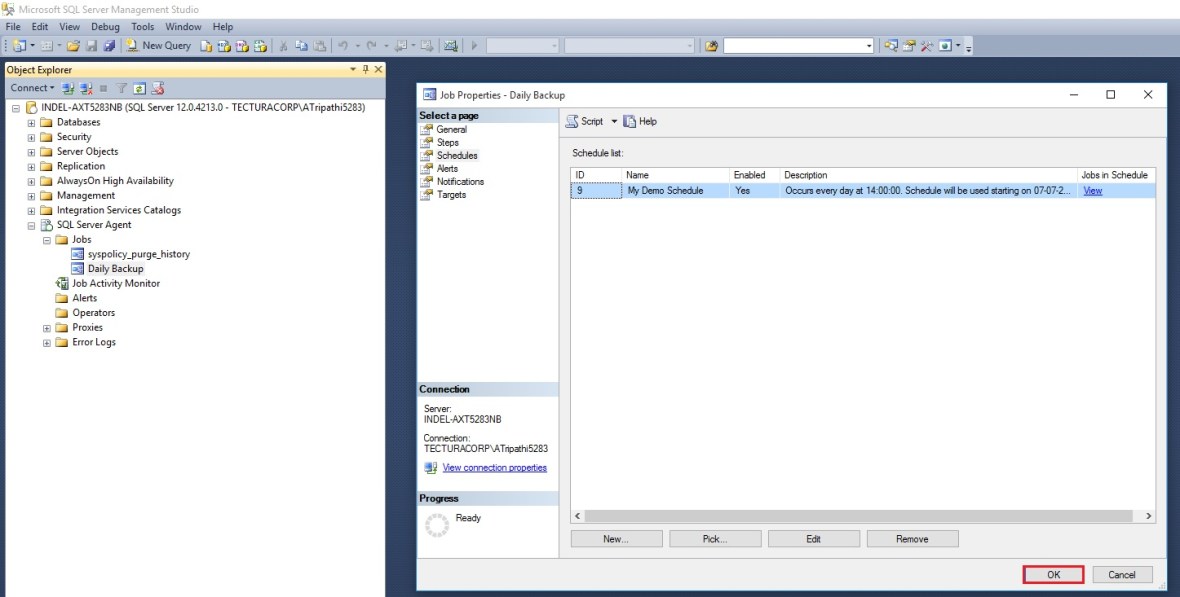
Select OK to return to Job Page.

SCheduleJob-1

Select OK to close and save the JOB.

Now our Job is  created and scheduled.

You can see defined Jobs and its Status using Job Activity Monitor.

Before Job is executed
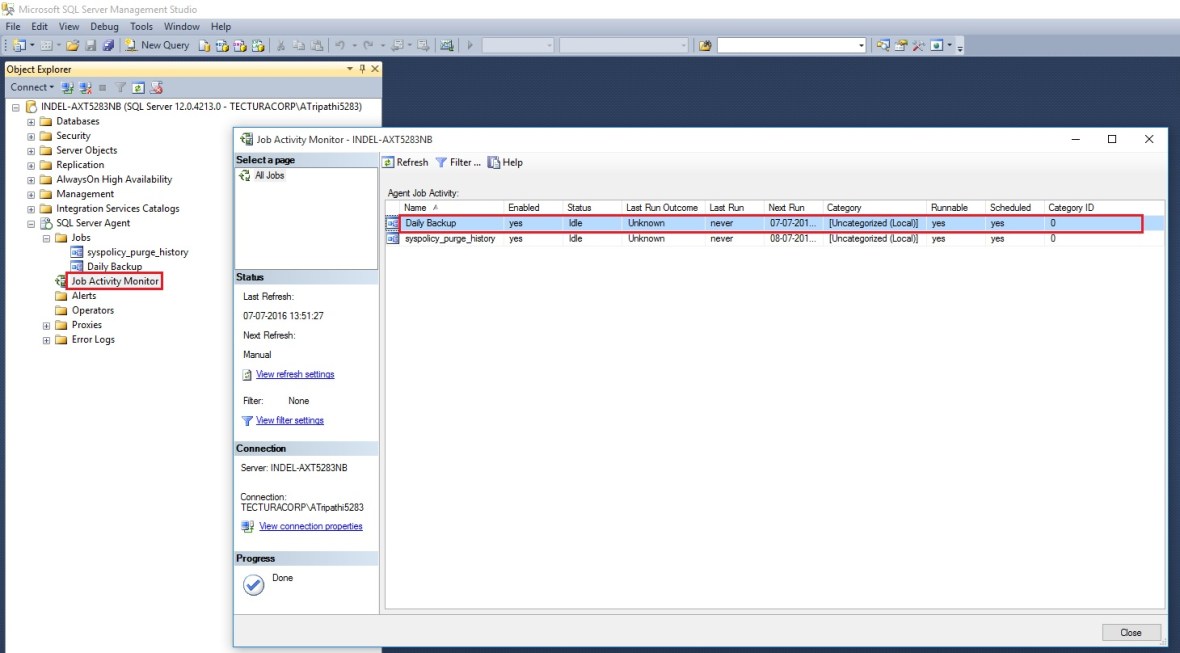
SCheduleJob-1

After executed you can see the Status as.
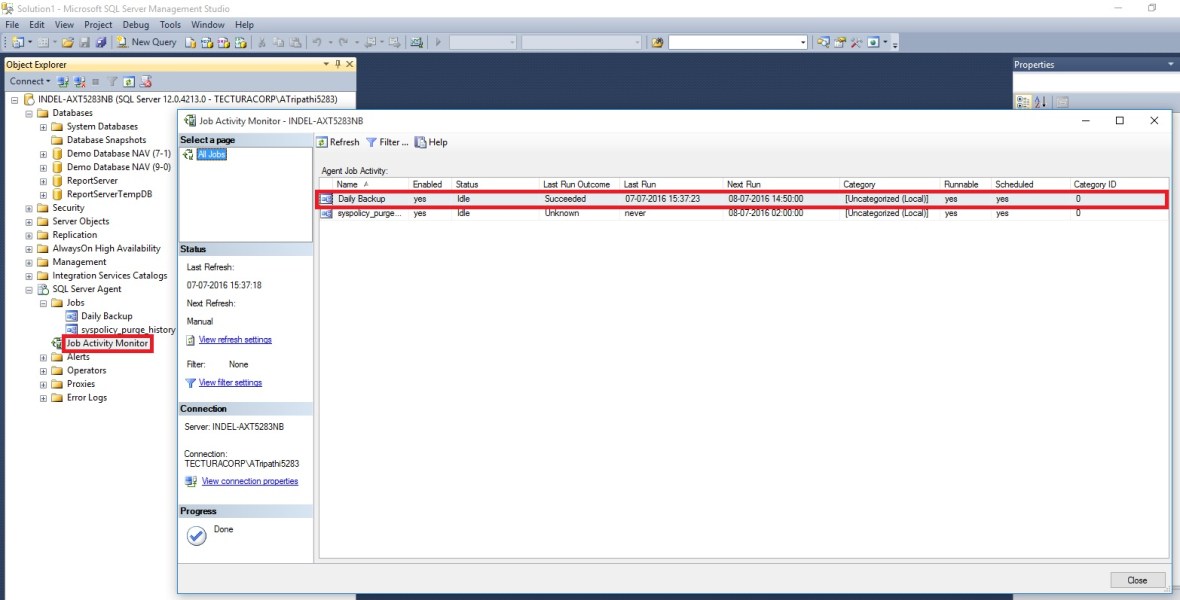
SCheduleJob-1

Post execution of Job here is the backup file created at defined path in the Script. Above script will overwrite the file on next execution.

If you want to create new file on every execution you need to modify the script for file name by adding timestamp or any other logic you desire.
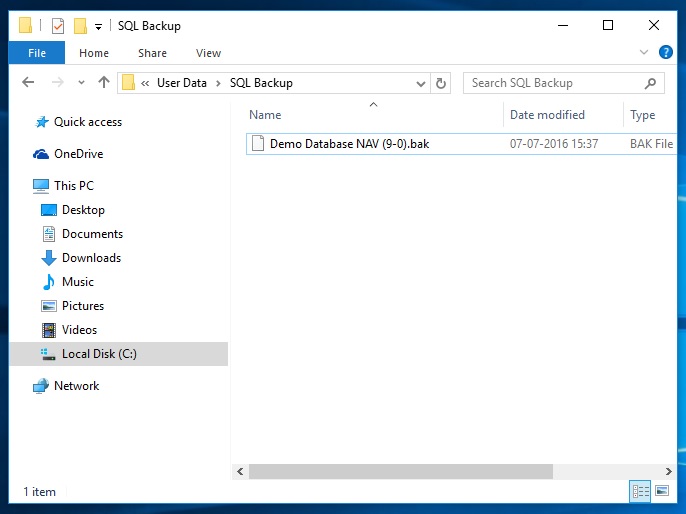
SCheduleJob-1

I will come up with more information in my upcomming posts.

thats all for this post.


Dynamics 365, Information

Insights from the Engineering Leaders behind Microsoft Dynamics 365 and Microsoft AppSource detailed information 

Microsoft Dynamics 365 is the next generation of business apps in the cloud. These apps bring together the full power of Microsoft across productivity, advanced analytics, Power BI and IoT, with the strength of Azure and a new application platform and common data model. As such, the new name reflects the significance of the offering and the coming together of the two worlds structured business processes and unstructured personal productivity so our business customers can achieve more.
Microsoft Dynamics 365 is a cloud service so it will not be available, as is, on premises or in private clouds.

Microsoft Dynamics 365 will bring together the best of our CRM and ERP cloud offerings into one cloud service with specific, purpose built, apps for each of your key business processes – like Finance, Sales, Customer Service, etc.

Dynamics 365 apps will also provide you with a modern and familiar experience with built in insights, intelligence and workflow. To ensure interoperability and extensibility they also use a common data model and consistent application platform.

To know more about Dynamics 365 see this link :-

https://community.dynamics.com/b/msftdynamicsblog/archive/2016/07/06/insights-from-the-engineering-leaders-behind-microsoft-dynamics-365-and-microsoft-appsource

Dynamics 365, Information

Dynamics 365 – primary information 

Read this blog from Microsoft for more details. 

Turning business process into business advantage for organizations everywhere

https://blogs.microsoft.com/blog/2016/07/06/turning-business-process-into-business-advantage-for-organizations-everywhere/#sm.000uq7ph617pheoosdl13azz02719

Corfu Navision 2016, Cumulative Updates, Updates

Cumulative Update 9 for Microsoft Dynamics NAV 2016 – released in July 2016

Cumulative Update 9 includes all application and platform hotfixes and regulatory features that have been released for Microsoft Dynamics NAV 2016.

Where to find Cumulative Update 9

You can download the cumulative update from KB 3172549 – Cumulative Update 9 for Microsoft Dynamics NAV 2016 (Build 46290).

Warning

Before you install a cumulative update in a production environment, take the following precautions:

  1. Test the cumulative update in a non-production environment.
  2. Make a backup of the system or computer where the cumulative update is to be installed.

Additional Information

For information about how to install the cumulative update, see How to Install a Microsoft Dynamics NAV 2016 Cumulative Update.
Note that if you upgrade to this cumulative update from a version older than Microsoft Dynamics NAV 2016 Cumulative Update 6, you must run the development environment with elevated rights (run as administrator).

For a list of all cumulative updates for this version, see Released Cumulative Updates for Microsoft Dynamics NAV 2016.

For more details see Link :https://blogs.msdn.microsoft.com/nav/2016/07/05/cumulative-update-9-for-microsoft-dynamics-nav-2016-has-been-released/

Cumulative Updates, Updates

Cumulative Update 21 for Microsoft Dynamics NAV 2015 – released in July 2016

Cumulative Update 21 includes all application and platform hotfixes and regulatory features that have been released for Microsoft Dynamics NAV 2015.

Note: You must convert the database if you are upgrading to this cumulative update from a cumulative update earlier than Cumulative Update 9 (build 41779). For more information, see Converting a Database in Help for Microsoft Dynamics NAV.

Where to find Cumulative Update 21

You can download the cumulative update from KB 3172546 – Cumulative Update 21 for Microsoft Dynamics NAV 2015 (Build 46293).

Warning

Before you install a cumulative update in a production environment, take the following precautions:

  1. Test the cumulative update in a non-production environment.
  2. Make a backup of the system or computer where the cumulative update is to be installed.

Additional Information

For information about how to install the cumulative update, see How to Install a Microsoft Dynamics NAV 2015 Cumulative Update.

For information about how to work around a recent process change, see How to Get Back the ‘Hotfix Directories’ from NAV 2015 Cumulative Update 1.

For a list of all cumulative updates for this version, see Released Cumulative Updates for Microsoft Dynamics NAV 2015.

For more details See this Link : https://blogs.msdn.microsoft.com/nav/2016/07/05/cumulative-update-21-for-microsoft-dynamics-nav-2015-has-been-released/

Cumulative Updates, Updates

Cumulative Update 33 for Microsoft Dynamics NAV 2013 R2 – released in July 2016

Cumulative Update 33 includes all application and platform hotfixes and regulatory features that have been released for Microsoft Dynamics NAV 2013 R2.

Note: Implementing this cumulative update will require a database upgrade.

Where to find Cumulative Update 33

You can download the cumulative update from KB 3172538 – Cumulative Update 33 for Microsoft Dynamics NAV 2013 R2 (Build 46296).

Warning

Before you install a cumulative update in a production environment, take the following precautions:

  1. Test the cumulative update in a non-production environment.
  2. Make a backup of the system or computer where the cumulative update is to be installed.

Additional Information

For more information about cumulative updates for this version, see Announcement of update rollups for Microsoft Dynamics NAV 2013 R2.

For a list of all cumulative updates for this version, see Released Cumulative Updates for Microsoft Dynamics NAV 2013 R2.

For a list of all hotfixes included in cumulative updates for this version, see the following CustomerSource and PartnerSource pages:

CustomerSource:

PartnerSource

See this Link for more details : https://blogs.msdn.microsoft.com/nav/2016/07/05/cumulative-update-33-for-microsoft-dynamics-nav-2013-r2-has-been-released/


Cumulative Updates, Updates

Cumulative Update 40 for Microsoft Dynamics NAV 2013 – released in July 2016

Cumulative Update 40 includes all application and platform hotfixes and regulatory features that have been released for Microsoft Dynamics NAV 2013.

Where to find Cumulative Update 40

You can download the cumulative update from KB 3172331 – Cumulative Update 40 for Microsoft Dynamics NAV 2013 (Build 46292).

Warning

Before you install a cumulative update in a production environment, take the following precautions:

  1. Test the cumulative update in a non-production environment.
  2. Make a backup of the system or computer where the cumulative update is to be installed.

Additional Information

For a list of all cumulative updates for this version, see Released Cumulative Updates for Microsoft Dynamics NAV 2013.

For a list of all hotfixes included in cumulative updates for this version, see the following CustomerSource and PartnerSource pages:

CustomerSource:

PartnerSource:


Please See this link for more details :- https://blogs.msdn.microsoft.com/nav/2016/07/05/cumulative-update-40-for-microsoft-dynamics-nav-2013-has-been-released/


Development Tips, Functional Tips, How To, Information, Jet Reports, Tip & Tricks

Gaining the Competitive Advantage with BI

See how a robust business intelligence solution can help you leverage technology in order to gain new visibility on your business that will enable profitable, data-driven decisions on a daily basis.

Video-1


Video-2

 
Development Tips, Functional Tips, How To, Information, Jet Reports, Tip & Tricks

Finding the Right Business Intelligence Solution for your Company

Get answers to the most commonly asked questions around what to look for in a business intelligence solution and provider, including implementation expectations, important features to look for (that you probably didn’t know you need), and different options for report and dashboard distribution.

Watch Video here :

 
Tip & Tricks

Microsoft Word Document Reports in Dynamics NAV and Project Madeira

In Microsoft Dynamics NAV and Project Madeira, it is possible to use Microsoft Word 2013 or later to modify the report layout to some extent . Customers can edit/modify the report layout in Microsoft word document and this editing experience is WYSIWYG. This feature makes it easy for customers to modify their reports and save them without touching the underlying report objects.

Suvidha Shashikumar's avatarCode. Prompt. Automate. — The Age of AI Agents

In Microsoft Dynamics NAV and Project Madeira, it is possible to use Microsoft Word 2013 or later to modify the report layout to some extent . Customers can edit/modify the report layout in Microsoft word document and this editing experience is WYSIWYG. This feature makes it easy for customers to modify their reports and save them without touching the underlying report objects.

This feature becomes all the more important in Project Madeira! Which is why, I decided to write about this feature. I will be using screenshots from Project Madeira in this blog. However, it matches pretty much with Dynamics NAV as well 🙂

Its important to know that reports in NAV and Madeira can have RDLC layout or Word Layout and some reports have both layouts.

View original post 845 more words