Dynamics 365, Information

Microsoft Dynamics 365 for Customer Service

Areas covered and Features available in Dynamics 365 for Customer Service:

  • Intelligence
    • Analyze with Power BI
    • Azure Machine Learning
    • Customer Insights
    • Data Export Service
    • Relevance Search
  • Mobile
    • Mobile Management Enhancements
    • Mobile Offline Data API
    • Mobile Authenticated Mashups
  • Social
    • No features released
  • Others
    • 3rd party S2S Inbound Authentication
    • Business recommendations
    • Customer backup and restore
    • Document suggestions
    • Dynamics 365 (online) administrator role in Office 365
    • Dynamics 365 App for Outlook
    • Dynamics 365 connector for Flow, Logic Apps, and Power Apps
    • Editable grids
    • Exchange booking integration
    • Modular business apps, app designer, and site map designer
    • Office 365 Groups
    • Partner portal
    • Portal service
    • Relationship Insights
    • Scheduling unification
    • Task-based experiences
    • Visual process designer
Dynamics 365, Information

Microsoft Dynamics 365 for Field Service

Areas covered and Features available in Dynamics 365 for Field Service:

  • Intelligence
    • Azure Machine Learning
    • Data Export Service
    • Relevance Search
  • Mobile
    • Mobile Management Enhancements
    • Mobile Offline Data API
  • Social
    • No features released
  • Others
    • 3rd party S2S Inbound Authentication
    • Connected Field Service
    • Customer backup and restore
    • Document suggestions
    • Dynamics 365 (online) administrator role in Office 365
    • Dynamics 365 connector for Flow, Logic Apps, and Power Apps
    • Editable grids
    • Field Service
    • Modular business apps, app designer, and site map designer
    • Office 365 Groups
    • Portal service
    • Resource scheduling optimization (Field Service)
    • Task-based experiences
    • Visual process designer
Dynamics 365, Information

Microsoft Dynamics 365 for Project Service Automation

Areas covered and Features available in Dynamics 365 for Project Service Automation:

  • Intelligence
    • Azure Machine Learning
    • Data Export Service
    • Relevance Search
  • Mobile
    • Mobile Management Enhancements
    • Mobile Offline Data API
  • Social
    • No features released
  • Others
    • 3rd party S2S Inbound Authentication
    • Customer backup and restore
    • Document suggestions
    • Dynamics 365 (online) administrator role in Office 365
    • Dynamics 365 connector for Flow, Logic Apps, and Power Apps
    • Editable grids
    • Modular business apps, app designer, and site map designer
    • Office 365 Groups
    • Portal service
    • Project Service Automation
    • Task-based experiences
    • Visual process designer


Dynamics 365, Information

Microsoft Dynamics 365 for Operations

Areas covered and Features available in Dynamics 365 for Operations:

  • Financial Management
    •             Accounts payable
    •             Accounts receivable
    •             Budgeting
    •             Cash and bank management
    •             Credit and collections
    •             Expense management
    •             Financial reporting
    •             Fixed assets
    •             General ledger
  • Globalization & Translation
    •             Country/region localizations & languages
    •             Dynamics Translation Service
    •             Localization configurations
  • Human Capital Management
    •             Enhanced analytics for Human Capital Management
    •             New termination rules
    •             New Workflows enabled in Human Resources
    •             Regulatory updates
    •             Talent management
    •             Transitioning employees and contractors
    •             US Payroll
  • Intelligence
    •             Compensation and benefits Power BI reports
    •             Competency and development reports
    •             Create Power BI reports with enumerated fields
    •             Customize application reports using extensions
    •             Human Resources Manager Power BI reports
    •             Personalized product recommendations powered by cognitive services and Microsoft Azure machine learning
    •             Project Management PowerBI reports
    •             Recruiting Power BI reports
    •             Training Power BI reports
  • Manufacturing
    •             Product variant enhancements
  • Mobile
    •             Mobile


  • Project Management Accounting
    •             Funding sources can be selected for fee journal lines
    •             Intercompany revenue and cost transactions
    •             Late selection option for invoice proposals in a batch
    •             Managing estimated costs, revenue, and item requirements
    •             Power BI content pack for Project management and accounting
    •             Project management and accounting improvements
    •             Project resourcing improvements
    •             Vendor prepayments in fixed-price project estimates
  • Retail Commerce
    •             Advanced warehousing in Retail store
    •             Analytics and intelligence
    •             e-Commerce & consumer shopping app
    •             Hybrid cloud – Retail Store
    •             Mobility and modern user experience
    •             Omni-channel
    •             Payments
    •             Retail store
  • Supply Chain Management
    •             Additional warehouse support in manufacturing
    •             Cost accounting
    •             Vendor collaboration
    •             Warehouse enhancements for high volume distribution centers
    •             Warehouse operation enhancements
  • Others
    •             Consignment Inventory
    •             Development and customization
    •             General
    •             Intercompany order processing: ATP and direct shipment
    •             Servicing environments
    •             Web client
Cumulative Updates, Tip & Tricks

Microsoft Dynamics NAV Cumulative Update Released in Nov 2016

Following cumulative updates released this month for Microsoft Dynamics Navision

You can download the cumulative update from links provided below, you will be requiring Customer/Partner Source access to download them.

NAV 2016 :- 

KB 3202888 – Cumulative Update 13 for Microsoft Dynamics NAV 2016 (Build 47256).

For more details see link :- https://community.dynamics.com/nav/b/navteam/archive/2016/11/04/cumulative-update-13-for-microsoft-dynamics-nav-2016-has-been-released

NAV 2015 :- 

KB 3202890  – Cumulative Update 25 for Microsoft Dynamics NAV 2015 (Build 47254).

For more details see link :- https://community.dynamics.com/nav/b/navteam/archive/2016/11/04/cumulative-update-25-for-microsoft-dynamics-nav-2015-has-been-released

NAV 2013 :- 

KB 3202888  – Cumulative Update 44 for Microsoft Dynamics NAV 2013 (Build 47258).

For more details see link :- https://community.dynamics.com/nav/b/navteam/archive/2016/11/04/cumulative-update-44-for-microsoft-dynamics-nav-2013-has-been-released

NAV 2013 R2 :- 

KB 3202886  – Cumulative Update 37 for Microsoft Dynamics NAV 2013 R2 (Build 47259).

For more details see link :- https://community.dynamics.com/nav/b/navteam/archive/2016/11/04/cumulative-update-37-for-microsoft-dynamics-nav-2013-r2-has-been-released

The cumulative update is intended mainly for solutions that are experiencing the problems described in the Knowledge Base article linked to below. However, you are advised to always keep your solution updated with the latest cumulative update.
Warning

Before you install a cumulative update in a production environment, take the following precautions:

1.    Test the cumulative update in a non-production environment.

2.    Make a backup of the system or computer where the cumulative update is to be installed.

Development Tips, Email, How To, Information, Office 365, Office Integration, Smtp, Tip & Tricks

Multiple Line Mail Body Formatting without using Mail Templates

I came across one requirement from one of my customer, so I decided to share the solution with you all.

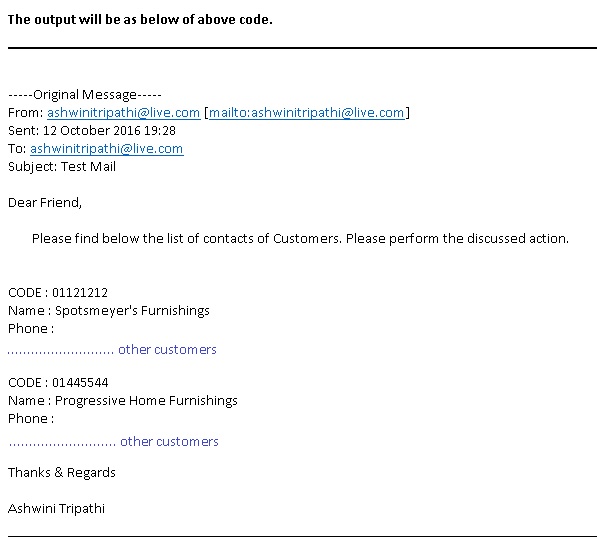
In today’s post we will see how we can create multi line mail body for SMTP mail.

Lets start with the solution rather than talking of logic.

Step-1: Create a codeunit for the function or decide where you wish to add this function

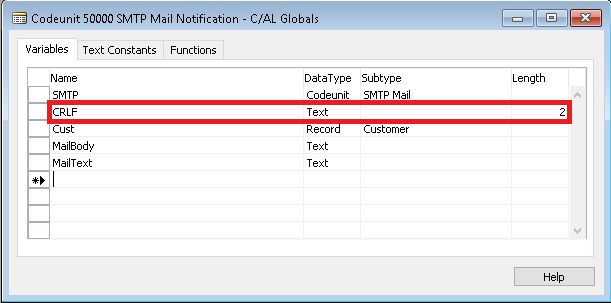
Step-2: Define Variables

1

you may notice that Variable CRLF is defined as Text with Size 2.

Define all other variables that you may require as per your logic.

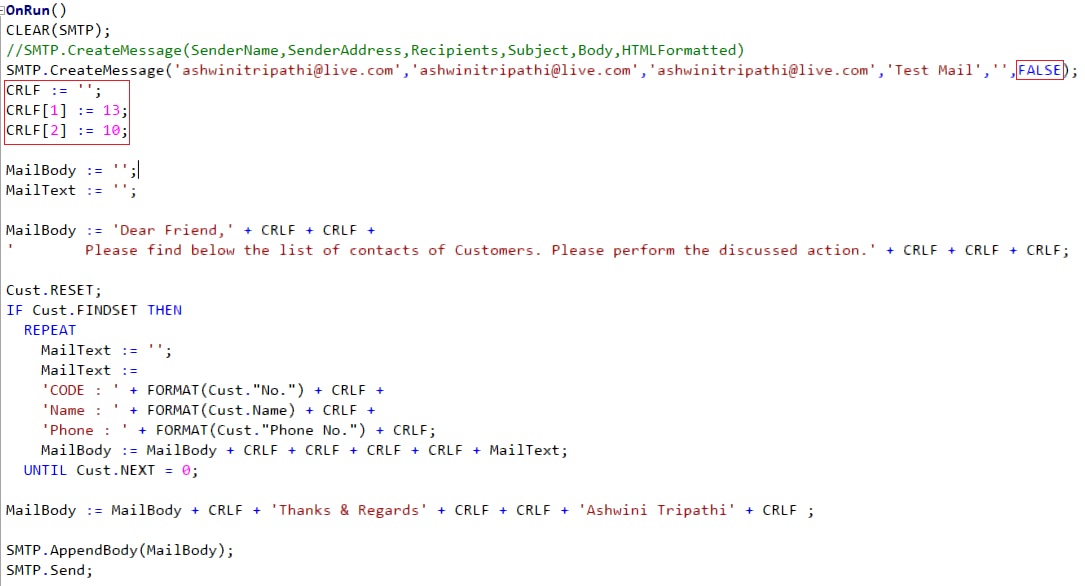
Step-3: Write the function. Define your parameters and additional codes you may require as per your logic.

2

In above code notice that I have set last parameter of CreateMessage as FALSE for(HTMLFormatted), this is required else CRLF logic will not work.

Where ever I require New Line I just add CRLF.

3

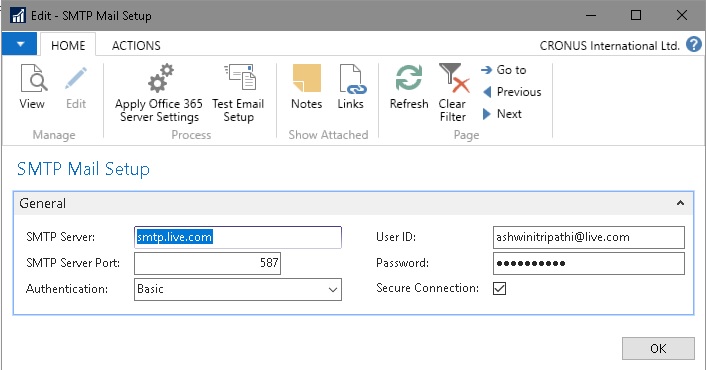
Step-4: SMTP Mail Setup I am using as below for live.com, you check with yours SMTP details accordingly.

4

Yes we are done now you can execute the above function to generate your mails.

I will come up with more details in my upcoming posts, till then keep exploring and learning.


Dynamics 365, Information

The first look at the next generation of intelligent business applications in the cloud. Dynamics – 365


Today I had a chance to attend Dynamics 365 – first look presentation from Microsoft.

Below are the few takeaways from this session, sharing with you, will come up with more details later in my upcoming posts.

Microsoft Dynamics 365

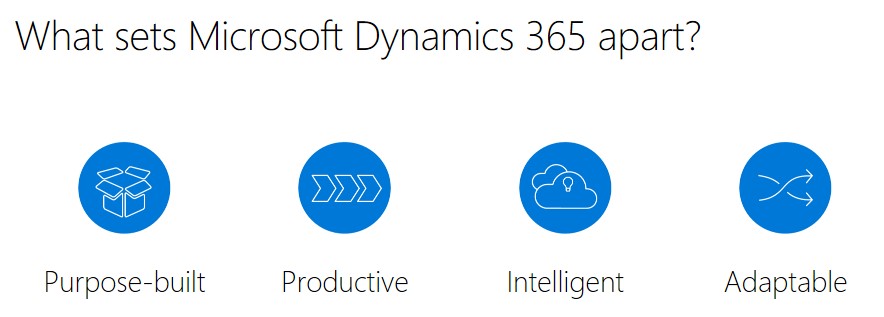
Enable your organization to grow, adapt, and evolve to meet the needs of your customers with Dynamics 365 – the next generation of intelligent business applications.


1


14


15

Use digital intelligence to reimagine what’s possible for your business.

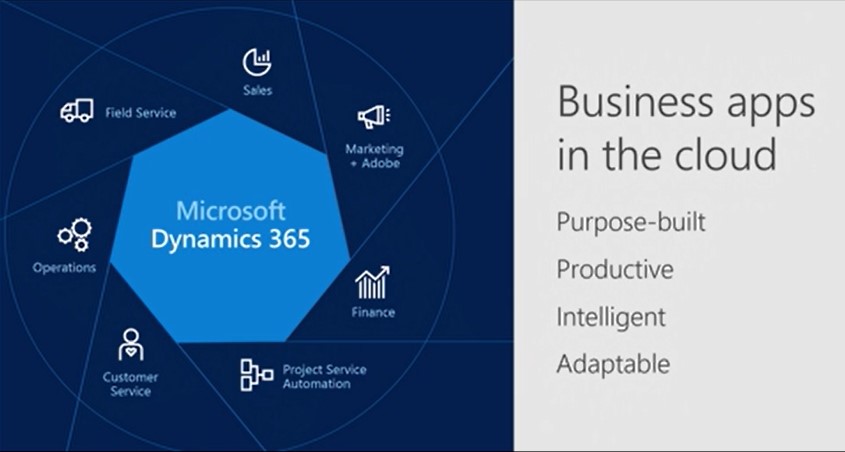
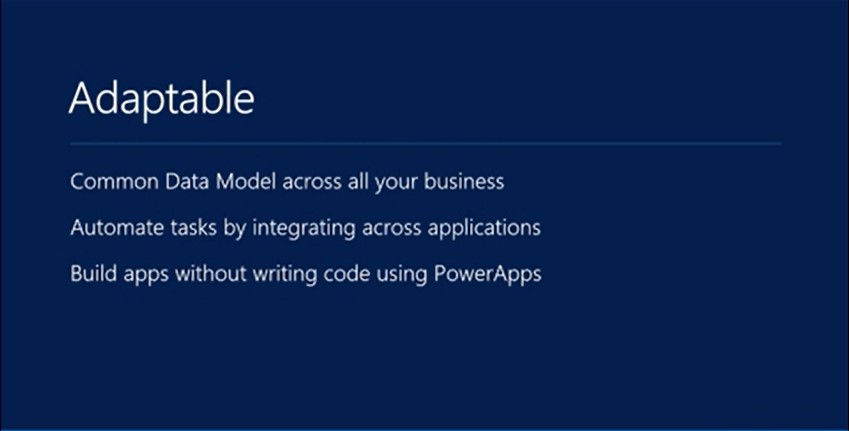
Dynamics 365 unifies CRM and ERP capabilities into applications that work seamlessly together across sales, customer service, field service, operations, financials, marketing, and project service automation.

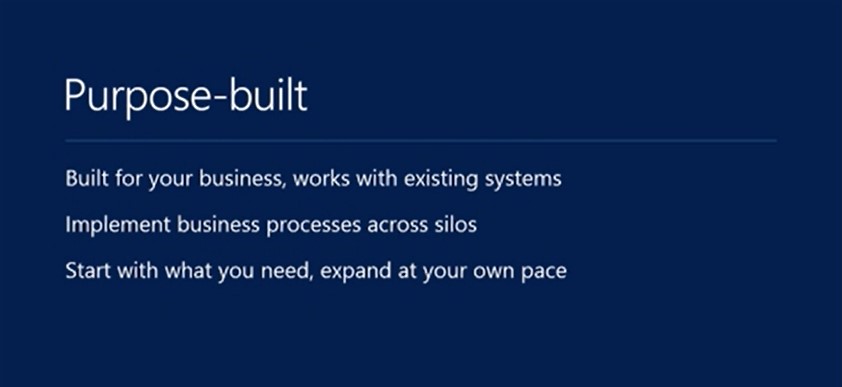
Start with what you need, add applications as your business grows.

Rethink what’s possible for your business when you:

  • Better engage customers
  • Empower employees
  • Optimize operations
  • Reinvent products and business models

23456789101112

Product demo was also given, will share those details also in my upcoming posts. Till then keep exploring and learning.

All screenshots are taken from Microsoft presentation.

You can find more details and explore on below link: https://www.microsoft.com/en-us/dynamics/default.aspx

13


Tip & Tricks

Launch of KSD Consultancy 

On auspicious day of Dusehra I am launching my own freelance company. 

This day is marked as win of truth over devil powers. 

Looking forward to have association with you for any sort of Dynamics NAV freelance work. Training, Development, Upgrade, Implementation, External Consultant cum Advisor, Project Implementation Guidance and assistance etc.

Cumulative Updates

Cumulative Update 12 for Microsoft Dynamics NAV 2016 Released Oct 2016

This cumulative update includes all hotfixes and regulatory features that have been released for Microsoft Dynamics NAV 2016, including hotfixes and regulatory features that were released in previous cumulative updates.

For a list of cumulative updates released for Microsoft Dynamics NAV 2016, see released cumulative updates for Microsoft Dynamics NAV 2016  (https://support.microsoft.com/kb/3108728/ ) . Cumulative updates are intended for new and existing customers who are running Microsoft Dynamics NAV 2016.

Which hotfix package to download

This cumulative update has multiple hotfix packages. Select and download one of the following packages depending on the country version of your Microsoft Dynamics NAV 2016 database:

Country Hotfix package
AT – Austria Download the ATKB3193868 package
AU – Australia Download the AUKB3193868 package
BE – Belgium Download the BEKB3193868 package
CH – Switzerland Download the CHKB3193868 package
CZ- Czech Download the CZKB3193868 package
DE – Germany Download the DEKB3193868 package
DK – Denmark Download the DKKB3193868 package
ES – Spain Download the ESKB3193868 package
FI – Finland Download the FIKB3193868 package
FR – France Download the FRKB3193868 package
IS – Iceland Download the ISKB3193868 package
IT – Italy Download the ITKB3193868 package
IN – India Download the INKB3193868 package
NA – North America Download the NAKB3193868 package
NL – Netherlands Download the NLKB3193868 package
NO – Norway Download the NOKB3193868 package
NZ – New Zealand Download the NZKB3193868 package
RU – Russia Download the RUKB3193868 package
SE – Sweden Download the SEKB3193868 package
UK – United Kingdom Download the GBKB3193868 package
All other countries Download the W1KB3193868 package

How to install a Microsoft Dynamics NAV 2016 cumulative update

See How to install a Microsoft Dynamics NAV 2016 cumulative update  (https://support.microsoft.com/kb/3109325/ ) .

Prerequisites

You must have Microsoft Dynamics NAV 2016 installed to apply this hotfix.

Hotfix Download Available View and download the hotfix

How to obtain the Microsoft Dynamics NAV update files

Click the link in the “Hotfix Download Available” section above to download the cumulative update files. After you request the Microsoft Dynamics NAV update, a hyperlink will be sent to you in an e-mail.

The e-mail will contain a hyperlink and a password. You can use the hyperlink to download the Microsoft Dynamics NAV hotfix or the update files. When you click the hyperlink, the File Download – Security Warning dialog box opens. Then, you are prompted to run, to save, or to cancel the download.

For more details see : Link

You will require PartnerSource or CustomerSource access.

Released Cumulative Updates for Microsoft Dynamics NAV 2016

Cumulative Updates for Microsoft Dynamics NAV 2016


You should always install the latest cumulative update.


Knowledge
Base ID
Title Release date Build no. Local versions included
3193868    Cumulative update 12 for Microsoft Dynamics NAV 2016 October, 2016 47042 AT, AU, BE, CH, CZ, DE, DK, ES, FI, FR, IS, IT, IN, NA, NL, NO, NZ, RU, SE, UK
3188240    Cumulative update 11 for Microsoft Dynamics NAV 2016 September, 2016 46773 AT, AU, BE, CH, CZ, DE, DK, ES, FI, FR, IS, IT, IN, NA, NL, NO, NZ, RU, SE, UK
3182131    Cumulative update 10 for Microsoft Dynamics NAV 2016 August, 2016 46621 AT, AU, BE, CH, CZ, DE, DK, ES, FI, FR, IS, IT, IN, NA, NL, NO, NZ, RU, SE, UK
3172549    Cumulative update 9 for Microsoft Dynamics NAV 2016 July, 2016 46290 AT, AU, BE, CH, CZ, DE, DK, ES, FI, FR, IS, IT, NA, NL, NO, NZ, RU, SE, UK
3166287    Cumulative update 8 for Microsoft Dynamics NAV 2016 June, 2016 46045 AT, AU, BE, CH, CZ, DE, DK, ES, FI, FR, IS, IT, NA, NL, NO, NZ, RU, SE, UK
3157492    Cumulative update 7 for Microsoft Dynamics NAV 2016 May, 2016 45834 AT, AU, BE, CH, CZ, DE, DK, ES, FI, FR, IS, IT, NA, NL, NO, NZ, RU, SE, UK
3151017    Cumulative update 6 for Microsoft Dynamics NAV 2016 April, 2016 45480 AT, AU, BE, CH, CZ, DE, DK, ES, FI, FR, IS, IT, NA, NL, NO, NZ, RU, SE, UK
3145855    Cumulative update 5 for Microsoft Dynamics NAV 2016 March, 2016 45243 AT, AU, BE, CH, CZ, DE, DK, ES, FI, FR, IS, IT, NA, NL, NO, NZ, RU, SE, UK
3139364    Cumulative update 4 for Microsoft Dynamics NAV 2016 February, 2016 44974 AT, AU, BE, CH, CZ, DE, DK, ES, FI, FR, IS, IT, NA, NL, NO, NZ, RU, SE, UK
3130298    Cumulative update 3 for Microsoft Dynamics NAV 2016 January, 2016 44365 AT, AU, BE, CH, CZ, DE, DK, ES, FI, FR, IS, IT, NA, NL, NO, NZ, RU, SE, UK
3121038    Cumulative update 2 for Microsoft Dynamics NAV 2016 December, 2015 43897 AT, AU, BE, CH, CZ, DE, DK, ES, FI, FR, IS, IT, NA, NL, NO, NZ, RU, SE, UK
3106089    Cumulative Update 1 for Microsoft Dynamics NAV 2016 November, 2015 43402 AT, AU, BE, CH, CZ, DE, DK, ES, FI,


Cumulative Updates

Cumulative Update 24 for Microsoft Dynamics NAV 2015 released Oct 2016

Cumulative Update 24 includes all application and platform hotfixes and regulatory features that have been released for Microsoft Dynamics NAV 2015.

The cumulative update includes hotfixes that apply to all countries and hotfixes specific to the following local versions:

  •   AU – Australia
  •   AT – Austria
  •   BE – Belgium
  •   CH – Switzerland
  •   CZ – Czech Republic
  •   DE – Germany
  •   DK – Denmark
  •   ES – Spain
  •   FI  – Finland
  •   FR – France
  •   IS – Iceland
  •   IT – Italy
  •   NA – North America
  •   NL – Netherlands
  •   NO – Norway
  •   NZ – New Zealand
  •   RU – Russia
  •   SE – Sweden
  •   UK – United Kingdom

Note: You must convert the database if you are upgrading to this cumulative update from a cumulative update earlier than Cumulative Update 9 (build 41779). For more information, see Converting a Database in Help for Microsoft Dynamics NAV.

Where to find Cumulative Update 24

You can download the cumulative update from KB 3193867  – Cumulative Update 24 for Microsoft Dynamics NAV 2015 (Build 47039).

Warning

Before you install a cumulative update in a production environment, take the following precautions:

  1. Test the cumulative update in a non-production environment.
  2. Make a backup of the system or computer where the cumulative update is to be installed.

Additional Information

For information about how to install the cumulative update, see How to Install a Microsoft Dynamics NAV 2015 Cumulative Update.

For information about how to work around a recent process change, see How to Get Back the ‘Hotfix Directories’ from NAV 2015 Cumulative Update 1.

For a list of all cumulative updates for this version, see Released Cumulative Updates for Microsoft Dynamics NAV 2015.

For more details see : https://blogs.msdn.microsoft.com/nav/2016/10/07/cumulative-update-24-for-microsoft-dynamics-nav-2015-has-been-released/