Cumulative Updates, Information

Released Cumulative Updates for Microsoft Dynamics NAV 2015

For a list of all cumulative updates for this version, see Released Cumulative Updates for Microsoft Dynamics NAV 2015.

Cumulative Updates for Microsoft Dynamics NAV 2015

Knowledge

Base ID

Title Release date Build no. Local versions included
3097767 Cumulative Update 12 for Microsoft Dynamics NAV 2015 October, 2015 42951 AT, AU, BE, CH, CZ, DE, DK, ES, FI, FR, IS, IT, NA, NL, NO, NZ, RU, SE, UK
3091812 Cumulative Update 11 for Microsoft Dynamics NAV 2015 September, 2015 42603 AT, AU, BE, CH, CZ, DE, DK, ES, FI, FR, IS, IT, NA, NL, NO, NZ, RU, SE, UK
3086434    Cumulative Update 10 for Microsoft Dynamics NAV 2015 August, 2015 42222 AT, AU, BE, CH, CZ, DE, DK, ES, FI, FR, IS, IT, NA, NL, NO, NZ, RU, SE, UK
3075726 Cumulative Update 9 for Microsoft Dynamics NAV 2015 July, 2015 41779 AT, AU, BE, CH, CZ, DE, DK, ES, FI, FR, IS, IT, NA, NL, NO, NZ, RU, SE, UK
3069272    Cumulative Update 8 for Microsoft Dynamics NAV 2015 June, 2015 41370 AT, AU, BE, CH, CZ, DE, DK, ES, FI, FR, IS, IT, NA, NL, NO, NZ, RU, SE, UK
3058000    Cumulative Update 7 for Microsoft Dynamics NAV 2015 May, 2015 40938 AT, AU, BE, CH, CZ, DE, DK, ES, FI, FR, IS, IT, NA, NL, NO, NZ, RU, SE, UK
3052226    Cumulative Update 6 for Microsoft Dynamics NAV 2015 April, 2015 40459 AT, AU, BE, CH, CZ, DE, DK, ES, FI, FR, IS, IT, NA, NL, NO, NZ, RU, SE, UK
3039824    Cumulative Update 5 for Microsoft Dynamics NAV 2015 March, 2015 40262 AT, AU, BE, CH, CZ, DE, DK, ES, FI, FR, IS, IT, NA, NL, NO, NZ, RU, SE, UK
3035986 Cumulative Update 4 for Microsoft Dynamics NAV 2015 February, 2015 39663 AT, AU, BE, CH, CZ, DE, DK, ES, FI, FR, IS, IT, NA, NL, NO, NZ, RU, SE, UK
3024901 Cumulative Update 3 for Microsoft Dynamics NAV 2015 January, 2015 39368 AT, AU, BE, CH, CZ, DE, DK, ES, FI, FR, IS, IT, NA, NL, NO, NZ, RU, SE, UK
3020885 Cumulative Update 2 for Microsoft Dynamics NAV 2015 December, 2014 38798 AT, AU, BE, CH, DE, DK, ES, FI, FR, IS, IT, NA, NL, NO, NZ, RU, SE, UK
3013215    Cumulative Update 1 for Microsoft Dynamics NAV 2015 November, 2014 38457 AT, AU, BE, CH, DE, DK, ES, FI, FR, IS, IT, NA, NL, NO, NZ, RU, SE, UK
Cumulative Updates, Information

Released Cumulative Updates for Microsoft Dynamics NAV 2013

For a list of all cumulative updates for this version, see Released Cumulative Updates for Microsoft Dynamics NAV 2013.

Cumulative Updates for Microsoft Dynamics NAV 2013

Knowledge

Base ID

Title Release date Build no. Local versions included
3097765 Cumulative Update 31 for Microsoft Dynamics NAV 2013 October, 2015 42948 AT, AU, BE, CH, DE, DK, ES, FI, FR, IS, IT, NA, NL, NO, NZ, SE, UK
3091810 Cumulative Update 30 for Microsoft Dynamics NAV 2013 September, 2015 42591 AT, AU, BE, CH, DE, DK, ES, FI, FR, IS, IT, NA, NL, NO, NZ, SE, UK
3086433 Cumulative Update 29 for Microsoft Dynamics NAV 2013 August, 2015 42219 AT, AU, BE, CH, DE, DK, ES, FI, FR, IS, IT, NA, NL, NO, NZ, SE, UK
3075723 Cumulative Update 28 for Microsoft Dynamics NAV 2013 July, 2015 41767 AT, AU, BE, CH, DE, DK, ES, FI, FR, IS, IT, NA, NL, NO, NZ, SE, UK
3069230 Cumulative Update 27 for Microsoft Dynamics NAV 2013 June, 2015 41354 AT, AU, BE, CH, DE, DK, ES, FI, FR, IS, IT, NA, NL, NO, NZ, SE, UK
3058009 Cumulative Update 26 for Microsoft Dynamics NAV 2013 May, 2015 40940 AT, AU, BE, CH, DE, DK, ES, FI, FR, IS, IT, NA, NL, NO, NZ, SE, UK
3051268 Cumulative Update 25 for Microsoft Dynamics NAV 2013 April, 2015 40468 AT, AU, BE, CH, DE, DK, ES, FI, FR, IS, IT, NA, NL, NO, NZ, SE, UK
3039828 Cumulative Update 24 for Microsoft Dynamics NAV 2013 March, 2015 40118 AT, AU, BE, CH, DE, DK, ES, FI, FR, IS, IT, NA, NL, NO, NZ, SE, UK
3035980 Cumulative Update 23 for Microsoft Dynamics NAV 2013 February, 2015 39671 AT, AU, BE, CH, DE, DK, ES, FI, FR, IS, IT, NA, NL, NO, NZ, SE, UK
3024895 Cumulative Update 22 for Microsoft Dynamics NAV 2013 January, 2015 39369 AT, AU, BE, CH, DE, DK, ES, FI, FR, IS, IT, NA, NL, NO, NZ, SE, UK
3020883 Cumulative Update 21 for Microsoft Dynamics NAV 2013 December, 2014 38800 AT, AU, BE, CH, DE, DK, ES, FI, FR, IS, IT, NA, NL, NO, NZ, SE, UK
3013213 Cumulative Update 20 for Microsoft Dynamics NAV 2013 November, 2014 38454 AT, AU, BE, CH, DE, DK, ES, FI, FR, IS, IT, NA, NL, NO, NZ, SE, UK
3000200 Cumulative Update 19 for Microsoft Dynamics NAV 2013 October, 2014 38052 AT, AU, BE, CH, DE, DK, ES, FI, FR, IS, IT, NA, NL, NO, NZ, SE, UK
2992503 Cumulative Update 18 for Microsoft Dynamics NAV 2013 September, 2014 37798 AT, AU, BE, CH, DE, DK, ES, FI, FR, IS, IT, NA, NL, NO, NZ, SE, UK
2984829 Cumulative Update 17 for Microsoft Dynamics NAV 2013 August, 2014 37532 AT, AU, BE, CH, DE, DK, ES, FI, FR, IS, IT, NA, NL, NO, NZ, SE, UK
2977472 Cumulative Update 16 for Microsoft Dynamics NAV 2013 July, 2014 37201 AT, AU, BE, CH, DE, DK, ES, FI, FR, IS, IT, NA, NL, NO, NZ, SE, UK
2971745 Cumulative Update 15 for Microsoft Dynamics NAV 2013 June, 2014 36919 AT, AU, BE, CH, DE, DK, ES, FI, FR, IS, IT, NA, NL, NO, NZ, SE, UK
2964546 Cumulative Update 14 for Microsoft Dynamics NAV 2013 May, 2014 36605 AT, AU, BE, CH, DE, DK, ES, FI, FR, IS, IT, NA, NL, NO, NZ, SE, UK
2955943 Cumulative Update 13 for Microsoft Dynamics NAV 2013 April, 2014 36347 AT, AU, BE, CH, DE, DK, ES, FI, FR, IS, IT, NA, NL, NO, NZ, SE, UK
2937998 Cumulative Update 12 for Microsoft Dynamics NAV 2013 March, 2014 36207 AT, AU, BE, CH, DE, DK, ES, FI, FR, IS, IT, NA, NL, NO, NZ, SE, UK
2930616 Cumulative Update 11 for Microsoft Dynamics NAV 2013 February, 2014 36076 AU, DE, DK, FR, IT, NA, NL, NZ, SE, UK
2918536 Cumulative Update 10 for Microsoft Dynamics NAV 2013 January, 2014 36005 AU, DE, DK, FR, IT, NA, NL, NZ, SE, UK
2913980 Cumulative Update 9 for Microsoft Dynamics NAV 2013 December, 2013 35782 AU, DE, DK, FR, IT, NA, NL, NZ, SE, UK
2901572 Cumulative Update 8 for Microsoft Dynamics NAV 2013 November, 2013 35670 AU, DE, DK, FR, IT, NA, NL, NZ, SE, UK
2892427 Cumulative Update 7 for Microsoft Dynamics NAV 2013 October, 2013 35488 AU, DE, DK, FR, IT, NA, NL, NZ, UK
2881294 Cumulative Update 6 for Microsoft Dynamics NAV 2013 September, 2013 35345 AU, DE, DK, FR, IT, NA, NL, NZ, UK
2872273 Cumulative Update 5 for Microsoft Dynamics NAV 2013 August, 2013 35201 AU, DE, DK, FR, IT, NA, NL, NZ, UK
2860301 Cumulative Update 4 for Microsoft Dynamics NAV 2013 July, 2013 35026 DE, DK, FR, IT, NA, NL, UK
2852685 Cumulative Update 3 for Microsoft Dynamics NAV 2013 June, 2013 34902 DE, DK, FR, IT, NA, NL, UK
2843305 Cumulative Update 2 for Microsoft Dynamics NAV 2013 May, 2013 34688 DE, DK, NA, NL, UK
2829782 Cumulative Update 1 for Microsoft Dynamics NAV 2013 April, 2013 34587 DE

For a list of all hotfixes included in Cumulative Updates for Microsoft Dynamics NAV 2013, view the following CustomerSource and PartnerSource pages:

CustomerSource

PartnerSource

Cumulative Updates, Information

Released Cumulative Updates for Microsoft Dynamics NAV 2013 R2

For a list of all cumulative updates for this version, see Released Cumulative Updates for Microsoft Dynamics NAV 2013 R2.

Knowledge

Base ID

Title Release date Build no. Local versions included
3097766 Cumulative Update 24 for Microsoft Dynamics NAV 2013 R2 October, 2015 42950 AT, AU, BE, CH, CZ, DE, DK, ES, FI, FR, IS, IT, NA, NL, NO, NZ, RU, SE, UK
3091811 Cumulative Update 23 for Microsoft Dynamics NAV 2013 R2 September, 2015 42610 AT, AU, BE, CH, CZ, DE, DK, ES, FI, FR, IS, IT, NA, NL, NO, NZ, RU, SE, UK
3084775 Cumulative Update 22 for Microsoft Dynamics NAV 2013 R2 August, 2015 42221 AT, AU, BE, CH, CZ, DE, DK, ES, FI, FR, IS, IT, NA, NL, NO, NZ, RU, SE, UK
3075724 Cumulative Update 21 for Microsoft Dynamics NAV 2013 R2 July, 2015 41768 AT, AU, BE, CH, CZ, DE, DK, ES, FI, FR, IS, IT, NA, NL, NO, NZ, RU, SE, UK
3069271 Cumulative Update 20 for Microsoft Dynamics NAV 2013 R2 June, 2015 41371 AT, AU, BE, CH, CZ, DE, DK, ES, FI, FR, IS, IT, NA, NL, NO, NZ, RU, SE, UK
3058010 Cumulative Update 19 for Microsoft Dynamics NAV 2013 R2 May, 2015 40941 AT, AU, BE, CH, CZ, DE, DK, ES, FI, FR, IS, IT, NA, NL, NO, NZ, RU, SE, UK
3052269 Cumulative Update 18 for Microsoft Dynamics NAV 2013 R2 April, 2015 40452 AT, AU, BE, CH, CZ, DE, DK, ES, FI, FR, IS, IT, NA, NL, NO, NZ, RU, SE, UK
3039826 Cumulative Update 17 for Microsoft Dynamics NAV 2013 R2 March, 2015 40076 AT, AU, BE, CH, CZ, DE, DK, ES, FI, FR, IS, IT, NA, NL, NO, NZ, RU, SE, UK
3035983 Cumulative Update 16 for Microsoft Dynamics NAV 2013 R2 February, 2015 39665 AT, AU, BE, CH, CZ, DE, DK, ES, FI, FR, IS, IT, NA, NL, NO, NZ, RU, SE, UK
3024898 Cumulative Update 15 for Microsoft Dynamics NAV 2013 R2 January, 2015 39354 AT, AU, BE, CH, CZ, DE, DK, ES, FI, FR, IS, IT, NA, NL, NO, NZ, RU, SE, UK
3020884 Cumulative Update 14 for Microsoft Dynamics NAV 2013 R2 December, 2014 38801 AT, AU, BE, CH, CZ, DE, DK, ES, FI, FR, IS, IT, NA, NL, NO, NZ, RU, SE, UK
3013214 Cumulative Update 13 for Microsoft Dynamics NAV 2013 R2 November, 2014 38455 AT, AU, BE, CH, CZ, DE, DK, ES, FI, FR, IS, IT, NA, NL, NO, NZ, RU, SE, UK
3000199 Cumulative Update 12 for Microsoft Dynamics NAV 2013 R2 October, 2014 38053 AT, AU, BE, CH, CZ, DE, DK, ES, FI, FR, IS, IT, NA, NL, NO, NZ, RU, SE, UK
2992495 Cumulative Update 11 for Microsoft Dynamics NAV 2013 R2 September, 2014 37799 AT, AU, BE, CH, CZ, DE, DK, ES, FI, FR, IS, IT, NA, NL, NO, NZ, RU, SE, UK
2984452 Cumulative Update 10 for Microsoft Dynamics NAV 2013 R2 August, 2014 37563 AT, AU, BE, CH, CZ, DE, DK, ES, FI, FR, IS, IT, NA, NL, NO, NZ, RU, SE, UK
2977473 Cumulative Update 9 for Microsoft Dynamics NAV 2013 R2 July, 2014 37221 AT, AU, BE, CH, CZ, DE, DK, ES, FI, FR, IS, IT, NA, NL, NO, NZ, RU, SE, UK
2971746 Cumulative Update 8 for Microsoft Dynamics NAV 2013 R2 June, 2014 36897 AT, AU, BE, CH, DE, DK, ES, FI, FR, IS, IT, NA, NL, NO, NZ, RU, SE, UK
2964528 Cumulative Update 7 for Microsoft Dynamics NAV 2013 R2 May, 2014 36703 AT, AU, BE, CH, DE, DK, ES, FI, FR, IS, IT, NA, NL, NO, NZ, RU, SE, UK
2955941  Cumulative Update 6 for Microsoft Dynamics NAV 2013 R2 March, 2014 36366 AT, AU, BE, CH, DE, DK, ES, FI, FR, IS, IT, NA, NL, NO, NZ, RU, SE, UK
2937999 Cumulative Update 5 for Microsoft Dynamics NAV 2013 R2 March, 2014 36281 AT, AU, BE, CH, DE, DK, ES, FI, FR, IS, IT, NA, NL, NO, NZ, SE, UK
2930617 Cumulative Update 4 for Microsoft Dynamics NAV 2013 R2 February, 2014 36078 AU, DE, DK, FR, IT, NA, NL, NZ, SE, UK
2918538 Cumulative Update 3 for Microsoft Dynamics NAV 2013 R2 January, 2014 36035 AU, DE, DK, FR, IT, NA, NL, NZ, SE, UK
2913982 Cumulative Update 2 for Microsoft Dynamics NAV 2013 R2 December, 2013 35800 AU, DE, DK, FR, IT, NA, NL, NZ, SE, UK
2901573 Cumulative Update 1 for Microsoft Dynamics NAV 2013 R2 November, 2013 35701 AU, DE, DK, FR, IT, NA, NL, NZ, SE, UK

For a list of all hotfixes included in Cumulative Updates for Microsoft Dynamics NAV 2013 R2, view the following CustomerSource and PartnerSource pages:

CustomerSource

PartnerSource

Cumulative Updates, Information

Cumulative Update 12 for Microsoft Dynamics NAV 2015 has been released

Cumulative Update 12 includes all application and platform hotfixes and regulatory features that have been released for Microsoft Dynamics NAV 2015.

For more details checkout link : Cumulative Update 12 for Microsoft Dynamics NAV 2015 has been released

Corfu Navision 2016, Development Tips, Information

Introducing Extensions in Microsoft Dynamics NAV 2016

Extensions enable you to modify your Microsoft Dynamics NAV system without directly altering the source resources, making it easier to deploy, manage, and upgrade customizations or extensions.

While you will still use the existing Microsoft Dynamics NAV Development system to customize or extend Microsoft Dynamics NAV, a new set of Windows PowerShell cmdlets have been introduced that mean you can add your changes into a proprietary package format, called a .navx package file.

These packages can be installed, and more importantly uninstalled, from a Microsoft Dynamics NAV system with ease.

Packages can be automatically upgraded through the installation process, so up taking newer versions is made easier.

For the time being for more details see : Introducing Extensions in Microsoft Dynamics NAV 2016

Will come up with more details in my upcoming posts.

Corfu Navision 2016, Development Tips, Functional Tips, How To, Information, Workflow

Workflows in Dynamics NAV 2016

Workflows in Dynamics NAV are represented by workflow events and workflow responses.

The smallest workflow is the pairing of a single event with a single response.

“When something happens, do something” pattern. This is the Event/Response model that makes up the simple but effective design of Workflow for Microsoft Dynamics NAV.

The workflow functionality utilizes several other features as listed below of Dynamics NAV.

Few Listed here below:

Job Queues Setup

E-mail Notification Setup

Work date Setup

User Setup

Approval User Setup

SMTP Mail Setup

In particular, approvals and notifications must be set up so that workflows can send approval requests and process approvals.

Dynamics NAV 2016 introduces two new event concepts. Events and Workflow events. The two are distinct but often coupled together to build solutions.

Dynamics NAV Events allow you to write code which will be called when an event occurs – this is called subscribing to an event.

Workflow Events typically use Platform Events as their trigger, but are richer. Workflow events are registered in the workflow engine and show up in the workflow designer. Microsoft recommends that Workflow events be written at a higher level of abstraction than Platform Events.

Sales Invoice is created or Modified could be example of Event Subscriber, whereas Invoice is Release could be good example for Workflow Event.

Event

For the event we need a new codeunit.

Add helper method for binding our event with the workflow engine.

The method is a simple one which returns and identifying code.

Function Signature:

LOCAL OnMyEventCode() : Code[128]

Function Property:
Workflow-1

Sample Function Code:

EXIT(UPPERCASE(‘OnMyEvent’));


Next we add another method which will be called whenever our Event Occurs

Function Signature:

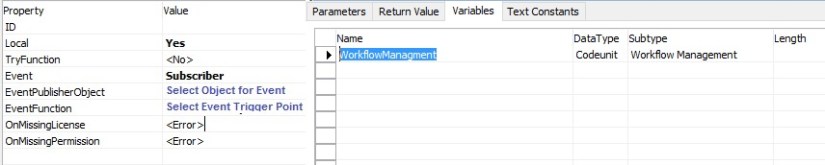
LOCAL [EventSubscriber] OnMyEvent(VAR Rec Object;VAR xRec Object;RunTrigger : Boolean)

Assuming a table is selected on which the Event is triggered.

Function Property & Variables:
Workflow-2

Sample function code:

MESSAGE(‘Event Fired On MyEvent’);

WorkflowManagment.HandleEvent(OnMyEventCode,Rec);

For the code itself, we’ll do two things

  • Show a message box so we can see our event did trigger
  • Call into the workflow engine to have the NAV Workflow engine process any next steps


Then we need to add another event subscriber method which is responsible for adding our event to the workflow library. The workflow library is the collection of events which can be seen and managed from the Workflow Setup page.

Function Signature:

LOCAL [EventSubscriber] AddEventToLibrary()

Function Property & Variables:
Workflow-3

Sample function code:

WorkflowEventHandling.AddEventToLibrary(MyEventCode,DATABASE::Object,OnMyFinishTxt,0,FALSE);

Text Constant for Event Description:

OnMyFinishTxt : This will be listed in Workflow Event Window.
Workflow-4

To add a Workflow event we need to do three things:

  • Subscribe to the event.
  • Define a user readable string which describes the event.
  • Call a method in the workflow event handling codeunit, passing in the identifier and the descriptive string.

Save the Codeunit as MyWorkflowEvent with available ID in your Database.

Response

Most of the work is done in the code editor and we will use codeunits for our application objects.

First we’ll make a helper method for binding our response with the workflow engine.

The method is a simple one which returns and identifying code.

Function Signature:

LOCAL RunMyResponseCode() : Code[128]

Function Property:
Workflow-1

Sample Function Code:

EXIT(UPPERCASE(‘RunMyResponse’));


Then we need to add another event subscriber method which is responsible for adding our response to the workflow library. The workflow library includes the collection of responses which can be seen and managed from the Workflow Setup page.

Function Signature:

LOCAL [EventSubscriber] AddResponseToLibrary()

Function Property & Variables:

Workflow-5

Sample Function Code:

WorkflowResponseHandling.AddResponseToLibrary(RunMyResponseCode,0,ResponseDescription,’Group 0′);

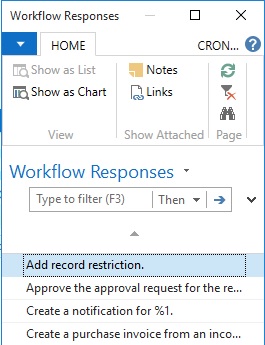
Text Constant for Response Description:

ResponseDescription : This will be listed in Workflow Responses Window.

Workflow-6

To add a Workflow response we need to do three things:

  • Subscribe to the event which adds new responses to the workflow library
  • Define a user readable string which describes the response
  • Call a method in the workflow response handling codeunit, passing in the identifier and the descriptive string.

The earlier functions were used to add the response to the workflow library.

But we need another method that actually listens to when the response needs to be called.

Function Signature:

LOCAL [EventSubscriber] RunReportResponse(VAR ResponseExecuted : Boolean;Variant : Variant;xVariant : Variant;ResponseWorkflowStepInstance : Record “Workflow Step Instance”)

Function Property & Variables:

Workflow-7

Sample Function Code:

IF WorkflowResponse.GET(ResponseWorkflowStepInstance.”Function Name”) THEN

CASE WorkflowResponse.”Function Name” OF

RunMyResponseCode:

BEGIN

RunMyFunction;

ResponseExecuted := TRUE;

END;

END;

When this code is called it needs to do two things.

Firstly it needs to evaluate if the response should be called (and it does this by checking the code value) and secondly it should return TRUE if it handles the response.

Finally we will add our Response Handling Function RunMyFunction, which will execute actual action which we want Response of this call.

Enable Workflow in System

First we will create our Category so that our Workflow can be identified uniquely.

Workflow-8

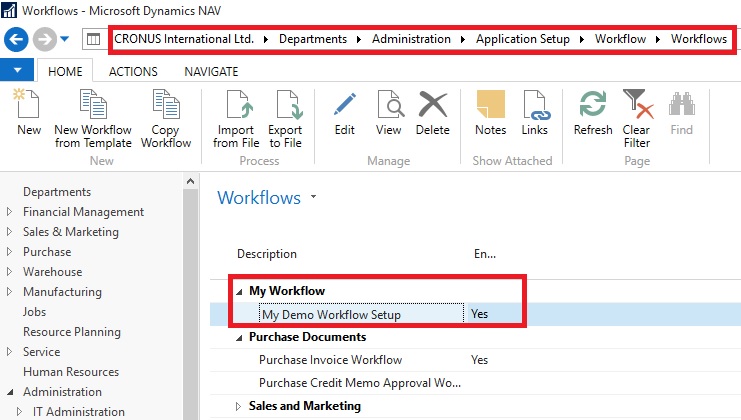
Next we will configure our Workflow.

Workflow-9

Here my workflow is listed once configured and saved.

Workflow-10

Now we are good in position to go for testing of our workflow.


This was the simplest scenario with bare minimum action required of implementing workflow.

You can use existing Template and define or you can implement your own as described above.


I will come up with more details on this topic later in my upcoming posts.

Corfu Navision 2016, Events, Information

Events in C/AL Navision 2016

By implementing events in C/AL code, you can design applications to react to specific actions or behaviour that occur.

Events enable you to separate customized functionality from the application business logic.

By using events in the application where customizations are typically made, you can lower the cost of code modifications and upgrades to the original application.

Events can be used for different purposes, such as generating notifications when certain behaviour occurs or the state of an entity changes, distributing information, and integrating with external systems and applications.

How Events Work

There are three major participants involved in events: the event, a publisher and a subscriber.

An event is the declaration of the occurrence or change in the application. An event is declared by a C/AL function, which is referred to as an event publisher function. An event publisher function is comprised of a signature only and does not execute any code.

A publisher is the object that contains event publisher function that declares the event. The publisher exposes an event in the application to subscribers, essentially providing them with a hook-up point in the application. An event is raised by adding logic to the application that calls into the publisher to invoke the event (the event publisher function). There are three different event types: business, integration, and trigger events.

Business and integration type events must be explicitly declared and published, which means that you must create event publisher functions and add them to objects manually. On the other hand, trigger events, which occur on table and page operations, are published and raised implicitly by the Microsoft Dynamics NAV runtime. Therefore, no coding is required to publish them.

A subscriber listens for and handles a published event. A subscriber is a C/AL function that subscribes to a specific event publisher function and includes the logic for handling the event. When an event is raised, the subscriber function is a called and it code is run.

How to Implement Events

Implementing events in Microsoft Dynamics NAV consists of the following tasks:

  1. Publish the event. For business and integration events, create and configure a function in an application object to be an event publisher function.
  2. Raise the event. Add code that calls the event publisher function..
  3. Subscribe to the event. At the consumer end, add one or more subscriber functions that subscribe to published events when they are raised.

Will come up with how to practically use it in my upcoming posts.

Corfu Navision 2016, How To, Information, Posting Preview

Posting Preview in Navision 2016

On every document and journal that can be posted, you can choose the Preview Posting button to review the different types of entries that will be created when you post the document or journal.

Below I have shown Example from Sales Invoice Window, similarly you will get in other related Pages too.
PreviewPosting-1

From Actions TAB you will get this option for Preview Posting.

You will get below Navigation Window where you can Navigate Entries which will get posted upon Posting.
PreviewPosting-2
Give it a try, very useful feature introduced in Navision 2016.

Corfu Navision 2016, How To, Information, Permission, User Group

Record Permissions and Apply Permissions Sets to User Groups in Navision 2016

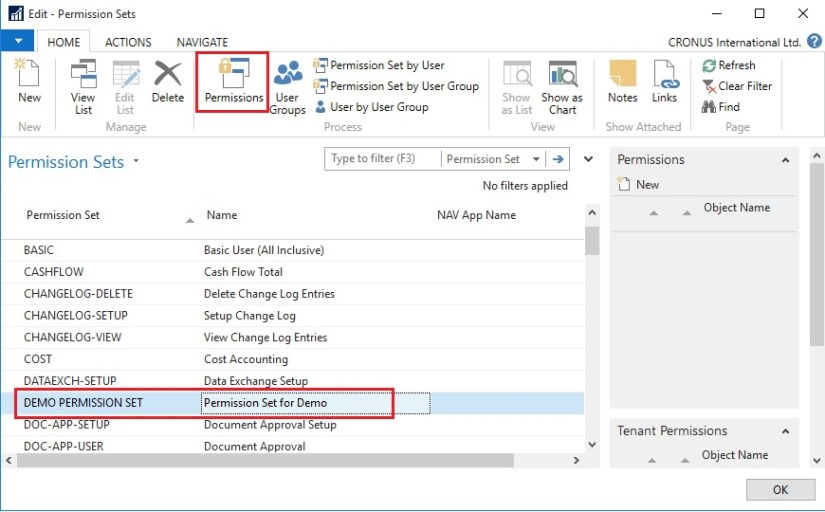
Administrators can record new permission sets in Microsoft Dynamics NAV 2016.

Recording permissions is based on the code coverage functionality.

You can access the various windows and activities in the Microsoft Dynamics NAV Windows client or the Microsoft Dynamics NAV Web client that you want users with this permission set to access.

You must carry out the tasks that you want to record permissions for. Then, you can apply the new permission set to a group of users.

A user group is a combination of roles and users. If you want to change permissions for the user group, the changes are automatically applied to the users who are members of the group.

To help you manage permissions in Microsoft Dynamics NAV for your company, you can set up one or more user groups, add permissions sets to the groups, and then add users to the groups. You can add more than one permission set to a user group.

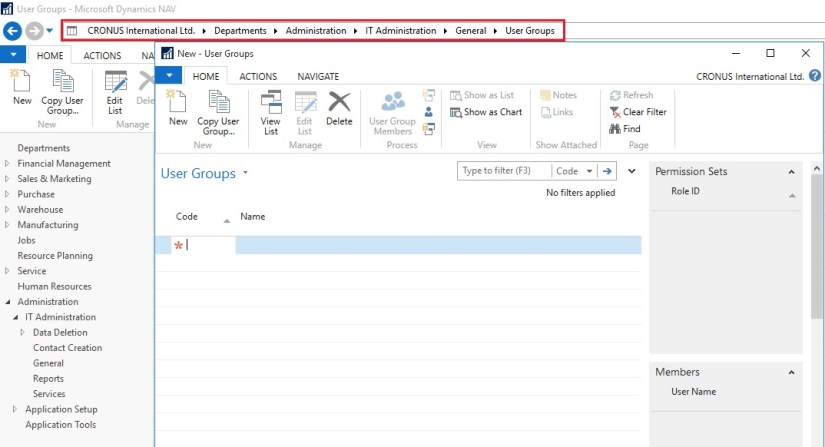
In the User Groups window, you can set up user groups, add and remove permissions, and you can apply changes to all or specific user groups.
Permission-1

Permission-2

Permission-3

Permission-4

Permission-5
If the default permission sets that are provided with Microsoft Dynamics NAV are not sufficient or not appropriate for your organization, then you can create new permission sets. If the individual object permissions that define a permission set are not adequate, then you can modify a permission set.

You can create a permission set manually, or you can record permissions by navigating in the application.
Permission-6

Permission-7

Permission-8
This starts a recording process that is based on the code coverage functionality in Microsoft Dynamics NAV. You can now access the various windows and activities in the Microsoft Dynamics NAV Windows client or the Microsoft Dynamics NAV Web client that you want users with this permission set to access. You must carry out the tasks that you want to record permissions for.

When you want to finish the recording, return to the Permissions window, and then, on the Actions tab, choose Stop.

Choose Yes to add the recorded permissions to the new permission set, or choose No to cancel.

If you choose Yes, the objects that you accessed are added to the window. In Microsoft Dynamics NAV 2016, only the objects are recorded, so you must specify if users must be able to insert, modify, or delete records in the recorded tables.

C/AL Editor, Corfu Navision 2016, Information

Redesigned C/AL Editor in Navision 2016

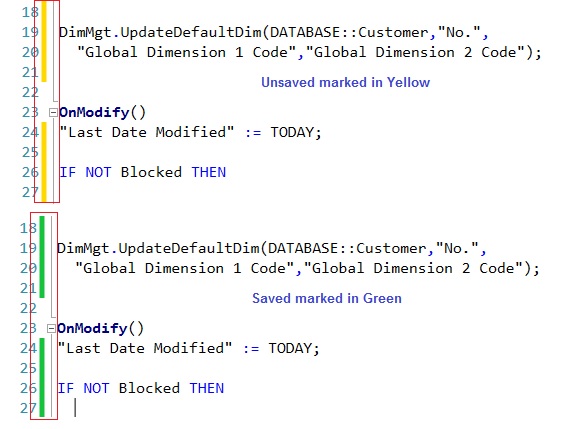
The C/AL Editor in the Microsoft Dynamics NAV Development Environment has been redesigned to give you more coding capabilities. Coding in the new C/AL editor is like before except you benefit from new features such as IntelliSense, name completion, change tracking, improved syntax highlighting and colorization. The new design has a look-and-feel that resembles the Debugger regarding breakpoints.

Name Completion:  Editor-1

Now Editor suggest the Variable Names which are available.

IntelliSense:  Editor-2
Now Editor Suggest available options for the variables.
Editor-3

Change Tracking:  Editor-4

Improved syntax highlighting and colorization:
Editor-5
If you still want to use old version editor, you can use the old version of the C/AL Editor by running the Microsoft Dynamics NAV Development Environment from a command prompt and setting the useoldeditor parameter.
Editor-6

finsql.exe useoldeditor=yes

useoldeditor Specifies whether to use the C/AL Editor that was available in Microsoft Dynamics NAV 2015 and earlier versions. The C/AL Editor was redesigned in Microsoft Dynamics NAV 2016.

To use the old editor, specify the parameter as useoldeditor=yes or useoldeditor.

To use the new editor, omit the parameter or specify it as useoldeditor=no.