Cumulative Updates, Development Tips, How To, Information, Instalation & Configuration, Tip & Tricks, Updates

Cumulative Update 41 for Microsoft Dynamics NAV 2015 (Build 50086) – Released in March 2018

This cumulative update includes all hotfixes and regulatory features that have been released for Microsoft Dynamics NAV 2015, including hotfixes and regulatory features that were released in previous cumulative updates.

Note You must convert the database if you are upgrading to this cumulative update from a cumulative update earlier than cumulative update 9 (build 41779). For more information, see Converting a Database in Help for Microsoft Dynamics NAV.

This cumulative update replaces previously released cumulative updates. You should always install the latest cumulative update.

It may be necessary to update your license after implementing this hotfix to gain access to new objects included in this or a previous cumulative update (this only applies to customer licenses).

For a list of cumulative updates released for Microsoft Dynamics NAV 2015, see released cumulative updates for Microsoft Dynamics NAV 2015. Cumulative updates are intended for new and existing customers who are running Microsoft Dynamics NAV 2015.

How to obtain the Microsoft Dynamics NAV update files

This update is available for manual download and installation from the Microsoft Download Center.

Download Cumulative update CU 41 for Microsoft Dynamics NAV 2015

How to install a Microsoft Dynamics NAV 2015 cumulative update

See How to install a Microsoft Dynamics NAV 2015 Cumulative Update .

Prerequisites

You must have Microsoft Dynamics NAV 2015 installed to apply this hotfix.

For more information see:- https://support.microsoft.com/en-us/help/4091304/cumulative-update-41-for-microsoft-dynamics-nav-2015-build-50086
Data, Development Tips, How To, Information, Replication, SQL, Tip & Tricks

Database Replication – Part IV

This post is in continuation to my earlier post. Please check if you missed.

Database Replication – Part I

Database Replication – Part II

Database Replication – Part III

As committed in this post we will continue to cover practical approach, Next step from last post.

Publishing Data Using Transactional Replication

We will create a transactional publication using SQL Server Management Studio to publish a filtered subset of the Item table in the Nav 2018 sample database. We will also add the SQL Server login used by the Distribution Agent to the publication access list (PAL).

To create a publication and define articles

Connect to the Publisher in SQL Server Management Studio, and then expand the server node.

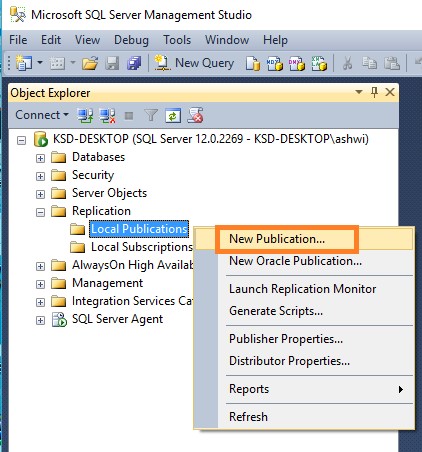
Expand the Replication folder, right-click the Local Publications folder, and click New Publication.

DR-24

The Publication Configuration Wizard launches.

DR-25

On the Publication Database page, select Nav 2018 database, and then click Next.

DR-26

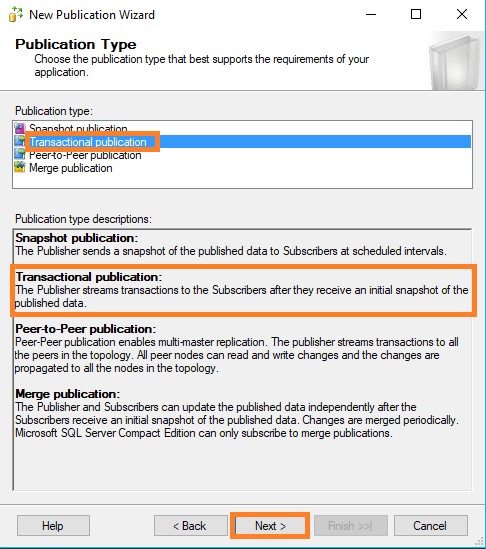
On the Publication Type page, select Transactional publication, and then click Next.

DR-27

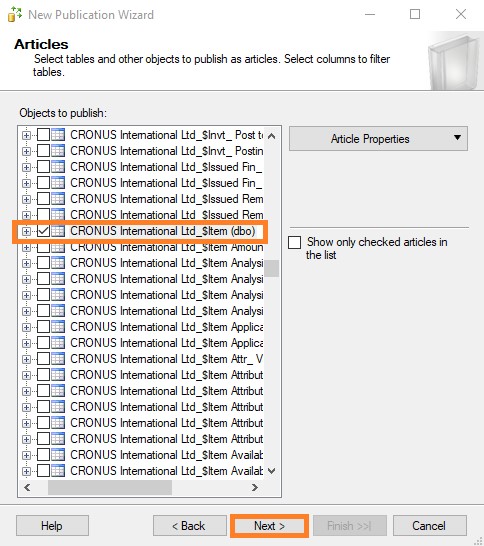
On the Articles page, expand the Tables node, select the check box for table CRONOUS International Ltd_$Item (dbo). Click Next.

DR-28

On the Filter Table Rows page, click Add.

In the Add Filter dialog box, click the Replenishment System column, click the right arrow to add the column to the Filter statement WHERE clause of the filter query, and modify the WHERE clause as follows:

WHERE [Replenishment System] = 1

Click OK,

DR-29

Click Next.

DR-30

Select the Create a snapshot immediately and keep the snapshot available to initialize subscriptions check box, and click Next.

DR-31

On the Agent Security page, clear Use the security settings from the Snapshot Agent check box.

Click Security Settings for the Snapshot Agent, enter <Machine_Name>\repl_snapshot in the Process account box, supply the password for this account, and then click OK.

DR-32

Repeat the previous step to set repl_logreader as the process account for the Log Reader Agent

DR-33

Click Finish.

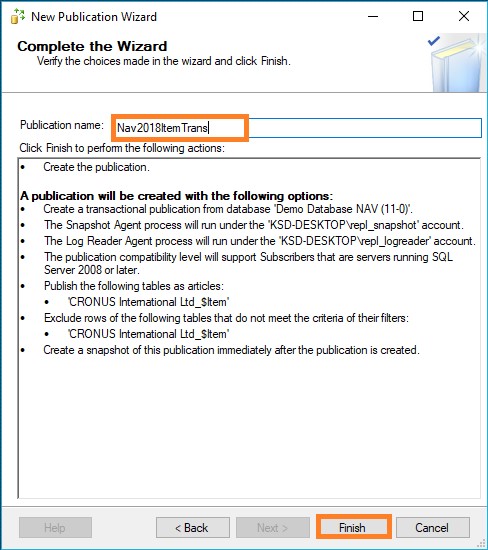
On the Complete the Wizard page, type Nav2018ItemTrans in the Publication name box, and click Finish.

DR-34

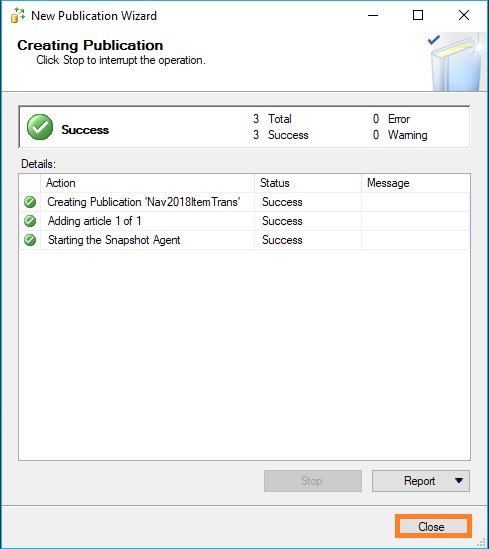
After the publication is created, click Close to complete the wizard.

DR-35

To view the status of snapshot generation

  • Connect to the Publisher in SQL Server Management Studio, expand the server node, and then expand the Replication folder.

In the Local Publications folder, right-click Nav2018ItemTrans, and then click View Snapshot Agent Status.

DR-36

The current status of the Snapshot Agent job for the publication is displayed. Verify that the snapshot job has succeeded.

DR-37

To add the Distribution Agent login to the PAL

  • Connect to the Publisher in SQL Server Management Studio, expand the server node, and then expand the Replication folder.
  • In the Local Publications folder, right-click Nav2018ItemTrans, and then click Properties.
  • The Publication Properties dialog box is displayed.
  • Select the Publication Access List page, and click Add.

In the Add Publication Access dialog box, select <Machine_Name>\repl_distribution and click OK. Click OK.

DR-38


We will discuss Next step in our upcoming post.


Cumulative Updates, Development Tips, How To, Information, Instalation & Configuration, NAV 2018, Tip & Tricks, Updates

Cumulative Update 02 for Microsoft Dynamics NAV 2018 (Build 20348) – Released in Feb 2018

This cumulative update includes all hotfixes and regulatory features that have been released for Microsoft Dynamics NAV 2018, including hotfixes and regulatory features that were released in previous cumulative updates.

This cumulative update replaces previously released cumulative updates. You should always install the latest cumulative update.

It may be necessary to update your license after implementing this hotfix to gain access to new objects included in this or a previous cumulative update (this only applies to customer licenses).

For a list of cumulative updates released for Microsoft Dynamics NAV 2018, see released cumulative updates for Microsoft Dynamics NAV 2018. Cumulative updates are intended for new and existing customers who are running Microsoft Dynamics NAV 2018.

How to obtain the Microsoft Dynamics NAV update files

This update is available for manual download and installation from the Microsoft Download Center.

Download Cumulative update CU 02 for Microsoft Dynamics NAV 2018

How to install a Microsoft Dynamics NAV 2018 cumulative update

See How to install a Microsoft Dynamics NAV 2018 cumulative update .

Prerequisites

You must have Microsoft Dynamics NAV 2018 installed to apply this hotfix.

For more details see:- https://support.microsoft.com/en-us/help/4078580/cumulative-update-02-for-microsoft-dynamics-nav-2018-build-20348

Cumulative Updates, Development Tips, How To, Information, Instalation & Configuration, NAV 2017, Tip & Tricks, Updates

Cumulative Update 15 for Microsoft Dynamics NAV 2017 (Build 20333) – Released in Feb 2018

This cumulative update includes all hotfixes and regulatory features that have been released for Microsoft Dynamics NAV 2017, including hotfixes and regulatory features that were released in previous cumulative updates.

This cumulative update replaces previously released cumulative updates. You should always install the latest cumulative update.

It may be necessary to update your license after implementing this hotfix to gain access to new objects included in this or a previous cumulative update (this only applies to customer licenses).

For a list of cumulative updates released for Microsoft Dynamics NAV 2017, see released cumulative updates for Microsoft Dynamics NAV 2017. Cumulative updates are intended for new and existing customers who are running Microsoft Dynamics NAV 2017.

How to obtain the Microsoft Dynamics NAV update files

This update is available for manual download and installation from the Microsoft Download Center.

Download Cumulative update CU 15 for Microsoft Dynamics NAV 2017

How to install a Microsoft Dynamics NAV 2017 cumulative update

See How to install a Microsoft Dynamics NAV 2017 cumulative update .

Prerequisites

You must have Microsoft Dynamics NAV 2017 installed to apply this hotfix.

For more details see:- https://support.microsoft.com/en-us/help/4078579/cumulative-update-15-for-microsoft-dynamics-nav-2017-build-20333

Cumulative Updates, Development Tips, How To, Information, Instalation & Configuration, Tip & Tricks, Updates

Cumulative Update 28 for Microsoft Dynamics NAV 2016 (Build 49968) – Released in Feb 2018

This cumulative update includes all hotfixes and regulatory features that have been released for Microsoft Dynamics NAV 2016, including hotfixes and regulatory features that were released in previous cumulative updates.

This cumulative update replaces previously released cumulative updates. You should always install the latest cumulative update.

It may be necessary to update your license after implementing this hotfix to gain access to new objects included in this or a previous cumulative update (this only applies to customer licenses).

For a list of cumulative updates released for Microsoft Dynamics NAV 2016, see released cumulative updates for Microsoft Dynamics NAV 2016. Cumulative updates are intended for new and existing customers who are running Microsoft Dynamics NAV 2016.

How to obtain the Microsoft Dynamics NAV update files

This update is available for manual download and installation from the Microsoft Download Center.

Download Cumulative update CU 28 for Microsoft Dynamics NAV 2016

How to install a Microsoft Dynamics NAV 2016 cumulative update

See How to install a Microsoft Dynamics NAV 2016 cumulative update .

Prerequisites

You must have Microsoft Dynamics NAV 2016 installed to apply this hotfix.

For more details see:-https://support.microsoft.com/en-us/help/4078578/cumulative-update-28-for-microsoft-dynamics-nav-2016-build-49968

Cumulative Updates, Development Tips, How To, Information, Instalation & Configuration, Tip & Tricks, Updates

Cumulative Update 40 for Microsoft Dynamics NAV 2015 (Build 49969) – Released in Feb 2018

This cumulative update includes all hotfixes and regulatory features that have been released for Microsoft Dynamics NAV 2015, including hotfixes and regulatory features that were released in previous cumulative updates.

Note You must convert the database if you are upgrading to this cumulative update from a cumulative update earlier than cumulative update 9 (build 41779). For more information, see Converting a Database in Help for Microsoft Dynamics NAV.

This cumulative update replaces previously released cumulative updates. You should always install the latest cumulative update.

It may be necessary to update your license after implementing this hotfix to gain access to new objects included in this or a previous cumulative update (this only applies to customer licenses).

For a list of cumulative updates released for Microsoft Dynamics NAV 2015, see released cumulative updates for Microsoft Dynamics NAV 2015. Cumulative updates are intended for new and existing customers who are running Microsoft Dynamics NAV 2015.

How to obtain the Microsoft Dynamics NAV update files

This update is available for manual download and installation from the Microsoft Download Center.

Download Cumulative update CU 40 for Microsoft Dynamics NAV 2015

How to install a Microsoft Dynamics NAV 2015 cumulative update

See How to install a Microsoft Dynamics NAV 2015 Cumulative Update .

Prerequisites

You must have Microsoft Dynamics NAV 2015 installed to apply this hotfix.

For more details see:- https://support.microsoft.com/en-us/help/4078577/cumulative-update-40-for-microsoft-dynamics-nav-2015-build-49969

Cumulative Updates, Development Tips, How To, Information, Instalation & Configuration, NAV 2018, Tip & Tricks

Cumulative Update 01 for Microsoft Dynamics NAV 2018 (Build 19846) – Released in Jan 2018

This cumulative update includes all hotfixes and regulatory features that have been released for Microsoft Dynamics NAV 2018, including hotfixes and regulatory features that were released in previous cumulative updates.

This cumulative update replaces previously released cumulative updates. You should always install the latest cumulative update.

It may be necessary to update your license after implementing this hotfix to gain access to new objects included in this or a previous cumulative update (this only applies to customer licenses).

For a list of cumulative updates released for Microsoft Dynamics NAV 2018, see released cumulative updates for Microsoft Dynamics NAV 2018. Cumulative updates are intended for new and existing customers who are running Microsoft Dynamics NAV 2018.

How to obtain the Microsoft Dynamics NAV update files

This update is available for manual download and installation from the Microsoft Download Center.

Download Cumulative update CU 01 for Microsoft Dynamics NAV 2018

How to install a Microsoft Dynamics NAV 2018 cumulative update

See How to install a Microsoft Dynamics NAV 2018 cumulative update .

Prerequisites

You must have Microsoft Dynamics NAV 2018 installed to apply this hotfix.

For more details see :- https://support.microsoft.com/en-us/help/4058601/cumulative-update-01-for-microsoft-dynamics-nav-2018-build-19846

Cumulative Updates, Development Tips, How To, Information, Instalation & Configuration, Tip & Tricks, Updates

Cumulative Update 14 for Microsoft Dynamics NAV 2017 (Build 19831) – released in Jan 2018

This cumulative update includes all hotfixes and regulatory features that have been released for Microsoft Dynamics NAV 2017, including hotfixes and regulatory features that were released in previous cumulative updates.

This cumulative update replaces previously released cumulative updates. You should always install the latest cumulative update.

It may be necessary to update your license after implementing this hotfix to gain access to new objects included in this or a previous cumulative update (this only applies to customer licenses).

For a list of cumulative updates released for Microsoft Dynamics NAV 2017, see released cumulative updates for Microsoft Dynamics NAV 2017. Cumulative updates are intended for new and existing customers who are running Microsoft Dynamics NAV 2017.

How to obtain the Microsoft Dynamics NAV update files

This update is available for manual download and installation from the Microsoft Download Center.

Download Cumulative update CU 14 for Microsoft Dynamics NAV 2017

How to install a Microsoft Dynamics NAV 2017 cumulative update

See How to install a Microsoft Dynamics NAV 2017 cumulative update .

Prerequisites

You must have Microsoft Dynamics NAV 2017 installed to apply this hotfix.

For more details see Link :- https://support.microsoft.com/en-us/help/4058600/cumulative-update-14-for-microsoft-dynamics-nav-2017-build-19831


Cumulative Updates, Development Tips, How To, Information, Instalation & Configuration, Tip & Tricks, Updates

Cumulative Update 27 for Microsoft Dynamics NAV 2016 (Build 49741) – released in Jan 2018

This cumulative update includes all hotfixes and regulatory features that have been released for Microsoft Dynamics NAV 2016, including hotfixes and regulatory features that were released in previous cumulative updates.

This cumulative update replaces previously released cumulative updates. You should always install the latest cumulative update.

It may be necessary to update your license after implementing this hotfix to gain access to new objects included in this or a previous cumulative update (this only applies to customer licenses).

For a list of cumulative updates released for Microsoft Dynamics NAV 2016, see released cumulative updates for Microsoft Dynamics NAV 2016. Cumulative updates are intended for new and existing customers who are running Microsoft Dynamics NAV 2016.

How to obtain the Microsoft Dynamics NAV update files

This update is available for manual download and installation from the Microsoft Download Center.

Download Cumulative update CU 27 for Microsoft Dynamics NAV 2016

How to install a Microsoft Dynamics NAV 2016 cumulative update

See How to install a Microsoft Dynamics NAV 2016 cumulative update .

Prerequisites

You must have Microsoft Dynamics NAV 2016 installed to apply this hotfix.

For more details see Link :- https://support.microsoft.com/en-us/help/4058599/cumulative-update-27-for-microsoft-dynamics-nav-2016-build-49741


Cumulative Updates, Development Tips, How To, Information, Instalation & Configuration, Tip & Tricks, Updates

Cumulative Update 39 for Microsoft Dynamics NAV 2015 (Build 49736) – released in Jan 2018

This cumulative update includes all hotfixes and regulatory features that have been released for Microsoft Dynamics NAV 2015, including hotfixes and regulatory features that were released in previous cumulative updates.

Note You must convert the database if you are upgrading to this cumulative update from a cumulative update earlier than cumulative update 9 (build 41779). For more information, see Converting a Database in Help for Microsoft Dynamics NAV.

This cumulative update replaces previously released cumulative updates. You should always install the latest cumulative update.

It may be necessary to update your license after implementing this hotfix to gain access to new objects included in this or a previous cumulative update (this only applies to customer licenses).

For a list of cumulative updates released for Microsoft Dynamics NAV 2015, see released cumulative updates for Microsoft Dynamics NAV 2015. Cumulative updates are intended for new and existing customers who are running Microsoft Dynamics NAV 2015.

How to obtain the Microsoft Dynamics NAV update files

This update is available for manual download and installation from the Microsoft Download Center.

Download Cumulative update CU 39 for Microsoft Dynamics NAV 2015

How to install a Microsoft Dynamics NAV 2015 cumulative update

See How to install a Microsoft Dynamics NAV 2015 Cumulative Update .

Prerequisites

You must have Microsoft Dynamics NAV 2015 installed to apply this hotfix.

For more details see link :- https://support.microsoft.com/en-us/help/4058598/cumulative-update-39-for-microsoft-dynamics-nav-2015-build-49736