Cumulative Updates, Information, Instalation & Configuration, Tip & Tricks

Cumulative Update 38 for Microsoft Dynamics NAV 2013 – Released in May 2016

Cumulative Update 38 includes all application and platform hotfixes and regulatory features that have been released for Microsoft Dynamics NAV 2013.KB 3157486

The cumulative update includes hotfixes that apply to all countries and hotfixes specific to the following local versions:

  • AU – Australia
  • AT – Austria
  • BE – Belgium
  • CH – Switzerland
  • DE – Germany
  • DK – Denmark
  • ES – Spain
  • FI – Finland
  • FR – France
  • IS – Iceland
  • IT – Italy
  • NA – North America
  • NL – Netherlands
  • NO – Norway
  • NZ – New Zealand
  • SE – Sweden
  • UK – United Kingdom

Where to find Cumulative Update 38

You can download the cumulative update from KB 3157486 – Cumulative Update 38 for Microsoft Dynamics NAV 2013 (Build 45787).

Warning

Before you install a cumulative update in a production environment, take the following precautions:

  1. Test the cumulative update in a non-production environment.
  2. Make a backup of the system or computer where the cumulative update is to be installed.

Additional Information

For a list of all cumulative updates for this version, see Released Cumulative Updates for Microsoft Dynamics NAV 2013.

For a list of all hotfixes included in cumulative updates for this version, see the following CustomerSource and PartnerSource pages:

CustomerSource:

PartnerSource:

Cumulative Updates, Tip & Tricks

Cumulative Update 37 for Microsoft Dynamics NAV 2013 released in April

Cumulative Update 37 includes all application and platform hotfixes and regulatory features that have been released for Microsoft Dynamics NAV 2013.

https://blogs.msdn.microsoft.com/nav/2016/04/04/cumulative-update-37-for-microsoft-dynamics-nav-2013-has-been-released/


Where to find Cumulative Update 37

You can download the cumulative update from KB 3151023 – Cumulative Update 37 for Microsoft Dynamics NAV 2013 (Build 45477).

Warning

Before you install a cumulative update in a production environment, take the following precautions:

  1. Test the cumulative update in a non-production environment.
  2. Make a backup of the system or computer where the cumulative update is to be installed.

Additional Information

For a list of all cumulative updates for this version, see Released Cumulative Updates for Microsoft Dynamics NAV 2013.

For a list of all hotfixes included in cumulative updates for this version, see the following CustomerSource and PartnerSource pages:

CustomerSource:

PartnerSource:

Cumulative Updates

Cumulative Update 35 for Microsoft Dynamics NAV 2013 has been released on 5th Feb 2016

Overview of Released Platform Hotfixes for Microsoft Dynamics NAV 2013Cumulative Update 35 includes all application and platform hotfixes and regulatory features that have been released for Microsoft Dynamics NAV 2013.

Additional Information

For a list of all cumulative updates for this version, see Released Cumulative Updates for Microsoft Dynamics NAV 2013.

For a list of all hotfixes included in cumulative updates for this version, see the following CustomerSource and PartnerSource pages:

CustomerSource:

PartnerSource:

You can check for complete details here : https://blogs.msdn.microsoft.com/nav/2016/02/05/cumulative-update-35-for-microsoft-dynamics-nav-2013-has-been-released/

Cumulative Updates

Cumulative Update 4 for Microsoft Dynamics NAV 2016 has been released on 5th Feb 2016

Cumulative Update 4 includes all application and platform hotfixes and regulatory features that have been released for Microsoft Dynamics NAV 2016.


Additional Information

For information about how to install the cumulative update, see How to Install a Microsoft Dynamics NAV 2016 Cumulative Update.

For a list of all cumulative updates for this version, see Released Cumulative Updates for Microsoft Dynamics NAV 2016.


You can check for complete details here : https://blogs.msdn.microsoft.com/nav/2016/02/05/cumulative-update-4-for-microsoft-dynamics-nav-2016-has-been-released/

Corfu Navision 2016, Cumulative Updates

Cumulative Update 1 for Microsoft Dynamics NAV 2016 (Build 43402) Released

This cumulative update includes all hotfixes and regulatory features that have been released for Microsoft Dynamics NAV 2016, including hotfixes and regulatory features that were released in previous cumulative updates.

You can find more information here.
For more information see this Link.
Additional Information

For information about how to install the cumulative update, see How to Install a Microsoft Dynamics NAV 2016 Cumulative Update

For a list of all cumulative updates for this version, see Released Cumulative Updates for Microsoft Dynamics NAV 2016

Cumulative Updates, Information

Cumulative Update 12 for Microsoft Dynamics NAV 2015 has been released

Cumulative Update 12 includes all application and platform hotfixes and regulatory features that have been released for Microsoft Dynamics NAV 2015.

For more details checkout link : Cumulative Update 12 for Microsoft Dynamics NAV 2015 has been released

Development Tips, Instalation & Configuration, Jet Reports, Office Integration, Report

Using the Jet Ribbon Jet Essentials 2015 Update 1 for Navision 2015

Jet ribbon in Excel has been modified to make it easier to use.
JetRibbon-1

Some items have been moved so as to provide better grouping of related items.  Other (less-common) items do not display by default.

Additionally, the Function Wizard (“Jfx”) has been replaced by four smaller icons…
JetRibbon-2

which allow you to easily select what type of Jet function you would like to place in your report.

You have a great deal of control over which items appear on the ribbon.  Simply go to the “Jet Ribbon” section of the Jet Essentials Application Settings..
JetRibbon-3

Place a check next to those items you do want on the ribbon and uncheck those that you do not want to see.

Checkout Upcoming posts for more information.

Development Tips

UpdatePropagation Property

Sets a value that specifies what happens when a main page with a subpage is updated.

The UpdatePropagation property is available on part controls and has two options; Subpage and Both.

If UpdatePropagation is set to Subpage, an update action will update the subpage only.

If UpdatePropagation is set to Both, an update action will update both the main page and the subpage.

This is useful if a value on the subpage changes, and you want a main page total to be refreshed automatically.

Use the UpdatePropagation property to update a main page total, when the amount on the subpage lines is updated. Add a CurrPage.UPDATE(); call, for example, in the OnValidate trigger on the subpage to have the UpdatePropagation property take effect.

Let’s do it practically how it works:

I am taking Sales Order for demo of above property.

Let’s start with adding a field in Sales Header Table
UpdatePropagation-1

I have added Total Line Amount as Flow field to Sum Line Amount from Lines.

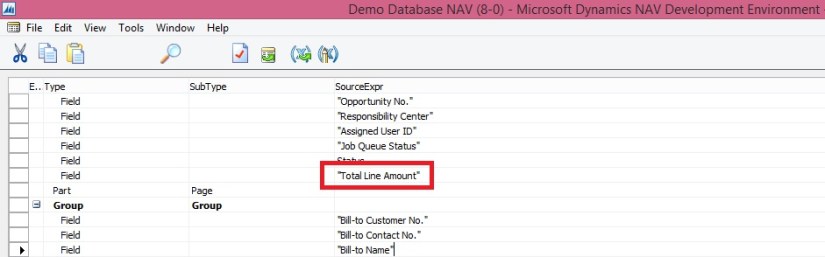
Next I will add this field to Sales Order Page.
UpdatePropagation-2

If we run now and make changes in Lines the Total Line amount will not update until we refresh the Page. To enable auto refresh we will be required to add Update Propagation Property of the Subpage to Both.
UpdatePropagation-3

After doing this if I make any changes which changes the Line Amount for the lines, The Total Line Amount in Header will get updated automatically, we will not require to refresh the page.
UpdatePropagation-4

We are done, so simple.